The Spanning Tree Protocol article ends on a picture that feels wrong — you run two cables for redundancy, and STP switches one of them off so the loop cannot form. The money you spent on the second cable then sits idle, waiting for an accident.
This article is how you use that cable instead of disabling it.
The mechanism makes several cables look like one to everything above them. STP sees a single port and has nothing to block. The MAC address table sees a single port and does not get confused. And if one cable is cut, the rest pick up the work without anything above noticing.
Cisco calls it EtherChannel, the standard calls it Link Aggregation, and the protocol that runs it is LACP.
One misunderstanding dominates everything else here — people expect four bundled cables to be four times faster, which is simply not true for a single connection. Copying one large file across a four-link bundle still rides one cable. There are measured numbers below.
If you have never looked, start here
You do not need a switch to read along, because macOS ships with this built in.
$ man ifconfig | grep -A3 'bondmode lacp'Four lines that tell you most of what matters.
  bondmode lacp | static
     If the interface is a bond pseudo device, this option will
     set the mode on the bond interface.  The two currently
     supported modes are lacp and static.  The default mode is lacp.
Two modes, and the default is lacp. Why that is the default is the first half of this article. The command that shows real state once a bundle exists is:
$ ifconfig -bThe manual page says "To monitor the 802.3ad Link Aggregation state, use the -b option."
Two problems to solve, not one
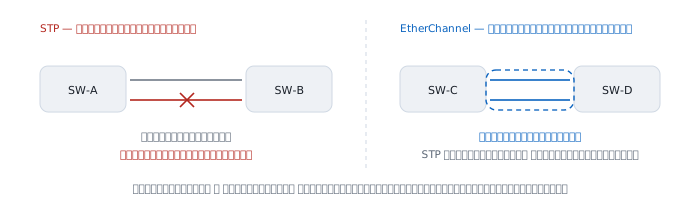
The first is the one STP leaves behind: the redundant link is switched off.
The second is invisible unless you go back to the period — Ethernet speeds moved in factors of ten, from 10 to 100 to 1000 megabits, with nothing in between. An organisation for which 100 was no longer enough, but which could not yet afford gigabit, had nowhere to go.
The IEEE tutorial of November 1997 puts the table on a slide directly.
  Ethernet          10 Mbps      trunked      20-80 Mbps
  Fast Ethernet    100 Mbps      trunked    200-800 Mbps
  Gigabit Ethernet   1 Gbps      trunked      multi Gbps
Under it sits the summary: "Reuse standard interface technology and go ever faster" — take what you already own and climb in small steps instead of jumping by ten.
November 1997 — when everyone had already built their own
The IEEE 802.3 Trunking Study Group page is still up, and the speaker list from that tutorial describes the situation better than any explanation could.
  Introduction                     H. Frazier   Cisco
  Ethernet Parallel Path Trunking  P. Bottorff  Bay
  Trunking in Multiple Ethernet    H. Chin      Cisco
  Server/Switch Trunking Schemes   P. Congdon   HP
  Link Aggregation Trunking        A. Hendel    Sun
  The case for In-Band Protocols   D. Friedman  3Com
Five competing companies, each with its own way of bundling links, none of which worked across brands. That meeting was not about inventing something new; it was an admission that what everyone already shipped could not talk to anything else.
From there it followed the IEEE process, as both group pages record.
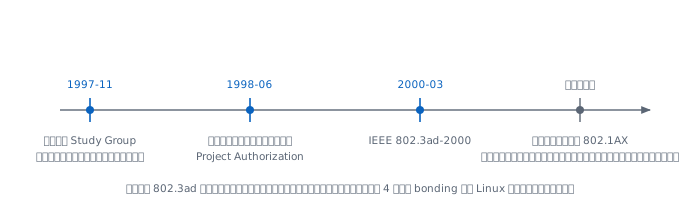
  1997-11   Trunking Study Group formed, opens with the tutorial
  1998-06   Project Authorization Request approved
  2000-03   IEEE 802.3ad-2000 approved
The Task Force page sums it up: "The work of the IEEE P802.3ad Link Aggregation Task Force is now complete with the approval of IEEE 802.3ad-2000 at the March 2000 IEEE Standards Board meeting."
Link aggregation later moved out of 802.3 into a standard of its own called 802.1AX, because it had stopped being an Ethernet-only concern. The name 802.3ad stuck anyway, and remains the name of the mode in a great deal of software — bonding mode 4 on Linux is still called 802.3ad.
Why a protocol, when configuring both ends identically would do
This is the question Del Friedman of 3Com answered in a slide deck titled "Trunking: The Case for In-Band Protocols" in November 1997, and every word of the answer still holds.
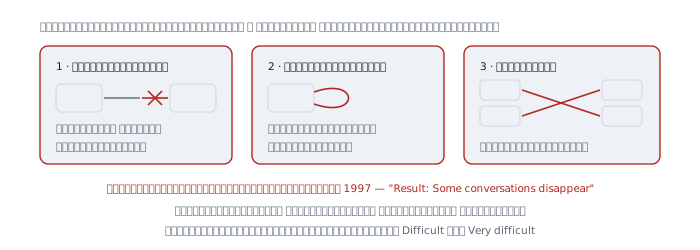
He raises three failure modes, and all three end the same way.
One, the link that is dead while the light stays green
"Link status alone does not guarantee detection of link outages" "Stuck transmitter prevents effective use of single link"
Two, the cable looped back on itself
"Loopback links turn trunks back on themselves"
Three, the crossed cables
"Split trunks caused by crossed wires"
The consequence of all three is written with the same sentence every time.
"Result: Some conversations disappear"
Note the word conversations, not "the whole link goes down" — because a bundle spreads traffic by hashing. When one cable fails silently, what happens is that part of the traffic vanishes while the rest works normally. Some users are fine and some are not. The slide rates how hard this is to diagnose as Difficult and Very difficult.
His conclusion is what became LACP.
"Confirmation of proper connectivity of link before using or configuring it" "Achievable via simple Hello-Message exchange" "Minimal bandwidth utilization - < .01% of 100 Meg Link"
That last line is why there is no excuse for leaving it off. The price of knowing that a cable really works is under one ten-thousandth of a 100 megabit link.
LACPDU — 110 bytes, always running
An LACPDU is not wrapped in IP and has no port. It is a plain Ethernet frame.
  destination   01:80:C2:00:00:02
  ethertype     0x8809
  subtype       0x01
0x8809 is Slow Protocols, and the destination is an IEEE reserved address that switches will not forward out of any other port. The frame therefore reaches only the device at the far end of that one cable and can never escape into the wider network.
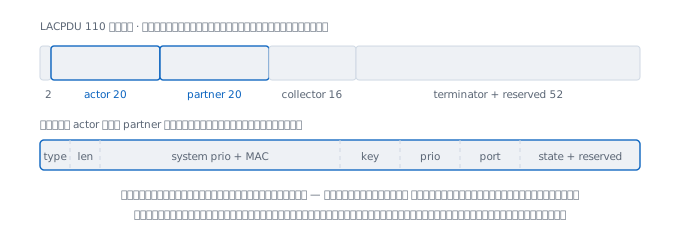
The structure in the Linux kernel source spells it out; the offsets add up like this.
  offset  size  field
       0     1   subtype = 0x01
       1     1   version
       2     1   TLV actor
       3     1   length = 20
       4     2   actor system priority
       6     6   actor system (MAC)
      12     2   actor key
      14     2   actor port priority
      16     2   actor port
      18     1   actor state
      19     3   reserved
      22    20   partner block, field for field the same as actor
      42    16   collector max delay + reserved
      58    52   terminator + reserved
That is 110 bytes, plus the 14-byte Ethernet header, giving 124 bytes per frame — over Ethernet's 64-byte minimum, so no padding is needed.
The thing to understand is actor and partner. Each side writes two things into one frame: what I am, and what I believe you are. When the other side receives it, it compares what its partner believes about it against reality.
That is the mechanism that catches crossed cables. Plug a cable into the wrong switch and the partner system values the two sides write about each other will not match, so the bundle simply never forms — rather than forming and then failing silently.
Eight bits that decide everything
actor_state and partner_state are one byte each, and every bit means something.
  0x01  Activity          I will start talking, not just wait
  0x02  Timeout           I want the fast rate, once per second
  0x04  Aggregation       this port can be bundled with others
  0x08  Synchronization   I agree we have reached an agreement
  0x10  Collecting        I have started accepting frames here
  0x20  Distributing      I have started sending frames here
  0x40  Defaulted         I have heard nothing, using defaults
  0x80  Expired           my partner's information has aged out
The order of the three middle bits is the heart of it. A port does not carry real data until it has Synchronization, then Collecting, then Distributing. Receiving always comes before sending, because starting to send before the other end is ready to receive loses frames.
Timers, and what they cost
The constants in the Linux source match what the standard requires.
  fast periodic         1 s     send an LACPDU every second
  slow periodic        30 s     send one every thirty seconds
  short timeout         3 s     three times the fast rate
  long timeout         90 s     three times the slow rate
  churn detection      60 s     watch for state flapping
  aggregate wait        2 s     wait for other ports to join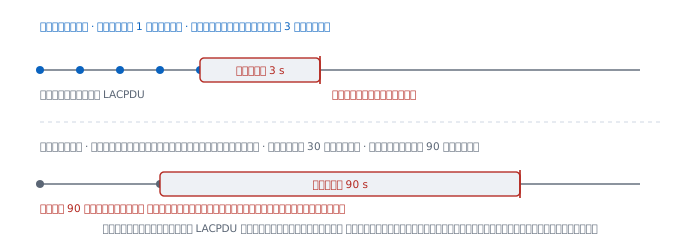
The factor of three has a reason. It tolerates two consecutive lost LACPDUs before declaring the link dead. At a factor of two, a brief burst of interference losing two frames would drop a healthy link out of the bundle for no good reason.
And here is where configurations commonly go wrong. Slow mode is the default on most equipment, which means that if a cable dies with its light still on, the far end takes a full 90 seconds to accept that it is dead. For all ninety of those seconds, whatever traffic hashes onto that cable is gone. Set fast mode on both ends and it becomes 3 seconds.
Active, passive, and the trap that follows
Each port chooses whether it will start the conversation, which is the Activity bit.
  active   + active    they reach agreement
  active   + passive   they reach agreement
  passive  + passive   nothing whatsoever happens
Passive on both ends is a silence that looks like broken hardware. Nobody speaks, so nobody hears. The port lights are green and the cable is fine, but no bundle forms.
Cisco had its own protocol first, PAgP, with the same logic under different names: desirable is active and auto is passive. The genuinely dangerous setting is mode on, which means no protocol at all — the equivalent of static on macOS.
The macOS manual page describes static this way:
"In static mode, a member interface is made an active part of the link aggregate as long as the link status is active."
"as long as the link status is active" is the phrase to read slowly, because the 1997 slides had already said "Link status alone does not guarantee detection of link outages". This mode trusts exactly the thing a document twenty-nine years old says cannot be trusted.
Frame distribution — where every misunderstanding lives
The standard does not say how to spread frames. It says only that frames belonging to one conversation must not be reordered. The way everyone guarantees that is hashing.
The IETF's RFC 7424 states the reasoning plainly.
"The advantages of hash-based techniques for load distribution are the preservation of the packet sequence in a flow and the real-time distribution without maintaining per-flow state in the router."
"The result of the hashing procedure is a many-to-one mapping of flows to component links."
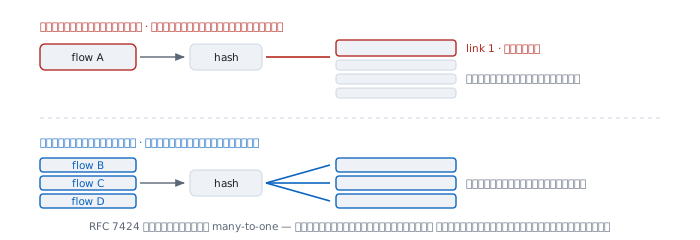
many-to-one is the phrase to remember. Several flows can land on one link; one flow cannot land on several.
The Linux bonding documentation gives every formula. The simplest is:
  hash = source MAC[5] XOR destination MAC[5] XOR packet type ID
  slave number = hash modulo slave count
with its consequence written alongside: "This algorithm will place all traffic to a particular network peer on the same slave."
The variant that also uses ports is layer3+4, and its warning fits in one sentence.
"This allows for traffic to a particular network peer to span multiple slaves, although a single connection will not span multiple slaves."
"a single connection will not span multiple slaves" is the answer to the question everybody asks, written in the official documentation all along.
Four cables is not four times faster
I turned the formulas from the Linux documentation above into a program and ran them.
One connection, such as copying a large file over ssh:
  2 links    one link used, 1 idle
  3 links    one link used, 2 idle
  4 links    one link used, 3 idle
  8 links    one link used, 7 idle
Adding cables does not help at all, because that flow's hash is a single constant.
Many connections, such as a busy web server, really do spread. Tested with 500 connections:
  2 links   47.2%  52.8%
  4 links   24.8%  25.2%  22.4%  27.6%
  8 links   12.4%  13.0%  10.6%  14.2%  12.4%  12.2%  11.8%  13.4%
The busiest link carries about 1.1 times the average, which is fine.
But real flows are not all the same size. RFC 7424 lists three conditions that have to hold, one being "the individual flow rates are much smaller as compared to the link capacity" and another "the differences in flow rates are not dramatic".
I ran 200 flows where four of them are multi-gigabyte backup jobs and the rest is ordinary traffic, then measured it two ways — by flow counts connections and by bytes counts the actual data.
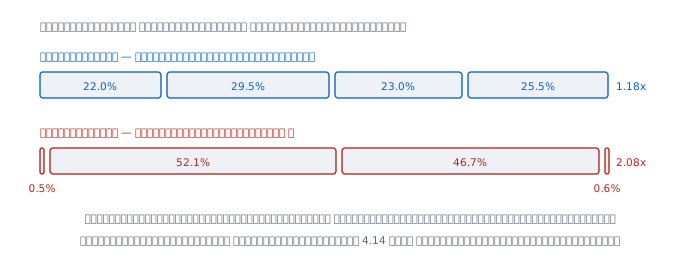
  4 links
    by flow    22.0%  29.5%  23.0%  25.5%   worst 1.18x
    by bytes    0.5%  52.1%  46.7%   0.6%   worst 2.08x

  8 links
    by flow    10.5%  14.0%  14.0%  14.5%
               11.5%  15.5%   9.0%  11.0%   worst 1.24x
    by bytes    0.3%   0.4%  21.0%   0.3%
                0.2%  51.8%  25.7%   0.3%   worst 4.14x
Read those two rows together and the real problem appears. Monitoring that counts connections reports everything as nicely balanced at 1.18x, while the actual data is piled onto two links out of four and the other two barely work.
And the most counter-intuitive result: adding links made it worse, from 2.08x at four links to 4.14x at eight, because four large flows cannot subdivide themselves. More links lowers the average while the big lumps stay exactly where they were.
When it lies
"Four cables gives four times the speed." Not for one flow, and only conditionally for many. What you reliably gain is resilience, not speed.
"The graph says it is balanced." Check what the graph counts. Connections or packets will always look pretty. What fills a link is bytes.
"More links is always better." Not always. When traffic is a few large flows, adding links makes the imbalance worse, as measured above.
"A green light means it works." This is the belief the 1997 document calls untrustworthy, and the reason an entire protocol was built.
"mode on is faster, no negotiation to wait for." It is faster, and it is how you build a loop that STP cannot see, because one end believes the bundle exists and the other does not.
"Any hash policy is much the same." Not so. If a server reaches the internet through one gateway, a layer2 hash produces one constant value, because neither the source nor the destination MAC ever changes. All the traffic lands on one link.
Real cases from real work
Case 1 — some machines work, some do not
Situation After a second cable was added to the bundle, some users report that they cannot reach a server while many others are fine. Both port lights are green.
Command Look at aggregation state, not at lights.
$ ifconfig -b bond0How to read it "Some can, some cannot" is the signature of one failed cable inside a bundle, not a problem on the server. The affected users are the ones whose traffic happens to hash onto that cable — the same sentence the 1997 slide wrote as "Some conversations disappear". If the bundle is running static or mode on, change it to LACP first, because that mode has no way of knowing a cable has failed.
What this does not prove We know the symptom fits the pattern. We do not know which cable. You need per-port state to find the one missing its Distributing bit, and this has not yet ruled out an MTU or VLAN mismatch between the two ports, which produces similar symptoms.
Case 2 — four cables bundled, file copies no faster
Situation Four gigabit ports were bundled, but copying a large file between two machines still runs at about 900 Mbps.
Command Measure with one connection, then with several at once.
$ iperf3 -c 10.0.0.5                 a single connection
$ iperf3 -c 10.0.0.5 -P 8            eight connections at once
Real output, the shape predicted by the numbers computed above.
  -P 1     ~900 Mbps    one link in use
  -P 8    ~3.4 Gbps     spread out, but not a clean 4x
How to read it This is not a fault, it is the designed behaviour. A single connection always lands on a single link because its hash is constant. If the organisation's real work is moving one big file at a time, link aggregation cannot help at all — you need a faster port instead.
What this does not prove The -P 8 figure falling short of 4x might come from the hash not reaching every link, or from a bottleneck at the disk, the CPU, or the TCP window as described in TCP and UDP. Each has to be measured separately.
Case 3 — the bundle never comes up, though both ends are configured
Situation Aggregation is configured on both sides, but no bundle forms and there is no error message.
How to read it Work down this list, one question at a time.
  1  are both ends set to passive
  2  do speed and duplex match on every port in the group
  3  are the ports in the same VLAN and of the same type
  4  is one end LACP while the other is PAgP or mode on
The first is both the most common and the least visible, because everything looks "enabled" on both sides — but nobody is speaking first.
What this does not prove These four cover the frequent causes, not all of them. Some hardware requires bundled ports to sit on the same chip, or limits how many groups a device may have, and neither can be guessed from outside. That means reading the manual for the specific model.
Case 4 — the link is saturated while the graph says half used
Situation The aggregate graph reports 50% utilisation, but users report slowness and packets are being dropped.
How to read it The aggregate graph is an average across links, which hides the fact that one link is at 100% while three sit idle. From the numbers measured above, four links carrying a few large flows produced 0.5% / 52.1% / 46.7% / 0.6% — which averages out to look exactly like half used. Always look at per-link graphs; the group average means nothing.
What this does not prove We can see the links are unbalanced. We do not know that changing the hash policy will help. If the cause is a few large flows, moving from layer2 to layer3+4 may change nothing at all, because the same big lump is still one lump.
When aggregation is not enough
Aggregation works between two devices. If the switch at the far end fails entirely, the whole bundle goes with it. The fix is to bundle across two switches that pretend to be one, which every vendor calls something different and none of which interoperate — the same situation as 1997, the one that produced this standard in the first place.
And if the real job is moving one large lump of data faster, the answer is not aggregation. It is a faster port.
References
Standards and source documents
- IEEE 802.3ad Link Aggregation Task Force the page recording that the standard passed in March 2000
- IEEE 802.3 Trunking Study Group where the project came from, and the June 1998 PAR approval date
- The tutorial of 11 November 1997 the whole set, including "Trunking: The Case for In-Band Protocols" quoted throughout this article
- RFC 7424 on hash-based traffic distribution and the conditions under which it becomes unbalanced
Implementations whose source you can read
- drivers/net/bonding/bond_3ad.c the timer constants and the LACPDU destination address come from this file
- include/net/bond_3ad.h the LACPDU structure whose offsets are counted in this article
- Linux bonding documentation every hash formula, and the warning about single connections
Manuals
man ifconfigon macOS, sectionsbonddevandbondmode