There is one command that people who work with networks type every day, have typed for forty years, and will keep typing. It is the first command anyone learns, and the first one anyone reaches for when something breaks.
The trouble is that most people stop learning it at "a reply means it works, no reply means it is broken", and both halves of that are wrong.
This page starts from nothing at all, then goes down to the point where people with ten years in the field still get it wrong.
If you have never typed it before, start here
Open a command window — Terminal on macOS or Linux, Command Prompt or PowerShell on Windows — and type
ping 8.8.8.8If your machine is online, you will get something like this (on Linux or macOS)
PING 8.8.8.8 (8.8.8.8): 56 data bytes
64 bytes from 8.8.8.8: icmp_seq=0 ttl=115 time=12.3 ms
64 bytes from 8.8.8.8: icmp_seq=1 ttl=115 time=11.8 ms
64 bytes from 8.8.8.8: icmp_seq=2 ttl=115 time=12.1 ms
^C
--- 8.8.8.8 ping statistics ---
3 packets transmitted, 3 packets received, 0.0% packet loss
round-trip min/avg/max/stddev = 11.8/12.1/12.3/0.2 ms
On Linux and macOS it keeps going until you press Ctrl-C. On Windows it sends four and stops on its own.
What just happened is that your machine shouted "can you hear me" at the other end three times, and the other end shouted back three times. Each round trip took about 12 milliseconds.
That is enough to use it. The rest of this page is about why.
July 1983, in Norway — it did not start as a project
To picture what kind of year 1983 was: on the first of January that year the ARPANET cut over from its old protocol, NCP, to TCP/IP across the whole network in a single day — the event people still call the flag day.
So when this story happens, TCP/IP on a real network was less than a year old. Networks behaved strangely every day, and there was almost nothing to diagnose them with.
In July 1983, at a DARPA meeting in Norway, Dr. David L. Mills mentioned in passing some work he had done on his Fuzzball LSI-11 systems: measuring path latency with timed ICMP Echo packets.
Mike Muuss was in that room, and remembered it.
Mills' name is worth holding on to for its own sake. He went on to create NTP, the protocol that keeps the clocks of the entire internet in agreement. An offhand remark by the man who made internet time accurate produced the most widely used tool for measuring internet time.
December 1983 — finished before sunrise
Muuss worked at the U.S. Army's Ballistic Research Laboratory at Aberdeen Proving Ground, Maryland. That December he sat down and wrote what he himself called "a little thousand-line hack" for 4.2a BSD UNIX.
There was an obstacle that retellings usually skip. At the time the operating system could not send ICMP packets from a user program at all — there was no raw ICMP socket to use.
So Muuss wrote the missing kernel support first, then wrote the program that used it. By his own account he finished all of it before sunrise.
That detail matters more than it looks, because it says ping was not merely a program. It arrived together with a new operating-system capability — one that nearly every network tool written since still stands on.
The other thing people get wrong is that Muuss did not invent ICMP Echo. The protocol already existed, defined in RFC 792 in September 1981 by Jon Postel. What Muuss did was write the tool that turned an existing capability into something an ordinary person could use in one line.
ping reached an officially distributed operating system for the first time in 4.3BSD, and the first released version was public domain — owned by nobody. That is part of why it spread into every operating system on earth as fast as it did.
Muuss also created BRL-CAD, the network throughput tool TTCP, and contributed to the idea of the default route that every machine on earth uses today. He received a USENIX Lifetime Achievement Award in 1993, and died in a car crash on Interstate 95 on 20 November 2000, aged 42.
Why it is called ping
The answer is more direct than most people expect. Muuss wrote it himself:
I named it after the sound that a sonar makes, inspired by the whole principle of echo-location.
A submarine's sonar works like this — send out one pulse of sound, the sound travels until it hits something and bounces back, and timing the round trip tells you how far away that thing is. ping does exactly the same, with packets instead of sound.
As for "Packet InterNet Groper", the phrase that turns up in textbooks: that is a backronym, fitted to the letters afterwards. The joke is that by Muuss's own account, the person who offered that expansion was Dave Mills — the same man whose remark caused the program to exist.
Muuss was explicit that to him PING was not an acronym at all, but a sonar analogy. Both things are true at once: the name came from a sound, and the expansion arrived later and stuck hard enough that the two are now hard to separate.
How it works
ping sends a message called an ICMP Echo Request and waits for one called an ICMP Echo Reply.
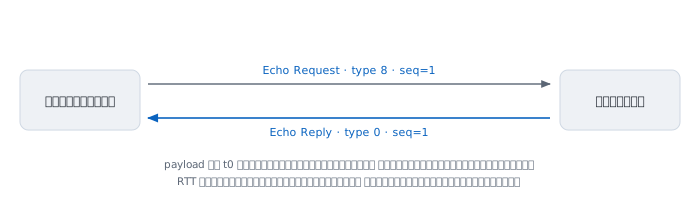
ICMP stands for Internet Control Message Protocol. It is the protocol that sits alongside IP for machines to tell each other about conditions; it does not carry user data. It does not run over TCP or UDP — it sits directly on IP, as protocol number 1.
The "type" number says what kind of message it is. For IPv4:
- type 8 is Echo Request — the question
- type 0 is Echo Reply — the answer
What is interesting is that answering is not optional. RFC 1122, the document that defines what an internet host has to be able to do, says in section 3.2.2.6:
Every host MUST implement an ICMP Echo server function and respond to ICMP Echo requests sent to the host itself.
"MUST" in a standards document is a technical term with weight, not advice. A machine that does not answer ping is a machine where somebody deliberately turned it off — not a machine following the standard. Hold on to that; it matters later.
What is inside the envelope
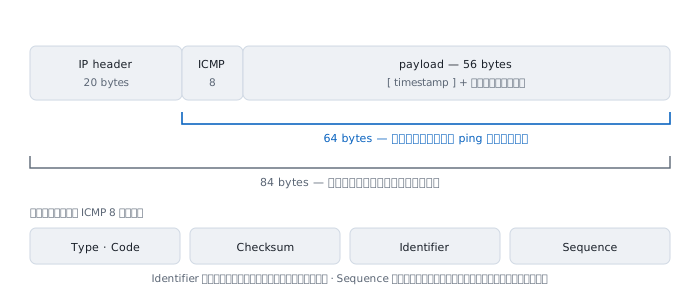
This is where the 64 in 64 bytes from ... comes from: 56 bytes of data plus the 8-byte ICMP header. On the wire the packet is actually 84 bytes, because there is another 20 bytes of IP header that ping does not count for you.
What Identifier and Sequence Number are for
These two fields solve different problems.
Identifier answers "whose reply is this?" If you open three ping windows at the same destination, all the replies come back to the same machine, and the operating system has to work out which window each belongs to. Typically the program writes its own process id into this field.
Sequence Number answers "which one is this?" It goes up by one each time, and it is the field that lets you see a problem rather than guess at it.
- Numbers skipped, say 1, 2, 4 — packet 3 was lost somewhere
- Numbers out of order, say 1, 3, 2 — the path reordered them, which is sometimes a sign of load sharing across several links
- A repeated number with
(DUP!)— something answered twice, usually a broadcast address or a loop at layer two
Where the measured time comes from
A question people ask early: to measure a round trip, do the clocks on the two machines have to agree?
They do not, and the trick used to avoid the problem is a neat one.
When it sends, ping writes its own current time into the packet's payload. The standard requires the destination to copy the payload back unchanged. When the reply arrives, ping simply reads back the time it wrote itself and subtracts it from the current time.
Both numbers come from the same clock, so however wrong the far end's clock is, it makes no difference.
The design thinking — why it was built this way
A thousand-line program written in one night does not last forty years unless the founding decisions were right. This section is the reasoning behind each one, and it is the most valuable part of this page if you write tools of your own.
1. Do not invent a protocol; use the one every host is required to have
This is the most important decision, and the only reason ping works at all.
If Muuss had designed a new protocol, he would have needed a program at the far end, installed on every machine he wanted to test. That would have made it useless against machines he did not own — and the machines with problems are mostly machines you do not own.
Choosing ICMP Echo, which the RFCs already require every host to answer, means nothing has to be installed at the other end. You can ping a machine that has never heard the word ping, a router belonging to another provider, or hardware built twenty years after Muuss died.
A tool that needs the other side's cooperation is a tool that fails on the day you need it most.
2. The sender keeps no state at all
The obvious way to measure a round trip is to keep a table of which sequence number went out at what time, and look it up when the reply comes back.
ping does not do that. It writes the time into the packet and lets the packet carry it. The consequences run deeper than they first appear.
- Memory does not grow, even if the ping runs for a month
- A very late or badly reordered reply still yields a correct measurement
- If the program crashes and restarts, there is no state to recover
- And the code stays small enough to finish before sunrise
Designers call this a self-describing message: let the message carry everything needed to interpret it.
3. Require the payload to be echoed back verbatim
RFC 792 says the destination must return the received data unchanged. That requirement hands ping a capability nobody set out to build.
Since what was sent and what came back must match bit for bit, comparing them turns the tool into a data integrity test for the path, not just a reachability test.
The Linux manual says so directly about the -p flag: it exists for "diagnosing data-dependent problems in a network". The worked examples below include a real case of exactly that.
4. Identifier stands in for a port number
ICMP has no ports, because it is not a protocol for carrying user data. But the underlying problem remains — one machine may have several pings running at once, and every reply arrives at the same place.
So the Identifier field is used as a stand-in port, each process writing its own number into it. A problem solved without changing the protocol, which is the signature of design work from that era.
5. Make loss visible rather than inferred
If ping printed only a summary line at the end saying how much was lost, you would know there was a problem but not what shape it had.
Printing one line per packet with a sequence number makes the pattern of the damage visible. Scattered single losses are noise; losses in runs are a link flapping or a route changing; losses at a steady rhythm are rate limiting.
The same data, presented differently, answers a different question.
6. Report what was seen; do not interpret it for you
ping never says "the network is fine" or "the server is down". It says what went out, what came back, and how long it took. The conclusion is the human's job.
This sounds like laziness, and it is the reason the tool can never be wrong. A tool that interprets will interpret wrongly the day the network behaves outside what its author imagined. A tool that only reports stays correct even in situations its author never conceived of — and in forty years there have been many.
7. The output is text, so it composes with anything
Muuss recorded that one administrator piped ping output into a voice synthesiser and out through speakers, then walked the building listening for where the sound stopped — and found an intermittently failing Ethernet link that way.
Nobody designed ping for that. It was possible only because the output is plain text, one line per event. That is all it took.
Footnote: from patching the kernel to not needing root
In 1983 Muuss had to add raw ICMP sockets to the kernel first, and raw sockets are a privileged capability. So ping was a setuid root program for decades — something security people were never comfortable with either.
Modern Linux offers a third way: ICMP datagram sockets, which grant only the ability to send Echo Requests rather than all of ICMP. It is controlled by this setting:
sysctl net.ipv4.ping_group_rangeIf the user's group falls inside that range, ping runs with no special privilege at all. Most systems are configured that way today.
A related group of settings governs how the machine itself answers:
net.ipv4.icmp_echo_ignore_all          stop answering ping entirely
net.ipv4.icmp_echo_ignore_broadcasts   ignore ping sent to a broadcast
net.ipv4.icmp_ratelimit                rate limit outgoing ICMP
net.ipv4.icmp_ratemask                 pick which types are limited
That last group explains a symptom you will meet often: pinging one machine and seeing loss at a rhythm too regular to be chance. That is not a network problem. That is the far end limiting how fast it will answer.
Reading every field of the output
64 bytes from 8.8.8.8: icmp_seq=1 ttl=115 time=12.3 ms
|            |          |          |        |
|            |          |          |        +-- RTT
|            |          |          +-- TTL left
|            |          +-- sequence
|            +-- who answered
+-- ICMP size (56 payload + 8 header)
The field people overlook most often is who answered, because usually it is whoever you asked. Not always. If the address that answered is not the address you typed, that is important information — a router may be answering on someone else's behalf to tell you it cannot get there.
The summary line at the end has four numbers worth reading.
- min, the best time — the closest thing to the "real distance"
- avg, the mean
- max, the worst
- stddev or mdev, the spread
That last one matters more than it looks. A path that returns 50 ms every single time is more usable than one averaging 30 ms while swinging between 5 and 200, because video calls and voice break on variation, not on latency.
What ttl= tells you
The ttl in a reply is not the value you sent. It is what was left in the returning packet when it reached you.
TTL stands for Time To Live, a number in the IP header that every router the packet passes through decrements by one. It exists to stop packets circling forever when routing goes wrong.
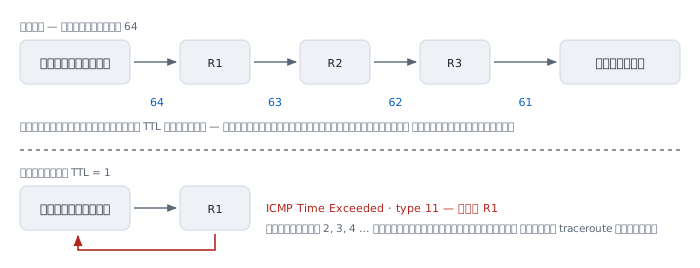
The useful part is that starting values differ by operating system, and they are well known.
  64    Linux, macOS, and most BSDs
  128   Windows
  255   many network devices, such as Cisco IOS
See ttl=115 and you can guess immediately: started at 128, crossed 13 routers, and the far end is probably Windows. See ttl=52 and you guess it started at 64, crossed 12, and is probably a Unix-family machine.
It is a guess, not a proof. Administrators can change the starting value, and some change it precisely so nobody can guess like this. But it is right often enough to be a good first clue.
What happens when TTL runs out
A router that decrements TTL to zero throws the packet away and sends a different ICMP message back to tell the sender: your packet expired here. That message is ICMP Time Exceeded, type 11.
And that is the entire mechanism behind traceroute.
  TTL=1 --> R1 : becomes 0 -> drop + Time Exceeded from R1
  TTL=2 --> R1 -> R2 : Time Exceeded from R2
  TTL=3 --> R1 -> R2 -> R3 : Time Exceeded from R3
  TTL=4 --> reaches the target -> Echo Reply -> done
traceroute has no special power. It just fires repeatedly, raising TTL by one each round, and writes down who complained each time. The list of complainers is the path.
You can try it with plain ping:
ping -t 1 8.8.8.8 # macOS/BSD: use -m 1You will get an answer from the first router out of your building instead of from the destination.
The flags people actually use
Linux (iputils)
  -c N        send N packets then stop
  -i SEC      seconds between packets
  -s BYTES    payload size (default 56)
  -t TTL      set the outgoing TTL
  -W SEC      how long to wait for one reply
  -w SEC      give up entirely after this many seconds
  -D          print a timestamp on every line
  -M do       set DF, never fragment
  -n          do not resolve names
  -f          flood; needs root
  -p HEX      fill the payload with this pattern
  -I NAME     send from this interface or source address
macOS and BSD
  -c 4              four packets, same as Linux
  -s 1472           payload size, same as Linux
  -D                set DF   <-- not "timestamp"
  -t 5              stop after 5 seconds   <-- not TTL
  -m 64             set the outgoing TTL   <-- this is TTL
  -g 1400 -G 1500 -h 8    sweep sizes upward to find the MTU
This is the cross-platform trap that catches the most people. -D and -t mean completely different things on Linux and macOS. A script written on a Linux box and run on a Mac will not error out; it will quietly do something else.
Windows
  ping -n 4 host        four packets
  ping -t host          keep going until Ctrl-C
  ping -l 1472 host     payload size
  ping -f host          set DF, do not fragment
  ping -i 64 host       set the outgoing TTL
  ping -w 2000 host     wait this many milliseconds per reply
  ping -4 host          force IPv4
  ping -6 host          force IPv6
Note that -t on Windows means "never stop" while -t on Linux means TTL, and -i on Windows means TTL while -i on Linux means the gap between packets. They are swapped. Always read the man page of the machine you are actually sitting at.
Using ping to find a path's MTU
MTU is the largest packet a path will carry. On ordinary Ethernet it is 1500 bytes, but put a VPN tunnel or PPPoE in the middle and the number drops. That is the cause of a classic symptom — some sites load, others hang half-drawn.
To find it, send large packets with fragmentation forbidden (the DF bit set).
  ping -M do -s 1472 8.8.8.8   ->  1472 + 8 + 20 = 1500   passes
  ping -M do -s 1473 8.8.8.8   ->  1501 bytes, too big
                                   the router drops it and returns
                                   ICMP type 3 code 4 with the real mtu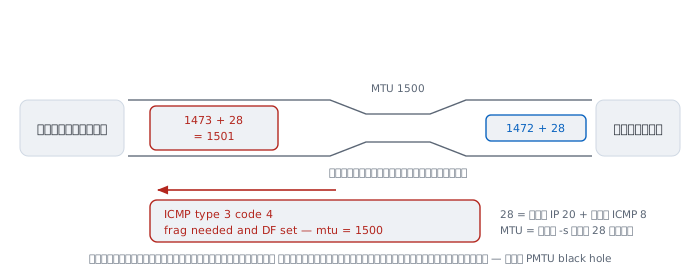
Remember 28: 20 bytes of IP header plus 8 of ICMP header. The MTU you are proving is always the -s value plus 28.
- MTU 1500, ordinary Ethernet — use
-s 1472 - MTU 1492, PPPoE — use
-s 1464 - MTU 1400, many VPN tunnels — use
-s 1372
On Windows use ping -f -l 1472 host, and on macOS ping -D -s 1472 host.
IPv6
Everything above applies to IPv6. Only the numbers change.
- type 128 is Echo Request
- type 129 is Echo Reply
- it lives at protocol number 58, not 1
- the minimum MTU the standard guarantees is 1280 bytes, not IPv4's 576
On modern systems there is no separate ping6 any more; one ping handles both families, and -4 or -6 forces the choice.
One genuinely useful trick with no IPv4 equivalent is pinging the multicast address ff02::1, which means "every machine on this link".
ping -6 ff02::1%en0Every machine on the same segment answers — a way to survey what is on the wire without scanning. The part after % is the interface name, which is required because IPv6 link-local addresses repeat on every segment, so the machine has to be told which way to send.
The other difference is that IPv6 has no ARP. It uses Neighbor Discovery, which runs on ICMPv6. That means ICMPv6 is not an optional extra you can switch off. Turn it all off and the network stops working entirely, not just ping.
When ping lies
This is the part that separates people who can use ping from people who can type it.
1. A slow router does not mean a slow path
Modern routers forward packets in dedicated hardware, which is very fast. But answering a ping is work that has to be handed up to the box's own CPU, which is an entirely different path — and one deliberately given low priority.
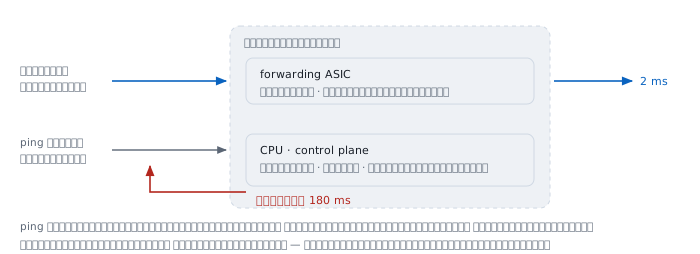
So a traceroute showing a middle hop at hundreds of milliseconds while the final destination is fast is normal and does not indicate a problem. That router simply does not consider answering you important work.
The rule: read the time at the final destination, not at the middle hops, and only believe a number that goes up and stays up.
2. No reply does not mean dead
The standard says hosts must answer, but plenty of administrators turn it off. Nearly every corporate firewall drops ICMP from outside, and several cloud providers block it by default.
So no reply proves only that ping got no reply. It does not prove the machine is down. If it is a web server, try connecting to port 443 directly before concluding anything.
3. The same address may be different machines
8.8.8.8 is not one machine. It is an anycast address, announced from dozens of data centres at once, and routing takes you to the nearest one.
You and a colleague in another country ping the same address and talk to different machines. And if routing shifts mid-session, you can change which machine you are talking to during a running ping, with nothing telling you.
4. RTT is not twice the one-way time
ping measures the round trip, not one direction, and the outbound and return paths do not have to be the same. On the real internet they often are not.
Halving RTT and calling it the one-way time can be badly wrong, which is why measuring true one-way latency needs tools with synchronised clocks at both ends.
5. Ping when idle and ping under load are different questions
A ping of 10 ms when nothing is running that jumps to 800 ms while someone downloads is not the path's fault. It is a queue in your own equipment filling up. The condition has a name: bufferbloat.
To test for it, leave ping running and start a large download. If the number jumps tenfold, you have found it — and the answer is not a faster connection but better queue management.
Security
Smurf
There was a time when sending an Echo Request to a network's broadcast address made every machine on it answer. Attackers forged the source address to be the victim's and aimed at the broadcast address of large networks, so thousands of replies buried the victim at once.
The fix is RFC 2644, which changed the default so routers do not forward directed broadcasts. It is rare now, but it is the reason some defaults are the way they are.
Ping of Death
A mid-1990s flaw where an ICMP packet that exceeded 65535 bytes once its fragments were reassembled would hang or reboot the operating systems of the day. Long since fixed everywhere, though the name stuck.
Smuggling data through ICMP
A ping payload can contain anything, and nobody usually looks at what. Some tools use that to carry data out of networks that block everything except ping. Unusual volumes of ICMP leaving an organisation are something to look at, not to wave through.
Why blocking all ICMP is a bad idea
This is the most important item in this section.
Path MTU discovery works by way of the ICMP message type 3 code 4, meaning "too big, this needs fragmenting and you forbade it". If a firewall drops that message, the sender never learns it must send smaller. It keeps sending the same size, and the packets vanish silently every time.
The result is called a PMTU black hole — connections start fine, the TCP handshake succeeds, small pages load, and then anything larger just hangs. It is extremely hard to track down, and the cause is one firewall line reading "drop all ICMP".
For IPv6 it is worse, because ICMPv6 carries the network's basic functions. RFC 4890 exists specifically to say which message types may be blocked and which must not. Read it before writing IPv6 firewall rules.
Worked examples from real work
This section is written for people who have to finish a diagnosis inside a fixed amount of time. Each case has the same shape — the situation, the command, the output, how to read it, and the part that matters most: what this evidence has not yet proved.
Case 1 — "the network is slow" when it is not the network
Users report that an internal system has been slow since the morning. The network team is always called first.
$ ping -c 20 app.internal
20 packets transmitted, 20 received, 0% packet loss
rtt min/avg/max/mdev = 0.412/0.470/0.612/0.052 ms

$ curl -o /dev/null -s \
       -w 'connect=%{time_connect} ttfb=%{time_starttransfer}\n' \
       https://app.internal/
connect=0.002 ttfb=4.311
How to read it. The round trip is under half a millisecond, nothing is lost, and the variation is tiny. The TCP connection completes in 2 milliseconds — but the first byte of the answer takes 4.3 seconds.
The gap between 2 milliseconds and 4.3 seconds is not in the network. It is in the application, or in the database behind it.
Not yet proved. We do not know why it is slow, only that it is not the path. And this measurement represents the window in which it was taken. If the symptom comes and goes, measure continuously rather than once.
Case 2 — an MTU black hole in a VPN tunnel
The most classic symptom there is. VPN users say the internal site loads, the login page appears normally, but clicking through to a data-heavy page hangs until it times out.
$ ping -c 3 -M do -s 1472 10.20.0.5
PING 10.20.0.5 (10.20.0.5) 1472(1500) bytes of data.
From 10.0.0.1 icmp_seq=1 Frag needed and DF set (mtu = 1400)
From 10.0.0.1 icmp_seq=2 Frag needed and DF set (mtu = 1400)
Caught in three seconds. The router at 10.0.0.1 says outright that this path carries only 1400 bytes. Confirm by sweeping:
$ for s in 1372 1373 1400 1472; do
>   printf '%5d  ' "$s"
>   ping -M do -s "$s" -c 1 -W 1 10.20.0.5 >/dev/null 2>&1 \
>     && echo ok || echo fail
> done
 1372  ok
 1373  fail
 1400  fail
 1472  fail
How to read it. 1372 plus 28 is exactly 1400, and it passes; 1373 does not. The path's real MTU is 1400. The TCP handshake uses small packets, so it always succeeds; the problem only shows up when a large body is sent — which matches what the users described.
The worse case is getting no "Frag needed" line at all — just silence. That means a firewall somewhere is dropping ICMP type 3 code 4, so the sender can never learn to send smaller. That is the real PMTU black hole, and in that case the only way to find the MTU is to sweep for it as above, because nobody is going to tell you.
Not yet proved. We know the MTU of this path right now. The return path may differ, and on a network with several paths the answer can change when load sharing sends you down a different one.
Case 3 — a duplicate IP address you cannot see by eye
A machine is reachable sometimes and not others, with no pattern.
$ ping -c 3 192.168.10.50
64 bytes from 192.168.10.50: icmp_seq=1 ttl=64  time=0.42 ms
64 bytes from 192.168.10.50: icmp_seq=1 ttl=128 time=1.90 ms (DUP!)
64 bytes from 192.168.10.50: icmp_seq=2 ttl=64  time=0.39 ms
64 bytes from 192.168.10.50: icmp_seq=2 ttl=128 time=2.11 ms (DUP!)
How to read it. One question, two answers — and more important, the ttl values differ. 64 and 128 cannot come from the same machine, because those are the starting values of different operating system families.
Two machines are holding the same address. Confirm with the neighbour table:
$ ip neigh show 192.168.10.50
192.168.10.50 dev eth0 lladdr 00:1b:21:3a:5c:9e REACHABLE
$ ip neigh show 192.168.10.50
192.168.10.50 dev eth0 lladdr 4c:52:62:11:07:d3 REACHABLE
The MAC address flips between two values. Case closed.
Not yet proved. (DUP!) does not always mean a duplicate address. It also comes from a layer-two loop, or from pinging a broadcast address. What settles it here is the differing ttl, not the word DUP itself.
Case 4 — packet loss that is not real
Monitoring reports that a transit router is losing 29% of packets. Everyone panics.
$ ping -c 100 -i 0.2 203.0.113.1        # ask the router itself
100 packets transmitted, 71 received, 29% packet loss

$ ping -c 100 -i 0.2 203.0.113.200      # ask a host behind it
100 packets transmitted, 100 received, 0% packet loss
How to read it. If that router really dropped packets, hosts behind it would lose them too, because everything must pass through it. But the destination received 100 out of 100.
So the path is not losing anything. What is being lost are the replies the router has to generate itself, which is CPU work and is rate limited — exactly the icmp_ratelimit setting from the section above.
The rule worth remembering: always measure through a device, never at it.
Not yet proved. It remains possible that the router has a real problem affecting some kind of traffic that ping does not resemble. This evidence only clears it of the specific charge of dropping transit packets.
Case 5 — catching bufferbloat in the act
Users say video calls stutter whenever somebody uploads a file.
Open two windows. In the first, leave a timestamped ping running:
$ ping -D -i 0.2 8.8.8.8
[1756500000.101] 64 bytes from 8.8.8.8: icmp_seq=12 ttl=115 time=11.9 ms
[1756500000.301] 64 bytes from 8.8.8.8: icmp_seq=13 ttl=115 time=12.1 ms
        ... start a large upload in the second window ...
[1756500004.902] 64 bytes from 8.8.8.8: icmp_seq=35 ttl=115 time=612 ms
[1756500005.104] 64 bytes from 8.8.8.8: icmp_seq=36 ttl=115 time=845 ms
How to read it. Latency goes from 12 to 845 milliseconds with no loss at all. A path or bandwidth problem would show loss as well. No loss but enormously slower is the signature of a queue filling up: every packet still arrives, it just waits in a much longer line.
The -D flag matters here because it ties the numbers to wall-clock time, so you can line them up against the moment the upload started instead of guessing.
Not yet proved. We do not yet know where the swollen queue is. It could be the router in the building or equipment at the provider. Finding out means pinging several points along the path to see which hop the effect starts at.
Case 6 — a link that fails only on certain data patterns
Rare, but it costs a great deal of time if you do not know it exists. A link looks healthy, ordinary pings all pass, yet certain applications fail regularly.
$ ping -c 200 -p 00 10.30.0.9
200 packets transmitted, 200 received, 0% packet loss

$ ping -c 200 -p ff 10.30.0.9
200 packets transmitted, 200 received, 0% packet loss

$ ping -c 200 -p 55 10.30.0.9
200 packets transmitted, 173 received, 13.5% packet loss
How to read it. All zeros and all ones pass. The pattern 55 — binary 01010101, the fastest possible alternation — loses 13.5%.
Data-dependent errors like this are almost always physical layer: cable out of spec, an SFP module on its way out, a run beyond its rated distance, or a clock recovery circuit that cannot keep up when the signal alternates rapidly.
This capability exists only because of the requirement that the far end echo the payload back unchanged, described in the design section above.
Not yet proved. We do not know where along the link it is. The next steps are the interface error counters at both ends, and optical power levels if it is fibre.
Case 7 — writing a monitoring script correctly
This is where health checks most often go wrong.
First mistake: deciding on a single packet. ping -c 1 reduces to pass or fail. Healthy networks lose the occasional packet, so a check like that will wake you at three in the morning over nothing.
Measure a proportion instead:
$ ping -c 5 -i 0.2 -W 1 10.0.0.8 | awk -F', ' '/packet loss/{print $3}'
0% packet loss
Second mistake: assuming exit codes match across systems. This one bites hard.
  Linux (iputils)     0 = at least one reply
                      1 = no replies at all
                      2 = any other error

  macOS and BSD       0 = at least one reply
                      2 = sent successfully but no replies
                      anything else = an error
A script written as if [ $? -eq 1 ] to catch "no answer" is correct on Linux and can never be true on macOS, with no error to show for it. If it must run on both, test only for zero versus non-zero.
Third mistake: confusing -W with -w. On Linux the capital is how long to wait for each reply; the lowercase is a deadline for the whole command. A monitoring script should always set the lowercase one, or the day the far end goes completely silent the command will hang far longer than intended.
$ ping -c 5 -i 0.2 -W 1 -w 3 10.0.0.8Fourth mistake: believing ping says the service is up. A machine answers ping perfectly well while the database on it is dead. ping checks that the machine is breathing, not that it is working.
When ping is no longer enough
ping answers only whether something is reachable and how long it takes. When the question is deeper, use the tool built for that question.
- traceroute or tracert — where along the way it stops
- mtr — a continuous traceroute showing loss statistics for every hop at once. If you learn only one more tool, this is the one worth the time
- hping3 or nping — ping over TCP or UDP when ICMP is blocked
- iperf3 — measures actual throughput, which
pingcannot do at all - tcpdump or Wireshark — look at what is really on the wire, once you are done guessing
ping has lasted forty years not because nobody thought of anything better, but because it answers the single most useful question in the simplest way there is — shout, and listen for an echo.
The way sonar had done for decades before it, and the way Mike Muuss intended that night in December 1983.
References
Standards
- RFC 792 — Internet Control Message Protocol Jon Postel, September 1981 — defines ICMP and Echo Request/Reply
- RFC 1122 — Requirements for Internet Hosts October 1989 — section 3.2.2.6 requires every host to answer Echo Requests
- RFC 4443 — ICMPv6 March 2006 — Echo Request/Reply for IPv6 (types 128 and 129)
- RFC 1191 — Path MTU Discovery
- RFC 8201 — Path MTU Discovery for IPv6
- RFC 8200 — IPv6 Specification sets the 1280-byte minimum MTU
- RFC 1812 — Requirements for IP Version 4 Routers
- RFC 2644 — Changing the Default for Directed Broadcasts in Routers BCP 34 — the measure that ended Smurf
- RFC 4890 — Filtering ICMPv6 Messages in Firewalls
History
- Mike Muuss, The Story of the PING Program — the author's own account, originally published at
ftp.arl.army.mil/~mike/ping.html. The original page is now offline; copies preserved by others remain readable. - Ping (networking utility) — Wikipedia
- Mike Muuss — Wikipedia
Source and manuals
- iputils — the ping most Linux systems use
man pingon the machine you are sitting at, which is always the most correct source for the flags that system supports