255.255.255.0 is a number every IT person can type without thinking, and one a great many of them cannot explain.
The problem is not that this is hard. It is that the notation is misleading — writing it as four dotted numbers makes it look like a number, when it is not a number at all. It is a boundary. And the moment you see it as a boundary, /25 /26 /30 take about three minutes to understand.
This page follows on from Internet Protocol, which established that an address is 32 bits. Read that first if you have not.
Your machine writes the mask more honestly than you think
Look at what your own machine is using:
$ ifconfig en0 | grep 'inet '
  inet 192.168.1.134 netmask 0xffffff00 broadcast 192.168.1.255
Notice that macOS does not write 255.255.255.0. It writes 0xffffff00, in hexadecimal, and that is much closer to the truth, because each ff is eight 1 bits in a row.
0x ff       ff       ff       00
   11111111 11111111 11111111 00000000
   |-------- 24 leading 1 bits -------||-- 8 trailing 0s --|
On Linux, ip addr is shorter still: 192.168.1.134/24, saying outright that 24 is the number of 1 bits.
Three notations, one value, and the one we are most used to tells us the least.
The single question a mask exists to answer
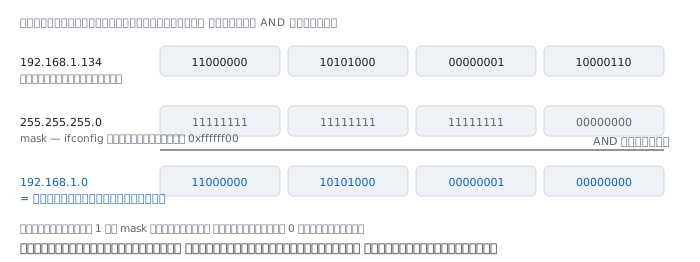
Your machine uses the mask for exactly one job: AND the address with the mask, bit by bit, to find which network it is on.
192.168.1.134   11000000 10101000 00000001 10000110
255.255.255.0   11111111 11111111 11111111 00000000
                --------------------------------- AND
192.168.1.0     11000000 10101000 00000001 00000000
AND yields 1 only when both sides are 1, so every bit aligned with a 1 in the mask is kept, and every bit aligned with a 0 is cleared to zero.
The machine then does the same to whatever destination it is about to send to.
- Same network number → same network; send straight there
- Different network number → hand it to the gateway
That single sentence is the whole of subnet masking. Everything else on this page follows from it.
August 1985 — and the reason that was not about running out
Subnetting is defined in RFC 950, written by Jeff Mogul of Stanford and Jon Postel of ISI, published in August 1985.
The common misconception is that it was done to save addresses. The document states the real reason plainly: routing table size.
Before it, an organisation with several internal networks had to request a separate network number for each, and every one of those numbers had to be announced across the whole internet. RFC 950 says that approach "results in an explosion in the size of Internet routing tables".
An organisation's internal structure is of no use to anybody outside it, yet every router on earth had to memorise it.
Subnetting fixed that by giving the organisation one network number to subdivide internally, invisibly to the outside. The whole organisation appears to the world as a single entry.
Notice that the same pressure returned eight years later, and the answer that time was CIDR.
The design thinking — why a bit boundary
1. Because aggregation depends on it
If networks could be arbitrary ranges — "hosts 40 through 190 are one network" — routers would have to store a start and an end for every network on earth.
But force the boundary onto a bit edge and adjacent networks collapse into one entry immediately. Four contiguous /26s are one /24. Two contiguous /24s are one /23.
That collapsing is what keeps the internet's routing table a manageable size despite billions of addresses.
2. Mask bits did not have to be contiguous — per the 1985 spec
Almost nobody knows this one. RFC 950 says:
The subnet bits need not be adjacent in the address. However, we recommend that the subnet bits be contiguous and located as the most significant bits.
Which means a mask like 255.0.255.0 was once standards-compliant. It was merely recommended against.
Today virtually no equipment accepts such a mask, and CIDR removed the possibility entirely, because writing /24 can only express contiguous bits — the notation we use daily enforces correctness for us without our noticing.
3. First and last were reserved from the beginning
RFC 950 states that "the values of all zeros and all ones in the subnet field should not be assigned to actual (physical) subnets".
That is the origin of the rule everyone recites — first address is the network, last is the broadcast, neither usable by a host — which has two important exceptions, covered further down.
Before 1993 there were only three places to put the boundary
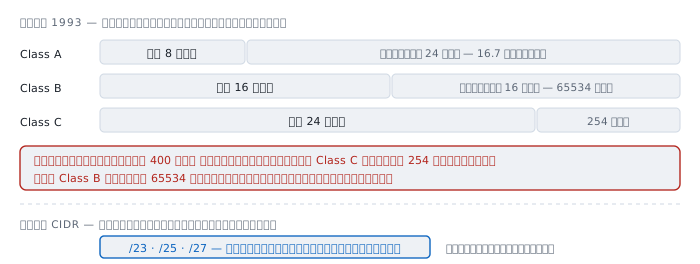
Originally IP divided addresses into classes by their leading bits, each class with a fixed boundary:
  Class A   network 8 bits    host 24 bits   16,777,214 per network
  Class B   network 16 bits   host 16 bits   65,534 per network
  Class C   network 24 bits   host 8 bits    254 per network
An organisation needing 400 addresses therefore had two bad options: a Class C giving 254, which is not enough, or a Class B giving 65,534, wasting over sixty thousand.
The result was two simultaneous crises in the early 1990s — Class B was running out, and routing tables were growing faster than equipment could handle.
CIDR solved it by discarding classes altogether and letting the boundary sit at any bit. The organisation needing 400 asks for a /23 and gets 510.
Today "Class A/B/C" has no technical meaning. It survives only as habit, and saying "this is a Class C network" usually just means "it is a /24".
What is inside one network
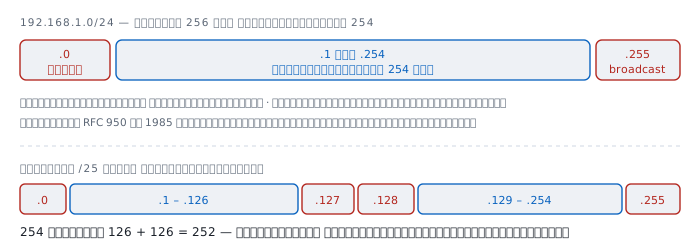
  192.168.1.0/24
    192.168.1.0     network number — the name of the network, not a host
    192.168.1.1     first usable host
    192.168.1.254   last usable host
    192.168.1.255   broadcast — every host in the network at once
256 addresses in total, 254 usable.
The formula is 2 to the power of the remaining bits, minus two:
  /24   2^8  = 256    usable 254
  /25   2^7  = 128    usable 126
  /26   2^6  = 64     usable 62
  /27   2^5  = 32     usable 30
  /28   2^4  = 16     usable 14
  /29   2^3  = 8      usable 6
  /30   2^2  = 4      usable 2
The commonly overlooked part: the more you subdivide, the more total addresses you lose, because every subnet pays for its own first and last. Split a /24 into four /26s and you have 62 × 4 = 248 usable instead of 254 — six addresses gone purely to the act of dividing.
The boundary moves one bit at a time
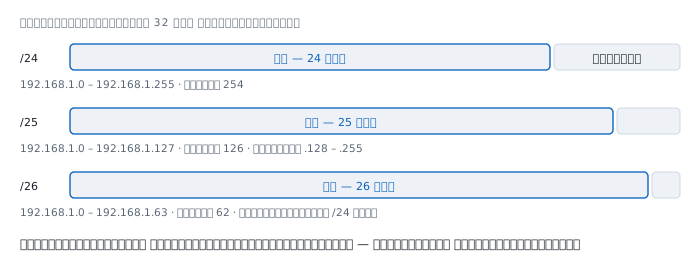
Move the boundary one bit right and the addresses in a network halve, while the number of networks doubles.
  /24   one network     .0 – .255
  /25   two networks    .0 – .127     .128 – .255
  /26   four networks   .0 – .63      .64 – .127
                        .128 – .191   .192 – .255
A boundary must land on a multiple of its own size. A /26 holds 64 addresses, so it can only begin at a number divisible by 64: .0 .64 .128 .192. You may write 192.168.1.130/26, but it means host 130 inside the network 192.168.1.128/26, not a network starting at 130.
VLSM — networks in one place need not be the same size
Before 1985 an entire organisation could use only one mask, so every network was the same size even if one of them held three machines.
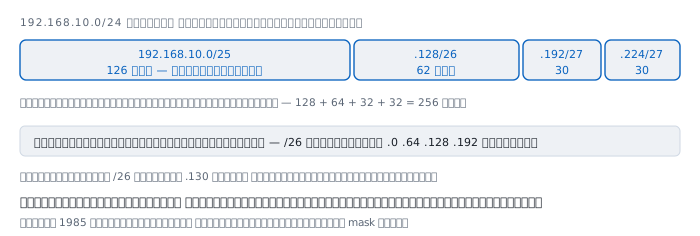
VLSM lets each network carry its own mask. A 192.168.10.0/24 can be split like this:
  192.168.10.0/25     .0   – .127   usable 126   the large department
  192.168.10.128/26   .128 – .191   usable 62    a medium one
  192.168.10.192/27   .192 – .223   usable 30    the server room
  192.168.10.224/27   .224 – .255   usable 30    spare
                                    256 addresses exactly
Always allocate largest first. Place the small ones first and you are left with scattered gaps that no large network fits into, even though the total count would have been sufficient.
Where the first-and-last rule does not apply
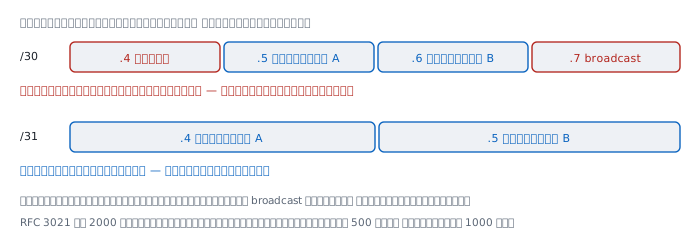
/31 on a link between two devices
A link between two routers needs exactly two addresses. With a /30 you must reserve four to get two usable — half wasted.
RFC 3021, published December 2000, fixed this by permitting /31 on point-to-point links. The reason is that such links "don't support the notion of broadcast" anyway, having only one possible destination, so nothing needs reserving for it.
The document states that both addresses in a /31 MUST be interpreted as host addresses, and gives the example that a network with 500 such links saves 1000 addresses.
/32 and /0
/32 is a network of one address, used for device loopbacks and for routes pointing at one specific machine. The first-and-last rule is meaningless there because there is only one address.
/0 is a mask with no 1 bits at all, meaning "every address on earth" — the default route 0.0.0.0/0 described in Internet Protocol.
When several routes match, who wins
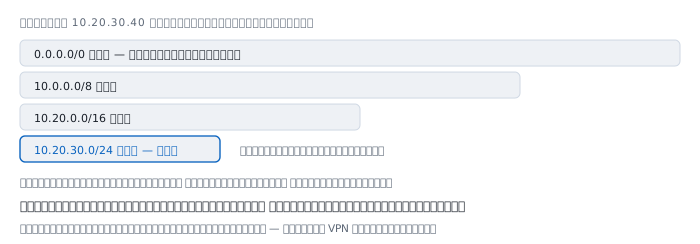
The destination 10.20.30.40 matches all four of these at once:
  0.0.0.0/0        matches   least specific
  10.0.0.0/8       matches
  10.20.0.0/16     matches
  10.20.30.0/24    matches   longest, so it wins
There is one rule: the longest prefix wins. It has nothing to do with order in the table, nothing to do with which was added first, and nothing to do with any metric at this stage.
The problem arises when two routes are equally long and overlap exactly, which is what happens on VPN when the home network uses the same range as the office.
Things that are not true
"First and last are never usable" — untrue for /31 and /32.
"/24 is the standard" — nothing about it is special. It merely lands on a byte boundary, which makes it easy to compute and familiar. Well designed networks are full of /23 /26 /29.
"This is a Class C network" — classes died in 1993. The sentence means "it is a /24", and thinking in classes actively leads to misunderstanding CIDR.
"192.168.x.x is the home range" — there are three private ranges: 10.0.0.0/8, 172.16.0.0/12 and 192.168.0.0/16. The middle one is forgotten most often, and misremembering it as all of 172.x.x.x produces wrong firewall rules.
"An address ending in .0 is always a network number" — only with a /24. With a /20 the network number is whatever is divisible by 16 in the third octet, so 10.20.30.40/20 is in 10.20.16.0/20, not 10.20.30.0.
Worked examples from real work
Case 1 — traffic that works in one direction only
Machine A is set to 192.168.1.10/24, machine B to 192.168.1.200/25, both on the same switch.
How to read it. Do the AND from each side and see what each concludes:
  A looking at .200 :  .200 AND /24  = 192.168.1.0   = A's own network
                       -> A sends directly to B
  B looking at .10  :  .10  AND /25  = 192.168.1.0
                       B itself is on 192.168.1.128
                       -> different network, B uses the gateway
A reaches B directly, but B replies via the gateway, which may have no route back. The visible symptom is ping working one way and not the other.
Not yet proved. We do not know which machine is wrong. Check the network's design documentation for whether it was meant to be a /24 or a /25.
Case 2 — a network number that does not end in zero as expected
$ ipcalc 10.20.30.40/20 2>/dev/null || python3 -c "
import ipaddress as i
n = i.ip_interface('10.20.30.40/20').network
print(n, n.network_address, n.broadcast_address, n.num_addresses)"
10.20.16.0/20 10.20.16.0 10.20.31.255 4096
How to read it. Many people guess the network is 10.20.30.0, but a /20 cuts the third octet in the middle, so networks are 16 wide there and start on multiples of 16. The number 30 falls into the range 16 to 31.
This is the trap that most often produces wrong firewall rules and ACLs, because the person writing them thinks they are permitting one network while actually permitting another.
Not yet proved. Correct arithmetic does not mean the device is configured the way it was designed. Check the equipment itself too.
Case 3 — a VPN that takes the home network away
The office uses 192.168.1.0/24; an employee's home network uses 192.168.1.0/24 too.
How to read it. On the VPN the machine has two equally long routes that overlap exactly. The longest-prefix rule cannot decide, so the outcome depends on what route the VPN software installed.
The usual symptom is being unable to reach the home router while connected, or worse, being unable to reach the office although the VPN is up.
$ netstat -rn -f inet | grep 192.168.1Run it while actually connected to see how many routes exist and where they point.
How to avoid it. Organisations should stay away from the popular 192.168.0.0/24 and 192.168.1.0/24 and pick something uncommon inside 10.0.0.0/8, such as 10.73.42.0/24, where the chance of colliding with somebody's home network is near zero.
Not yet proved. We do not know how that particular VPN product handles it; some install a more specific route to win. Look at the real thing while connected.
Case 4 — a network too small to grow
A server room was given a /29: six usable addresses, all six in use. One day another machine is needed.
How to read it. Expanding to a /28 requires the following addresses to be free and the existing network to begin on a /28 boundary:
  10.0.0.8/29    ->  cannot become a /28
                     because a /28 must start at .0 or .16
  10.0.0.16/29   ->  can become 10.0.0.16/28
                     if .24 – .31 are still free
The design lesson: leave a gap after every network from the start. Packing allocations tightly to save addresses is how you make them impossible to grow.
Not yet proved. We do not know the following addresses are actually free. Check against the organisation's address allocation records.
When computing it by hand stops being wise
ipcalcorsipcalc— every value at once, in one commandpython3 -c "import ipaddress ..."— already on most machines, and more trustworthy than arithmetic done in your headip route get <destination>— ask the machine directly which way it would send, which answers the real question better than reasoning from a mask- The organisation's address allocation records — the most important tool in this list, and the only one that is not on a computer
255.255.255.0 is not a number. It is a boundary, and it answers one question: is the destination on my network?
Everything else — subdividing, aggregation, the longest-prefix rule, and every special case — follows from one decision made in 1985: that the boundary should be allowed to move.
References
Standards
- RFC 950 — Internet Standard Subnetting Procedure J. Mogul and J. Postel, August 1985 — the origin of subnetting, including the routing-table reasoning, the first-and-last rule, and the note that mask bits need not be contiguous
- RFC 4632 — CIDR: The Internet Address Assignment and Aggregation Plan obsoletes RFC 1519 — the end of classes and the case for aggregation
- RFC 3021 — Using 31-Bit Prefixes on IPv4 Point-to-Point Links A. Retana, R. White, V. Fuller, D. McPherson, December 2000
- RFC 1918 — Address Allocation for Private Internets the three private ranges
- RFC 6890 — Special-Purpose IP Address Registries the full list of reserved ranges
- RFC 791 — Internet Protocol the source of the class system that CIDR later replaced
Manuals
man ifconfigon macOS, which writes the mask in hexadecimal, andman ipon Linux, which writes it as a prefix length — two notations that tell the truth more plainly than four dotted numbersman ipcalcif it is installed