Everything you do on the internet rests on one protocol, and that protocol guarantees you absolutely nothing.
No guarantee your data arrives. No guarantee it arrives in order. No guarantee it arrives undamaged. And if it is lost, nobody tells anybody.
That sounds like a badly designed thing. It is the only reason the internet scaled to what it is today, and this page is about why.
This site already has articles on ping, traceroute and DNS. All three keep referring to IP's fields and behaviour without ever laying them out — TTL, fragmentation, the DF bit, protocol numbers, private address ranges. This page is the foundation underneath all three.
If you have never looked before, start here
Type this on macOS or Linux to ask the machine where it would send a packet bound for 8.8.8.8:
route -n get 8.8.8.8          # macOS and BSD
ip route get 8.8.8.8          # Linux
You get roughly this:
   destination: 8.8.8.8
       gateway: 192.168.1.1
     interface: en0
Those three lines are the whole job of IP in one picture. The machine looks at the destination, compares it with its own table, and decides who to hand it to. That is all. No prior contact, no agreement with anybody.
September 1981 — a document still in force
IP is defined in RFC 791, published in September 1981, edited by Jon Postel under DARPA. It obsoletes RFC 760 and a number of earlier documents.
Forty-odd years later the core has not changed. The packet your machine sent a moment ago has exactly the fields that document describes.
Postel's name keeps appearing if you read on here — he also edited RFC 792, which defines ICMP, the basis of both ping and traceroute.
The design thinking — why it guarantees nothing
1. It guarantees nothing, and says so plainly
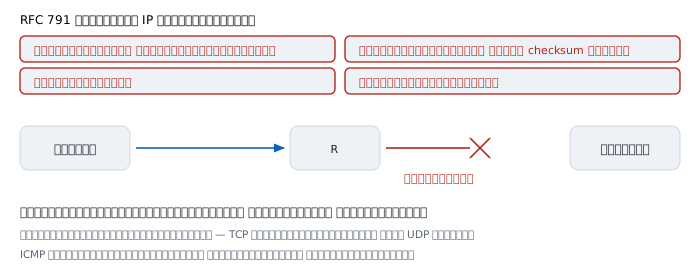
RFC 791 does not hedge. It declares:
The internet protocol does not provide a reliable communication facility. There are no acknowledgments either end-to-end or hop-by-hop. There is no error control for data, only a header checksum. There are no retransmissions. There is no flow control.
That reads like a list of defects. It is a list of things deliberately not done.
The reason is that if IP guaranteed those things, every device along the path would have to remember the state of every connection crossing it. A router forwarding a million connections would hold a million records, and if it rebooted, everything through it would break.
Guaranteeing nothing means routers remember nothing. Any of them can be replaced. Paths can change mid-flight without anyone caring. You can add as many devices as you like.
Reliability is pushed up to the two endpoints, which sort it out between themselves — TCP numbers and retransmits, while UDP does not bother because some jobs do not need it.
2. Decisions are made hop by hop; the packet carries no route
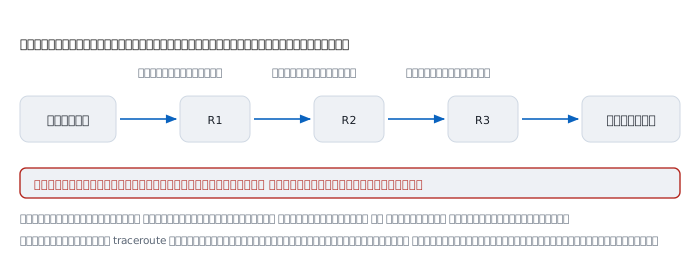
The header holds only "where from" and "where to". There is no field for a route.
So each router decides on its own, without knowing what the previous one thought and without caring what the next one will think. It reads the destination, checks its table, picks an exit. Done.
This is the root of two things described elsewhere on this site: traceroute prints a route that real packets may never have travelled, because every packet is decided afresh; and ping measures a round trip but cannot tell you whether the return path matched the outbound one.
3. The checksum covers the header only
This looks like mean-spirited economy. The RFC gives the reason itself:
A checksum on the header only. Since some header fields change (e.g., time to live), this is recomputed and verified at each point that the internet header is processed.
Because TTL changes at every hop, the checksum must be recomputed at every hop. If it also covered the payload, every router would have to read every byte of every packet to recompute it — far too expensive for something done millions of times a second.
Data integrity is likewise a job for the layer above, and IPv6 removed the header checksum entirely for the same reason: the upper layers already check.
What is inside the header
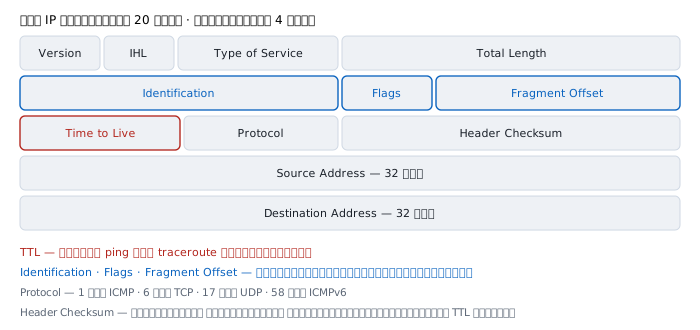
These twenty bytes are everything a transit router needs to know. Only a few fields are worth memorising:
  Version           4 or 6
  IHL               header length; says whether Options follow
  Total Length      whole packet length, up to 65535
  Identification    matches fragments belonging together
  Flags             DF (don't fragment) and MF (more fragments)
  Fragment Offset   where this piece sits in the original
  TTL               how many more hops it may cross
  Protocol          what is inside
  Header Checksum   header only, recomputed every hop
  Source            where from, 32 bits
  Destination       where to, 32 bits
Notice that no field has anything to do with reliability. No sequence number, no acknowledgment, no retransmission counter, because IP does not do those things.
An address is not four numbers; it is 32 bits
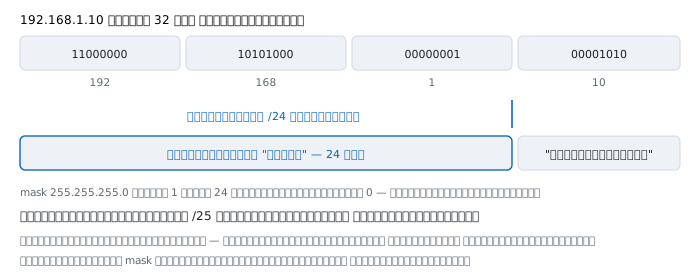
If there is one thing to take from this page, make it this one.
255.255.255.0 is not four numbers. It is twenty-four 1 bits in a row followed by eight 0 bits. Writing it as four dotted numbers is a convenience for humans, not what the machine sees.
Once you see it as bits, /25 /26 /30 become obvious immediately — they move the boundary one bit to the right, and each move to the right halves the network.
The machine uses that boundary to settle exactly one question: is the destination on my network?
- Same network → send straight to it
- Different network → hand it to the gateway and let it deal with it
Which means two machines with mismatched masks answer that question differently. One thinks they are on the same network and sends directly; the other thinks otherwise and goes via the gateway. The result is traffic that works in one direction only — a symptom that is very hard to track down if you have not met it before.
How a machine picks its exit
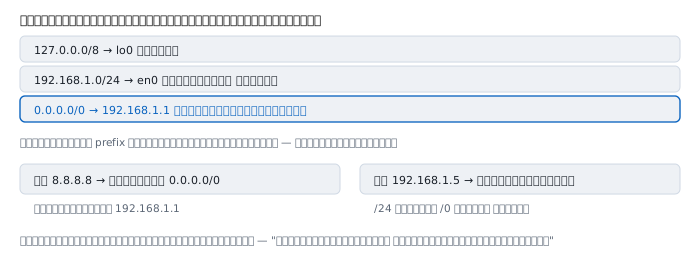
The real routing table of the machine this was written on, reduced to its essentials:
  127.0.0.0/8       ->  lo0             myself
  192.168.1.0/24    ->  en0             same network, send directly
  0.0.0.0/0         ->  192.168.1.1     everything else in the universe
There is one selection rule: the longest matching prefix wins. The more specific, the more it counts.
- To
8.8.8.8→ only0.0.0.0/0matches → hand to the gateway - To
192.168.1.5→ both/24and/0match,/24is longer → send directly
0.0.0.0/0 is the default route, and what it really means is an admission of ignorance: "I do not know this destination; give it to somebody who probably knows better than me."
Because every machine along the way reasons the same way, packets travel the world without any single one of them knowing the whole path.
Protocol — the field that says what is inside
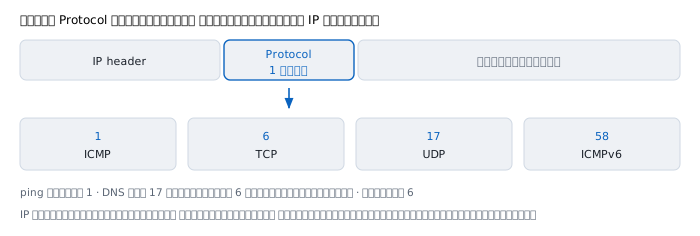
IP does not care what is inside. It carries it, and the destination reads this number to hand it to the right owner.
   1   ICMP      what ping and traceroute use
   6   TCP       web, email, ssh
  17   UDP       DNS mostly, and video calls
  58   ICMPv6    the IPv6 side, which does far more than the v4 one
If you read the DNS article you will recall that answers too large switch to TCP — that is this field changing from 17 to 6 for what is otherwise the same question.
Fragmentation, and why IPv6 stopped doing it
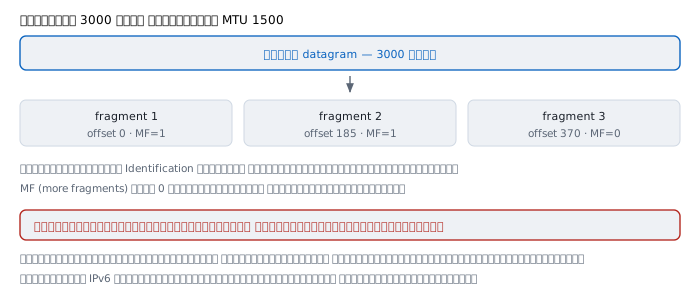
Every link carries a different maximum packet size, called the MTU. Ordinary Ethernet is 1500 bytes; loopback within one machine is far larger:
$ ifconfig en0 | grep mtu
  ... mtu 1500
$ ifconfig lo0 | grep mtu
  ... mtu 16384
When a packet is too big for a link, IPv4 permits splitting it. You can test it directly:
$ ping -c 1 -s 3000 192.168.1.1
3008 bytes from 192.168.1.1: icmp_seq=0 ttl=64 time=8.961 ms
3008 bytes came back although the link carries 1500 at a time — so it was split into three pieces and reassembled at the far end.
All three pieces share one Identification so they can be recognised as one datagram, use Fragment Offset for position, and set MF to 0 only on the last.
RFC 791 states clearly that reassembly happens at the destination only; transit routers do not do it. That creates three problems:
- Lose one piece and the whole datagram is useless; it must all be resent
- The destination must hold memory waiting for the rest, which invites abuse
- A router that has to split works much harder than one that just forwards
So IPv6 stopped letting routers fragment. The sender must find a size that fits before sending, which makes path MTU discovery far more important on IPv6.
A warning when testing MTU
The ping article describes finding the MTU by setting DF and sweeping sizes. There is a condition worth adding: test against something beyond your gateway, not against the gateway itself.
Tested on this Mac, an off-link destination behaves as expected:
$ ping -c 1 -D -s 1472 8.8.8.8
1480 bytes from 8.8.8.8: icmp_seq=0 ttl=112 time=11.613 ms
$ ping -c 1 -D -s 1473 8.8.8.8
(no reply — over 1500 and fragmentation forbidden)
But aimed at the gateway on the same link, oversized packets still get answers:
$ ping -c 1 -D -s 1600 192.168.1.1
1608 bytes from 192.168.1.1: icmp_seq=0 ttl=64 time=7.251 ms
This reproduces, and means setting DF does not prevent fragmentation for locally oversized packets to an on-link destination. If you test against your gateway and see large sizes pass, do not conclude the path MTU is that large.
TTL — the name says time, the behaviour is hops
The ping and traceroute articles describe TTL as a router counter, which is correct in practice but not what RFC 791 originally intended.
The document says:
This field indicates the maximum time the datagram is allowed to remain in the internet system... The time is measured in units of seconds, but since every module that processes a datagram must decrease the TTL by at least one even if it process the datagram in less than a second, the TTL must be thought of only as an upper bound on the time a datagram may exist.
So the original intent was "how many seconds may this live". But the rule forcing a decrement of at least one per hop, combined with modern routers finishing in fractions of a millisecond, has made it a hop counter in practice, completely.
It is a good example of something common in long-lived protocols: the name records the original intent, the behaviour records the present truth, and the two no longer agree.
Worked examples from real work
Case 1 — mismatched masks
Machine A is set to 192.168.1.10/24, machine B to 192.168.1.20/25, both on the same switch.
How to read it. /25 halves the original network; the first half is .0 through .127, and both machines are in it. So both consider the other local, and in this case they still talk.
But make B 192.168.1.200/25 and B is in the other half — A still thinks it is local and sends directly, while B thinks otherwise and goes via the gateway. Traffic works one way only.
Not yet proved. We do not know which machine is misconfigured. First establish whether this network was designed as a /24 or a /25.
Case 2 — ping works but the site does not load
$ ping -c 2 10.20.30.40
64 bytes from 10.20.30.40: icmp_seq=0 ttl=63 time=2.1 ms
How to read it. ping proves the IP layer works — the address is right, a route exists, and something at the far end answered.
But ICMP is Protocol 1 while the web is Protocol 6. Number 1 getting through does not mean number 6 will. A firewall can filter on exactly this field.
The next step is to test with the same protocol the application actually uses.
Not yet proved. We do not know whether it is filtered or the service is down. ping answers happily even when the service on that machine is dead.
Case 3 — guessing the far end's system from the remaining TTL
$ ping -c 1 8.8.8.8
64 bytes from 8.8.8.8: icmp_seq=0 ttl=112 time=11.879 ms
How to read it. Common starting values are 64, 128 and 255. Seeing 112 suggests it started at 128 and crossed 16 routers.
Not yet proved. It is a guess, not a proof. Administrators change the starting value, and the return path may differ from the outbound one, so the hop count belongs to the return path rather than the outbound.
Case 4 — private ranges that collide over VPN
The office uses 192.168.1.0/24, and an employee's home network uses 192.168.1.0/24 too.
How to read it. Connected to the VPN, the machine has two routes that match identically, and under the longest-prefix rule two equally long prefixes have no clear winner. Traffic meant for the office may go to the home router.
This is why organisations should avoid the popular 192.168.0.0/24 and 192.168.1.0/24 and pick something less used inside 10.0.0.0/8.
Not yet proved. We do not know how each VPN product handles this; some install a more specific route to win. Look at netstat -rn while actually connected.
When IP is not enough
IP only carries things to their destination. Everything beyond that belongs to another layer.
- ICMP — reports conditions back, such as TTL expiry or "too big and fragmentation forbidden". See ping and traceroute
- TCP — adds sequencing, retransmission and flow control, providing the reliability IP does not
- UDP — adds almost nothing but port numbers, suiting jobs that tolerate loss. See DNS
- ARP and Neighbor Discovery — turn an IP address into a real address on the wire within one link
- IPv6 — 128-bit addresses, no header checksum, and no router fragmentation
A protocol that promises nothing became the foundation of everything you use daily, because promising nothing means remembering nothing, and remembering nothing means scaling without limit.
Every time something on the internet works, that is not because IP guaranteed it. It is because somebody built a layer above that copes well enough with the uncertainty.
References
Standards
- RFC 791 — Internet Protocol Jon Postel (Editor), DARPA, September 1981 — obsoletes RFC 760, and the source of every quotation here: what IP does not guarantee, the definition of TTL in seconds, and reassembly at the destination only
- RFC 792 — Internet Control Message Protocol Jon Postel, September 1981 — the companion to RFC 791
- RFC 1122 — Requirements for Internet Hosts what a host must actually be able to do
- RFC 1812 — Requirements for IP Version 4 Routers the router side, including the rules on decrementing TTL
- RFC 1918 — Address Allocation for Private Internets the origin of 10.0.0.0/8, 172.16.0.0/12 and 192.168.0.0/16
- RFC 4632 — CIDR the end of classful addressing and the case for aggregation
- RFC 8200 — IPv6 Specification including why routers no longer fragment
Manuals
man ip,man route,man netstaton the machine you are sitting atip route get <destination>on Linux androute -n get <destination>on macOS, which say directly which way the machine would send