There is a joke in this industry, worn out from overuse, that when something breaks and nobody can find the cause, the first guess should be "it's DNS". The joke survives because it is right an alarming amount of the time.
Not because DNS is bad. Quite the opposite: it is a very well designed distributed system that has run for forty years with barely a change to its core. The trouble is that it deliberately allows answers to be stale, and deliberately allows two people to get different answers — two properties that make diagnosis harder than it should be unless you understand why they were chosen.
This page starts from nothing and goes down to what you need for real work.
This site already has articles on ping and traceroute. Together the three form the sequence people actually use — does the name resolve → is it reachable → where does it stop — and this page is the first step, which is also the one that breaks most often.
If you have never typed it before, start here
dig netkubelab.comIf you have no dig, nslookup netkubelab.com works everywhere.
What comes back:
;; ->>HEADER<<- opcode: QUERY, status: NOERROR, id: 57362
;; flags: qr rd ra ad; QUERY: 1, ANSWER: 2, AUTHORITY: 0, ADDITIONAL: 1

;; ANSWER SECTION:
netkubelab.com.		300	IN	A	104.21.35.137
netkubelab.com.		300	IN	A	172.67.175.92
In plain terms: the name netkubelab.com resolves to two addresses, and this answer may be reused for another 300 seconds.
That 300 is the TTL, and it is the heart of this whole article.
Before 1983 the entire internet had one file
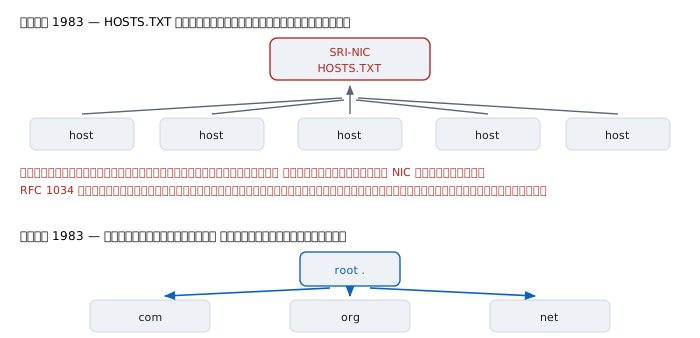
In the ARPANET era, turning names into addresses was done with a single text file called HOSTS.TXT, maintained by the Network Information Center at SRI. Every host on the network downloaded that file and kept a local copy. To make a new name usable you filed a request with the NIC, waited for the file to be edited, and waited again for everyone else to fetch the new version.
RFC 1034, the document that defines DNS, explains in its own words why that could not continue:
The total network bandwidth consumed in distributing a new version by this scheme is proportional to the square of the number of hosts in the network
One sentence, and it is the whole argument. More hosts means more edits, and every edit has to reach every host, so the cost does not grow linearly — it grows as the square.
The same document gives a second reason that matters just as much: the network was changing from large shared timeshared machines to local networks of workstations. Those organisations were already administering their own names, but had to wait for the NIC to change the central file before anything became visible.
Paul Mockapetris designed the replacement in 1983, published as RFC 882 and RFC 883, later rewritten as RFC 1034 and RFC 1035 in November 1987 — still the base specification today.
It is worth noticing that 1983 is the same year Mike Muuss wrote ping: the year TCP/IP on the internet was less than twelve months old, and the year a surprising number of the tools we still use every day were born.
The design thinking — why it was built this way
ping and traceroute won by asking nobody to implement anything new. DNS is the opposite: a system designed from scratch on purpose. Which makes its lesson a different one.
1. Nobody holds all the data
Instead of a central file, DNS splits names into levels and delegates authority downward one level at a time. The root knows only who runs .com; .com knows only who runs netkubelab.com; and only whoever runs netkubelab.com knows the actual answer.
The consequence matters more than it appears: changing a name in your own domain requires nobody's permission and no announcement. Organisations administer their own names completely, which is exactly what HOSTS.TXT could never allow.
2. Caching is what makes it scale, not an optimisation bolted on
If every question had to walk from the root, the root servers would have been overwhelmed in the first year.
So every DNS answer carries an age with it. Whoever receives it may keep it and reuse it until it expires. Most questions on earth are therefore answered by a nearby cache and never reach the root at all.
Caching is not a performance tweak added later; it is what makes the system possible at all. The price is that the answer you get may not be the latest one — a trade the designers made knowingly.
3. Let the data's owner decide how stale is acceptable
TTL is the control for that trade. The owner of a record sets it: this answer may be kept for this many seconds.
- Set it high, say a day — low load on the system, but changes take a long time to take effect
- Set it low, say five minutes — changes take effect quickly, but questions reach the real servers far more often
There is no correct value for all cases. It is a dial the data's owner turns according to what matters more at the time.
4. "No such thing" has to be cached too
An overlooked point. If only positive answers were cached, every mistyped name would send a question all the way to the real servers, forever.
So DNS caches negative answers as well, and their lifetime comes from the last field of the zone's SOA record. For netkubelab.com it is 1800 seconds:
netkubelab.com.  1800  IN  SOA  kyle.ns.cloudflare.com.
        dns.cloudflare.com. 2413456799 10000 2400 604800 1800
                                                        ^^^^
                                    lifetime of a "no such name"
This is why a newly created name sometimes still does not work: somebody asked for it before you created it, and the cached "does not exist" has not expired.
How it works
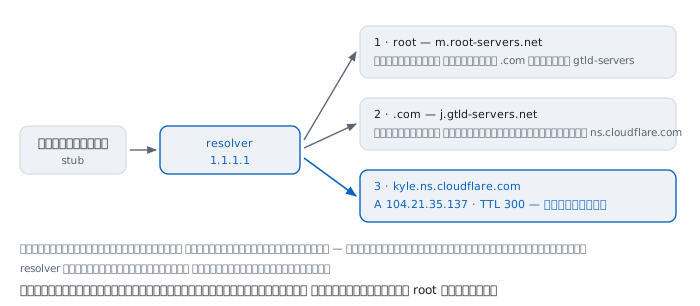
That picture is not invented. It is the real result of running dig +trace netkubelab.com from the machine this article was written on:
;; Received 239 bytes from 1.1.1.1#53(1.1.1.1)
com.  172800  IN  NS  a.gtld-servers.net.   (and 12 more)
;; Received 839 bytes from 202.12.27.33#53(m.root-servers.net)
netkubelab.com.  172800  IN  NS  kyle.ns.cloudflare.com.
netkubelab.com.  172800  IN  NS  opal.ns.cloudflare.com.
;; Received 359 bytes from 192.48.79.30#53(j.gtld-servers.net)
netkubelab.com.  300  IN  A  104.21.35.137
;; Received 75 bytes from 2606:4700:58::a29f:2c6f#53(kyle.ns...)
Reading down: ask a root server, get the list of .com servers; ask a .com server, get the list of servers for this domain; ask one of those, and finally get an address.
No level knows the final answer. Every level knows only who to ask next.
Who does the walking
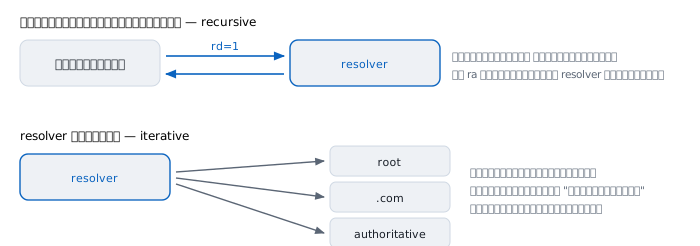
Your machine does not do the walking. It sends one question to a resolver and waits for a final answer. That is what the rd flag (recursion desired) means in the question, and ra (recursion available) in the reply means the other side is willing to do the walking.
The one doing the work is the resolver, which asks each level itself and caches every level it passes through. The next time somebody asks for a different name under .com, it does not have to ask the root again, because its knowledge of .com has not expired.
What is inside a message
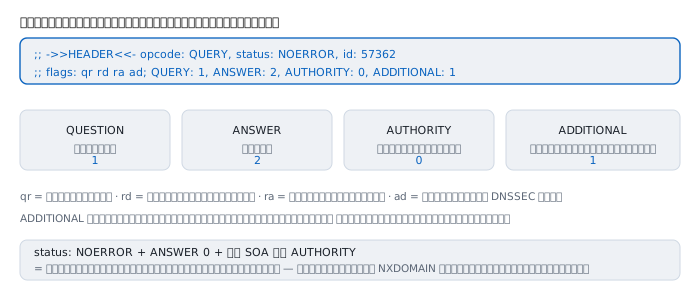
DNS questions and answers share one structure: a header followed by four sections, and the header states how many records each section holds.
Flags worth knowing:
  qr   this is an answer, not a question
  rd   the asker wants recursion (recursion desired)
  ra   the answerer offers recursion (recursion available)
  aa   this came straight from a server with authority, not from a cache
  ad   the data passed DNSSEC validation
  tc   the answer was too big and got truncated; ask again over TCP
The aa flag is extremely useful while diagnosing, because it separates immediately whether what you are looking at came from the real source or from somebody's cache along the way.
And tc is the origin of the common belief that DNS is UDP only. It uses both UDP and TCP on port 53; answers too large get truncated with a note to ask again over TCP. These days EDNS raises the UDP ceiling, and 1232 bytes is a value you will see often.
A firewall that permits UDP 53 but blocks TCP 53 therefore produces very odd symptoms: most names work, but certain names with many records do not.
TTL — and one word that means two different things
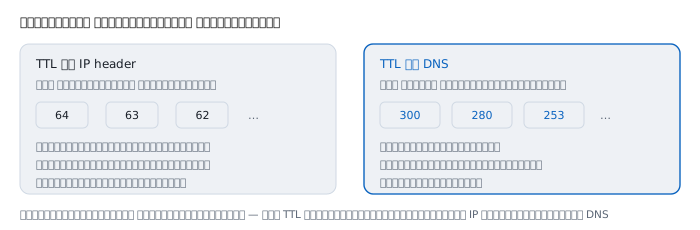
If you read the ping and traceroute articles you met TTL meaning "how many more routers may this cross". The TTL in DNS has nothing to do with that one. They merely share a name.
- TTL in IP counts routers, decrementing on every forward
- TTL in DNS counts seconds, decrementing as time passes
Whenever you meet the word, check first whether it is in an IP header or in a DNS record.
Caching is why two people see different things
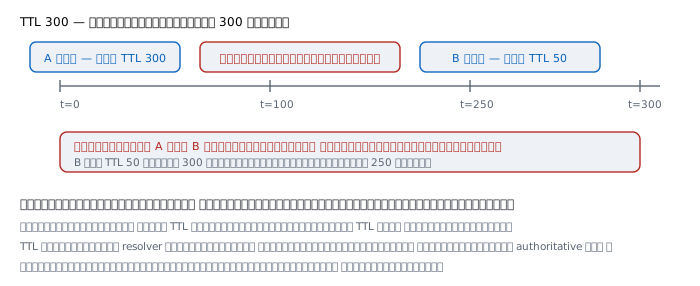
Run dig for the same name twice with a pause between, and watch the TTL fall:
$ dig +noall +answer google.com A
google.com.		280	IN	A	142.250.204.206

   ... wait a moment ...

$ dig +noall +answer google.com A
google.com.		253	IN	A	142.250.204.206
280 then 253 is not a mistake. That is the time remaining on the copy in the resolver's cache, not the value the domain's owner set.
Two practical consequences follow.
First, to see the real TTL the owner configured, ask an authoritative server directly rather than going through a resolver.
Second, before moving a server, lower the TTL at least one full old-TTL period in advance. If it was 86400, lower it a full day ahead and only then change the record. Otherwise people will keep seeing the old answer for a day and there is nothing you can do about it.
And there is no way to force somebody else's cache to discard an old answer. You can flush your own machine, and resolvers you operate. Other providers' resolvers and end users' machines worldwide are entirely outside your control.
NOERROR does not mean there is an answer
This is widely misread. There are three states to keep apart:
  NOERROR + ANSWER > 0     there is an answer, use it
  NOERROR + ANSWER 0 + SOA the name exists, that record type does not
  NXDOMAIN                 no such name exists at all
The middle case is called NODATA — asking for MX on a domain with no mail configured, for instance. The name exists; that record type does not.
There is a further trap: some providers never return NXDOMAIN. Ask for a name that certainly does not exist under this domain:
$ dig no-such-name-xyz789.netkubelab.com A
;; ->>HEADER<<- opcode: QUERY, status: NOERROR
;; flags: qr rd ra ad; QUERY: 1, ANSWER: 0, AUTHORITY: 1, ADDITIONAL: 1
netkubelab.com.  1800  IN  SOA  kyle.ns.cloudflare.com. ...
NOERROR, not NXDOMAIN, for a name that does not exist.
The lesson is not to write scripts that decide on NXDOMAIN alone, because this behaviour varies by provider. Checking whether ANSWER is zero is more reliable.
When DNS lies
1. The answer may always be older than the truth
Not a bug — the design. Any answer that did not come straight from an authoritative server is an answer that was true when it was stored.
When you change a record and somebody reports seeing the old one, do not assume the change failed. Ask an authoritative server directly first. If it is correct there, your work is done and the rest is waiting for TTLs.
2. The same name may give different answers, on purpose
At least three mechanisms cause this:
- anycast — one address announced from many places worldwide, like the ones
netkubelab.compoints at, so different people reach different machines - GeoDNS — the server returns different answers based on where the asker is
- split-horizon — people inside an organisation get internal addresses while outsiders get external ones
All three mean "I asked and got this address" is not evidence that anybody else gets the same one. While diagnosing, ask from the same place the user is.
3. The name you typed may not be the name that was asked
If the name you typed has no trailing dot, the system may append a search domain first. Type intranet and the machine may actually ask for intranet.corp.example.com.
This is the origin of the symptom where one machine opens a site and another does not, despite typing exactly the same thing — the two have different search domains.
4. The machine may not be asking the resolver you think
On macOS, /etc/resolv.conf is not used. The file says so itself: it is not consulted for hostname resolution. The real values need:
$ scutil --dns | grep nameserver
  nameserver[0] : 1.1.1.1
  nameserver[1] : 8.8.8.8
On modern Linux with systemd-resolved that file usually points at 127.0.0.53, a local intermediary, and resolvectl status shows the truth.
And dig does not follow the same path an application does. dig talks to a server directly; an application goes through the system library, which may consult /etc/hosts, mDNS, or a system cache first. dig working does not mean the application will work.
5. Encrypted DNS makes the old diagnosis blind
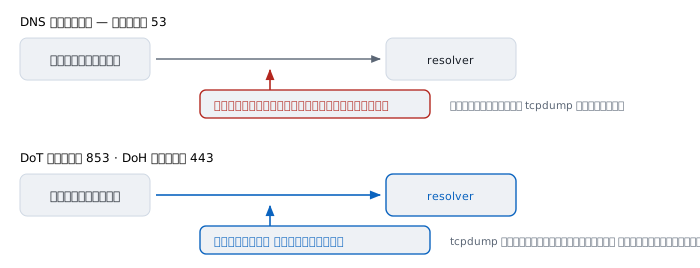
It used to be that suspecting DNS meant running tcpdump on port 53 and seeing everything.
Today many browsers use DoH, carrying DNS inside HTTPS traffic on port 443, and many operating systems support DoT on port 853. Both are encrypted.
The result is that a machine may be resolving names through something that is not the organisation's resolver at all, and you cannot see what it asked. If the numbers make no sense while diagnosing, check whether the browser has DoH enabled before anything else.
Worked examples from real work
Case 1 — decide whether it is DNS in ten seconds
A user reports that one site will not open.
$ ping app.example.com
ping: cannot resolve app.example.com: Unknown host

$ ping 203.0.113.20
64 bytes from 203.0.113.20: icmp_seq=0 ttl=54 time=12.1 ms
How to read it. The address is reachable; the name will not resolve. The problem is purely name resolution, and there is no need to touch routing or firewalls at all.
This is the first test to run every time, and the reason this article pairs with ping.
Not yet proved. We do not know which part of DNS is broken — an unreachable resolver, a deleted record, or filtering. dig is the next step.
Case 2 — a change some people see and others do not
$ dig +short @kyle.ns.cloudflare.com netkubelab.com A
104.21.35.137

$ dig +short @8.8.8.8 netkubelab.com A
203.0.113.99
How to read it. The authoritative server gives the new address; a public resolver still gives the old one. The change succeeded. What remains is a cache that has not expired.
See how long is left by reading the TTL from the resolver's side:
$ dig @8.8.8.8 +noall +answer netkubelab.com A
netkubelab.com.		214	IN	A	203.0.113.99
214 seconds. There is nothing to do but wait.
Not yet proved. This does not show that every resolver on earth expires at the same moment. Each started counting at a different time, and some do not honour TTL strictly.
Case 3 — a name that still does not work although it was just created
$ dig +noall +answer new.netkubelab.com A
(empty)

$ dig +short @kyle.ns.cloudflare.com new.netkubelab.com A
104.21.35.137
How to read it. The real server has the record, but the resolver still says there is none. That is negative caching at work — somebody asked for the name before it was created, and the "does not exist" has not expired, per the last field of the SOA.
The practical lesson: do not test a name before you create it. Checking early makes the wait longer.
Not yet proved. We cannot tell how long each individual resolver will take, because each started its own countdown at a different moment.
Case 4 — did this come from the source or from a cache
$ dig @kyle.ns.cloudflare.com netkubelab.com A | grep flags
;; flags: qr aa rd; QUERY: 1, ANSWER: 2, ...

$ dig @1.1.1.1 netkubelab.com A | grep flags
;; flags: qr rd ra ad; QUERY: 1, ANSWER: 2, ...
How to read it. The first has the aa flag: it came straight from a server with authority, so the data is fresh. The second has no aa but has ra: it came from a resolver that did the walking, and may have come from a cache.
That single flag settles the question "is what I am looking at current".
Not yet proved. aa says the answer came from an authority. It does not say the data is what the owner intended. If it was misconfigured from the start, aa confirms that mistake with complete confidence.
Case 5 — the parent and the child disagree
$ dig +short netkubelab.com NS
kyle.ns.cloudflare.com.
opal.ns.cloudflare.com.

$ dig +noall +answer netkubelab.com NS
netkubelab.com.		86400	IN	NS	kyle.ns.cloudflare.com.

from dig +trace, the .com level says
netkubelab.com.	       172800	IN	NS	kyle.ns.cloudflare.com.
How to read it. The server lists match, but the TTLs do not — .com says 172800 while the zone itself says 86400.
This is normal, not a fault. They are separate record sets maintained by different parties: the registrar sets one, the zone owner the other.
But the moment the lists themselves disagree, that is a real problem, and the cause of a very hard symptom: some queries answered and some not, depending on which server the resolver happened to pick.
Not yet proved. Matching now does not mean matching later. Check again after every change of DNS provider.
Case 6 — dig works but the application does not
$ dig +short internal.corp.example
10.20.30.40

$ curl https://internal.corp.example/
curl: (6) Could not resolve host: internal.corp.example
How to read it. dig goes straight to a resolver; curl goes through the system library, which takes a different path and may hit /etc/hosts, a system cache, or a different resolver first.
Check three things next: /etc/hosts, the real resolver via scutil --dns or resolvectl status, and whether a search domain is being appended.
Not yet proved. We do not know which layer sends it elsewhere. Work down the layers to find who answers first.
When dig is no longer enough
- dig +trace — walk the delegation level by level, when the problem may be above your own zone
- dig @server — ask the real source with no cache in between; the single most used command in DNS diagnosis
- resolvectl status or scutil --dns — see which resolver the machine really uses
- dnsviz.net — DNSSEC visualised, when a signature is suspected
- tcpdump port 53 — what is really on the wire, remembering that DoH and DoT will not appear there
DNS accepts stale answers in exchange for the ability to scale, and that was the right decision in 1983 and remains so today.
The price is that whenever something breaks inexplicably, the first guess must always be that an old answer is cached somewhere — which is exactly where the joke came from.
References
Standards
- RFC 1034 — Domain Names: Concepts and Facilities P. Mockapetris, November 1987 — obsoletes RFCs 882, 883 and 973, and explains in its own words why HOSTS.TXT could not continue
- RFC 1035 — Domain Names: Implementation and Specification message format, record types and protocol details
- RFC 2308 — Negative Caching of DNS Queries where caching of "no such name" comes from, and the use of the SOA's last field
- RFC 6891 — Extension Mechanisms for DNS (EDNS0) raising the UDP answer size ceiling
- RFC 4033 — DNS Security Introduction and Requirements an overview of DNSSEC and the origin of the ad flag
- RFC 7858 — DNS over TLS
- RFC 8484 — DNS Queries over HTTPS
- RFC 9156 — DNS Query Name Minimisation reducing what each level gets to see
Manuals
man digandman resolveron the machine you are sitting atresolvectl statuson systemd Linux andscutil --dnson macOS, the only places that truthfully report which resolver a machine uses