Four articles in this series arrived at the same conclusion without conferring.
  arp       the path cannot be trusted, so encrypt end to end
  dhcp      DHCP has no authentication at all, no signature, no secret
  stp       STP has no authentication at all, no signature, no secret
  tcp-udp   guess the initial sequence number and you can inject data
Not one layer below can be trusted, and every one of those pages pointed at the same answer: encrypt from end to end. This page is that answer.
But it has to start by correcting the largest misunderstanding. HTTPS does not mean safe. It means one very specific thing, and knowing which thing is the whole of the subject.
If you have never looked, start here
The site you are reading right now will show you its entire handshake.
$ echo | openssl s_client -connect netkubelab.com:443 \
         -servername netkubelab.com
Protocol  : TLSv1.3
Cipher    : AEAD-CHACHA20-POLY1305-SHA256
Verify return code: 0 (ok)
Those three lines answer three unrelated questions: which version was agreed, which encryption was chosen, and what happened when the certificate was checked — each explained below.
The last line is the one people skim past, and it is the one carrying everything.
Three promises, and what it does not promise
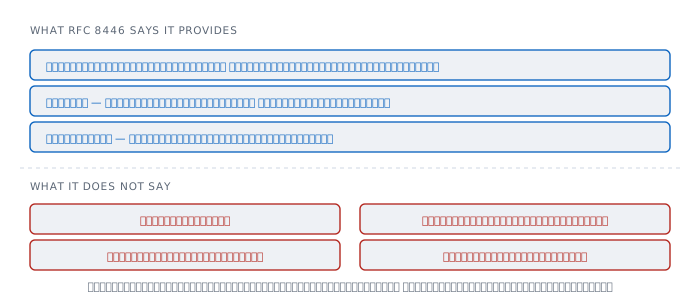
RFC 8446, the TLS 1.3 standard, names three properties plainly.
"Authentication: The server side of the channel is always authenticated; the client side is optionally authenticated"
"Confidentiality: Data sent over the channel after establishment is only visible to the endpoints"
"Integrity: Data sent over the channel after establishment cannot be modified by attackers without detection"
Read carefully and all three talk about the channel. None of them says anything about who is at the far end of it.
What does authentication actually mean here? It means the machine you are talking to holds the private key matching the name in the certificate. That is all. It does not mean the owner of that name is honest, that they will look after your data, or that the site is not a scam.
A scam site can obtain a certificate perfectly normally, and easily — because what must be proved is control of the domain, not trustworthiness. The padlock says you really are talking to the owner of this name. It does not say this name deserves your trust.
The handshake
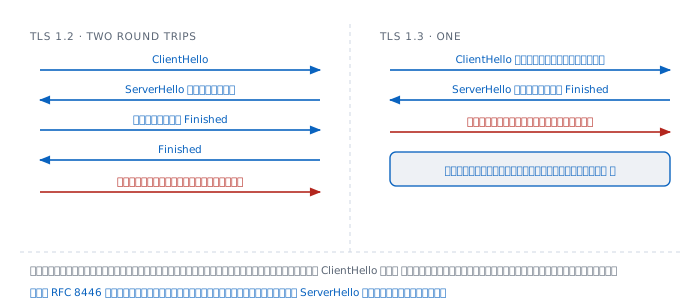
TLS 1.2 needs two round trips before any real data moves, on top of the TCP three-way handshake that must complete first — three round trips before the first byte.
TLS 1.3 saves a round trip
The method is refreshingly direct. The client guesses which key group the server probably supports and sends its own share along with the ClientHello, rather than asking first and waiting to be told.
Guess right and it is done in one round trip. Guess wrong and it costs one extra — which is rare, because only a few groups are used in practice.
What was removed matters as much as what was added. The RFC states that "Static RSA and Diffie-Hellman cipher suites have been removed", which comes back under forward secrecy below.
The other change is that "All handshake messages after the ServerHello are now encrypted" — including the certificate, which TLS 1.2 sent in the clear.
That sentence has a consequence that shows up in the SNI section: whatever comes before the ServerHello is still in the clear.
ALPN — HTTP/2 is chosen during the handshake
The HTTP article said HTTP/2 and HTTP/1.1 must be agreed before use. That agreement happens inside this handshake, and it is testable.
  request ['h2', 'http/1.1']    ->  h2
  request ['http/1.1']          ->  http/1.1
The client lists what it speaks during the handshake and the server picks one. It finishes along with setting up the channel, costing no extra round trip to ask which version of HTTP is available.
The certificate chain
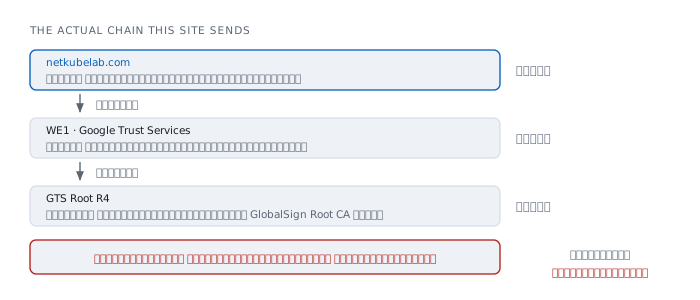
This site sends three certificates, and they can be read directly.
subject=CN=netkubelab.com
issuer= C=US, O=Google Trust Services, CN=WE1

subject=C=US, O=Google Trust Services, CN=WE1
issuer= C=US, O=Google Trust Services LLC, CN=GTS Root R4

subject=C=US, O=Google Trust Services LLC, CN=GTS Root R4
issuer= C=BE, O=GlobalSign nv-sa, OU=Root CA, CN=GlobalSign Root CA
Notice that each certificate's issuer equals the next one's subject. RFC 5280 calls this name chaining and describes it as "matching the issuer distinguished name in one certificate with the subject name in a CA certificate".
Why three certificates
The leaf is the only one holding the private key actually used in the handshake. The other two exist to lead up to a root the machine already trusts.
The reason for an intermediate in between is that a root is too valuable to use daily. Its private key is kept offline somewhere very hard to reach. Were it to sign every site's certificate directly, it would have to be brought out constantly.
The intermediate does that work instead, and if an intermediate is compromised, only it needs revoking while the root survives.
And there is something worth noticing in the third certificate. GTS Root R4, which looks like a root, is itself signed by GlobalSign Root CA. That is cross-signing, done so that older machines which do not yet know the newer root can still climb to an older one they do.
The point to hold onto is that the root actually trusted does not arrive with the chain. It was already on your machine. The chain that arrives exists only to lead to it.
Checking the name is where the security actually is
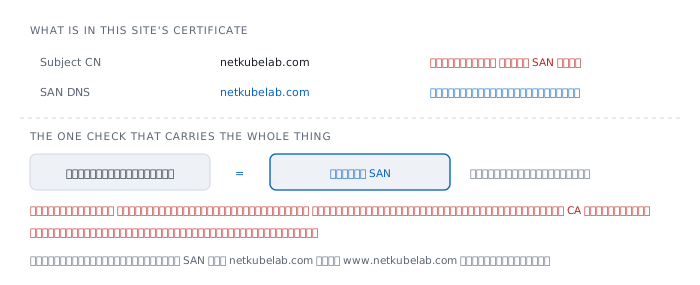
A valid chain proves only that this certificate was issued by a CA the machine trusts.
It proves nothing about whether it is the certificate of the site you meant to visit. Stop there and an attacker holding a perfectly valid certificate for their own domain can present it in place of any site at all.
The step that closes that hole is the name check. RFC 6125 gives the rule that a client must "check each of its reference identifiers against the presented identifiers for the purpose of finding a match" — compare the name the user intended against the names in the certificate.
This site's certificate carries a name in two places.
  Subject CN   netkubelab.com
  SAN  DNS     netkubelab.com
And only the lower one may be used. RFC 6125 states a client "MUST NOT seek a match for a reference identifier of CN-ID if the presented identifiers include a DNS-ID". Where a SAN exists, forget the CN entirely.
The reason is that CN is a general text field designed for people's names, not domain names, and holds only one value. SAN was built for this specific purpose and holds many.
This site's certificate has exactly one name in its SAN, which means www.netkubelab.com must be a separate certificate — and it is, which leads to the next section.
Where the root of trust lives
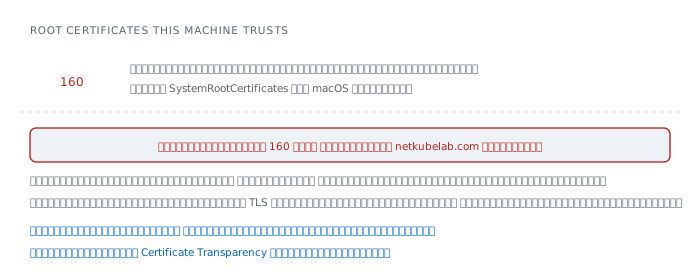
The question worth asking is how the machine knows which roots to trust. The answer is that a list ships with the operating system, and it can be counted.
$ security find-certificate -a \
    /System/Library/Keychains/SystemRootCertificates.keychain \
  | grep -c labl
160
One hundred and sixty organisations this machine trusts in advance, none of which its owner ever chose.
And the fact to sit with is that any one of those 160 can issue a certificate for the name netkubelab.com. Without the domain owner's permission, without telling anybody, and browsers will trust it exactly as they trust the real one.
This is TLS's actual trust model. It is not trust in the site you visit; it is trust in a list on your machine — and the strength of the whole system equals the strength of its weakest member.
Certificate Transparency — a fix that did not reduce the list
The chosen fix was not removing roots. It was making every certificate issued impossible to hide.
RFC 9162 states the aim: "Certificate Transparency aims to mitigate the problem of misissued certificates by providing append-only logs of issued certificates".
And its most important sentence is the one about what it does not do — "The logs do not themselves prevent misissuance, but they ensure that interested parties (particularly those named in certificates) can detect such misissuance".
It cannot prevent, but it cannot be hidden from. Anybody issuing a certificate for your name has to have it appear in a public log or browsers will not accept it, so you can watch for certificates issued for your domain that you never requested.
Those logs are append-only, built on Merkle Trees, which the RFC says makes it possible to "efficiently prove that any particular instance of the log is a superset of any particular previous instance" — proof that nobody went back and deleted anything.
SNI — the name still in the clear
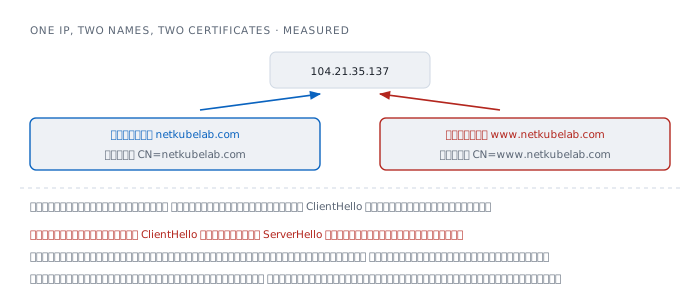
RFC 6066 describes the problem SNI solves: "TLS does not provide a mechanism for a client to tell a server the name of the server it is contacting" when "servers host multiple 'virtual' servers at a single underlying network address".
One server holds many sites. Somebody connects, and it has to send a certificate first. How can it know whose certificate to send, when nothing has been said yet?
The fix is for the client to state the name in the ClientHello, and it can be tested directly by connecting to the same address and changing only that.
  same IP 104.21.35.137
  servername netkubelab.com       ->  cert CN=netkubelab.com
  servername www.netkubelab.com   ->  cert CN=www.netkubelab.com
Everything about the destination is identical. One field differs, and a different certificate comes back.
And here is the gap that remains open. That field is in the ClientHello, which comes before the ServerHello — while RFC 8446 says what gets encrypted is the messages after the ServerHello.
Put those together and the name of the site you are visiting travels in the clear. Anybody watching the traffic can read where you are going, even without reading a single byte of what you do there.
This is not a mistake. It is unavoidable given the ordering: the name must come before the certificate, and the certificate before the encryption. Work is under way to encrypt this field using a key obtained by another route, but it is not yet widespread.
Forward secrecy
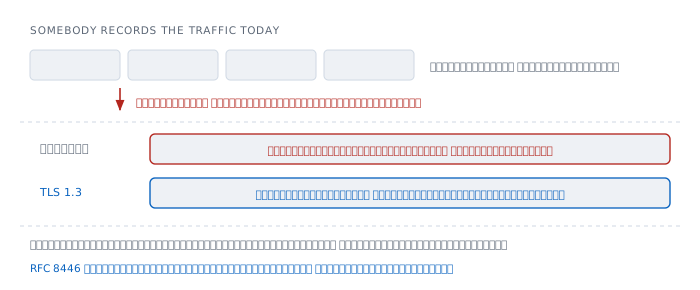
Suppose somebody records all of your encrypted traffic starting today, unreadable. Years pass, and they obtain the server's private key.
Under the old scheme they can decrypt everything recorded, every session retroactively, because each session's key was sent encrypted under the public key in the certificate. Hold the private key and it all opens.
TLS 1.3 makes that impossible, because session keys do not come from the certificate's key at all. They are generated fresh each time from random values both sides contribute, and discarded when the session ends.
The certificate's private key has exactly one job: to prove ownership of the name. It plays no part in producing the keys that encrypt the data.
And RFC 8446 did not merely recommend this; it removed the alternatives — "all public-key based key exchange mechanisms now provide forward secrecy". The old way is no longer selectable.
Revocation — the part that never worked
If a certificate's private key leaks, there has to be a way to tell the world it is no longer valid. This is the part the system has always done badly.
The traditional method is for the CA to publish a list of revoked certificates for clients to download and check. The lists are enormous, and when the download fails most clients choose to proceed anyway — because the alternative is making the whole internet unreachable whenever a checking server goes down.
So the mechanism meant to contain leaked keys became the one most often skipped.
The answer used in practice today is not fixing revocation but making certificates short-lived enough not to need it. This site's certificate is an example.
  notBefore   2026-08-29
  notAfter    2026-11-27
  lifetime    90 days
Ninety days means that if a key leaks today, the damage has a ninety-day ceiling without relying on any mechanism at all.
Which is why renewal has to be automated. A short-lived certificate renewed by hand is a certificate that expires at three in the morning on a holiday.
What TLS does not protect
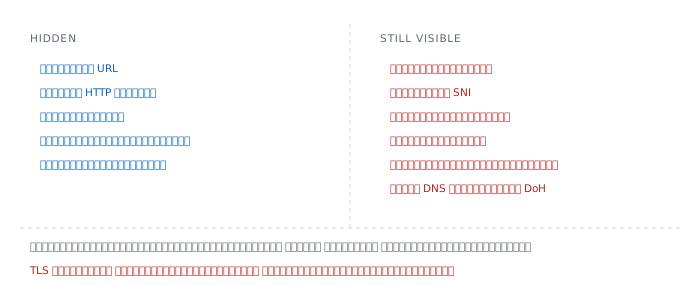
Putting all of the above together, here is the split.
Hidden — the path in the URL, every HTTP header, cookies, tokens, the content sent and received, and the status code returned. All of it sits behind the encryption.
Still visible — the destination address, the site name in SNI, the size of every packet, the timing, the number of connections, how long they last, and the DNS query unless DoH is in use.
The right column says more than people assume: which site you visited, when, for how long, and whether the pages were large or small — which in some cases is enough to guess which page, from size alone.
TLS hides the content. It does not hide who you are talking to. Those are different things, and confusing them is the source of a great deal of misplaced confidence.
Where it lies to you
"There is a padlock, so this site is safe." The padlock says you are talking to the owner of this name and that nobody altered anything in transit. It says nothing about who that owner is, what they intend, or what they do with your data afterwards.
"A more expensive certificate is more secure." The encryption is identical. What differs is how thoroughly the CA checked before issuing, which is about confirming an organisation exists. It does not strengthen the channel by any amount at all.
"HTTPS means privacy is handled." The site name still travels in the clear in SNI, and so does the DNS query unless DoH is in use. Anybody watching still knows where you went.
"An expired certificate still works, just click through." Clicking through cancels the name check entirely — the one step that gives TLS its meaning. What is left is encryption with somebody unidentified.
"Encrypted means safe from everything." Safe from somebody in the middle, only. Both ends remain as weak as they were. A machine with malware on it reads the data before encryption and after decryption regardless.
Worked examples from real work
Case 1 — a site that worked fine, and then nobody can open it
Nothing was changed, but one morning every browser warns at once.
How to read it. Every machine failing simultaneously with nobody having changed anything is the signature of time, not configuration. Check the expiry before anything else.
$ echo | openssl s_client -connect example.com:443 \
    -servername example.com 2>/dev/null \
  | openssl x509 -noout -dates
notBefore=Aug 29 01:40:33 2026 GMT
notAfter=Nov 27 02:40:27 2026 GMT
If notAfter has passed, that is the whole answer — and it usually means automatic renewal stopped working some time ago with nobody noticing.
Not yet proved. We know the certificate expired, not why renewal failed. Read the renewal tool's log back to the last successful run.
Case 2 — one name works and another does not
www.example.com opens, example.com warns that the certificate does not match the name.
How to read it. Look at what names are actually in the certificate.
$ echo | openssl s_client -connect example.com:443 \
    -servername example.com 2>/dev/null \
  | openssl x509 -noout -text | grep -A1 'Subject Alternative Name'
    X509v3 Subject Alternative Name:
        DNS:www.example.com
The SAN holds only www.example.com, while the user typed example.com, which does not match. The browser refuses, exactly as RFC 6125 requires.
Note that finding a matching name in the CN field does not help, because where a SAN exists the client must not look at CN at all.
Not yet proved. We know the certificate does not cover that name, but not whether that was deliberate or an omission. Check which names the issuing system was configured to request.
Case 3 — browsers open it, other programs cannot
Pages load in every browser, but a script calling the same API fails on the certificate.
How to read it. Count how many certificates the server sends.
$ echo | openssl s_client -showcerts -connect example.com:443 \
    -servername example.com 2>/dev/null \
  | grep -c 'BEGIN CERTIFICATE'
1
Only one means the intermediate is not being sent, so a client cannot build the chain up to a root.
Browsers survive because they can fetch the intermediate themselves, or have met it before and remembered it. Most libraries do not. Browsers passing while other programs fail is almost always this.
The fix belongs on the server — configure it to send the full chain, rather than patching clients.
Not yet proved. One certificate confirms the chain is incomplete, but not whether the configured file was always wrong or was overwritten during the last renewal.
Case 4 — one machine cannot open any site
One machine warns about certificates on every site while every other machine in the room is fine.
How to read it. Failing on every site at once means the problem is not the sites. Look at the two things that machine holds alone: its clock and its root list.
$ date
Mon Aug 31 00:40:00 +07 2026
If the clock is badly wrong, every certificate looks either not yet valid or long expired, because the check compares notBefore and notAfter against the machine's own time.
This is where TLS depends on something no other article in this series covers — agreeing on the time — and it is why a machine whose clock battery died often cannot open anything until it has synchronised.
Not yet proved. A correct clock does not rule out other causes. If the time is right and it persists, suspect something added to that machine's root list.
References
The core standards
- RFC 8446 — The Transport Layer Security (TLS) Protocol Version 1.3 E. Rescorla, August 2018, Standards Track, replacing RFCs 5077, 5246 and 6961 — the three properties, the single round trip, encryption of everything after the ServerHello, and the removal of suites without forward secrecy
- RFC 5280 — Internet X.509 Public Key Infrastructure Certificate Profile Cooper et al., May 2008 — certification paths, name chaining, and path validation
- RFC 6125 — Representation and Verification of Domain-Based Application Service Identity Saint-Andre and Hodges, March 2011 — the name matching rule, and the requirement to ignore CN whenever a SAN is present
Extensions and surrounding machinery
- RFC 6066 — TLS Extensions: Extension Definitions D. Eastlake 3rd, January 2011 — the origin of SNI and the many-sites-on-one- address problem it solves
- RFC 9162 — Certificate Transparency Version 2.0 Laurie, Messeri and Stradling, December 2021, replacing RFC 6962 — and the sentence saying the logs do not prevent misissuance but make it detectable
What is on the machine
openssl s_client -connect netkubelab.com:443 -servername netkubelab.comshows the version, the cipher, the verification result and all three certificates- Connecting to the same address while changing only
-servernamereturns a different certificate, which proves SNI selects it security find-certificate -aover the macOS root list counts 160 rootsopenssl x509 -noout -dateson this site's certificate gives exactly 90 days
Related reading here
- HTTP — the layer running inside, and the ALPN that chooses its version during this handshake
- TCP and UDP — the handshake that must finish before this one starts
- ARP — the article that ends by telling you to do what this page describes
- DNS — the question still travelling in the clear unless DoH is in use