The Ethernet article explains how devices on one cable detect that a collision happened and stop transmitting immediately. That mechanism is CSMA/CD, where CD stands for Collision Detection.
Wi-Fi cannot do that. Not through poor design, but because physics does not allow it.
And once collisions cannot be detected, everything else changes with it — avoid instead of detect, acknowledge every frame, share airtime, and finally your speed depends on people you cannot see and cannot control.
Everything in this article was measured on the machine it was written on, and the results may change how you read the number on the router box.
If you have never looked, start here
macOS ships with a tool for inspecting the radio. Nothing to install.
$ system_profiler SPAirPortDataTypeThe part that matters is the block describing the current link. On the machine this was written on it reads:
  PHY Mode: 802.11ac
  Channel: 157 (5GHz, 80MHz)
  Signal / Noise: -68 dBm / -96 dBm
  Transmit Rate: 390
  MCS Index: 4
Those five lines contain nearly everything worth knowing, and this article works through them one at a time.
The single fact that changes everything
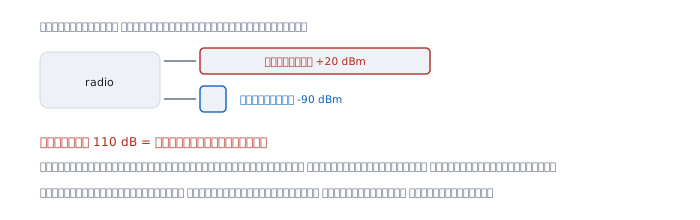
A Wi-Fi card has one radio sharing one antenna for sending and receiving. Look at the numbers.
  transmit power       +20 dBm     what it sends out
  receive sensitivity  -90 dBm     the faintest signal it can still read
  difference           110 dB      = a hundred billion times
Its own transmission is roughly a hundred billion times louder than the signal it wants to hear. Listening to someone else while speaking is therefore physically impossible — not a question of whether the chip is good enough.
Ethernet does not have this problem because one pair of copper wires carries the sending and a different pair carries the receiving.
Avoid, instead of detect
Since detection is impossible, the only option left is to try not to collide in the first place. That mechanism is CSMA/CA, where CA stands for Collision Avoidance.
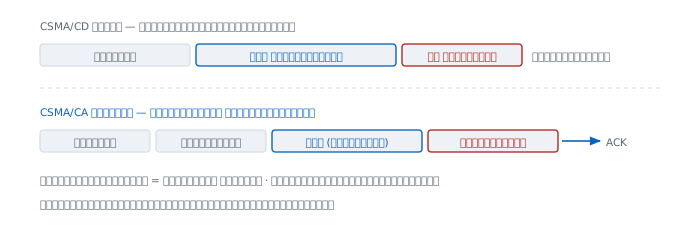
The steps differ here.
  CSMA/CD   listen; if clear, send; keep listening while sending
            the moment it collides you know, stop, retry

  CSMA/CA   listen; if clear, wait a while, then wait a random interval
            send, then wait for an acknowledgement; no ack means lost
The most expensive difference is the last line — when a collision cannot be detected, the only way to know a frame arrived is to have the far end acknowledge every single one.
Every frame needs an acknowledgement
Ethernet sends a frame and is done; there is no acknowledgement at that layer. Wi-Fi needs an acknowledgement frame back every time.
That means sending one frame of data always consumes two turns on the air, plus the waiting in between, which is the main reason the number on the box and the speed you get are so far apart. Not because the vendor lies, but because that number is a bit rate on the air, not the amount of data that gets through.
A problem cables do not have — nodes that cannot hear each other
On copper, everyone on the same cable hears everyone. On radio, they do not.
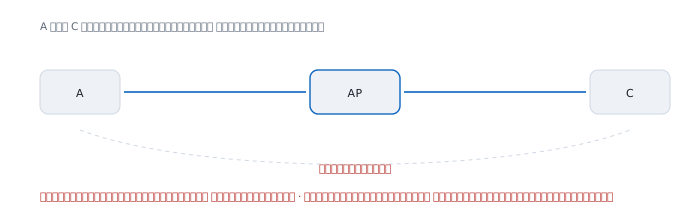
A and C sit on opposite sides of the access point. Both hear it clearly, but they cannot hear each other. So both listen, find the air clear, and transmit at once. The signals collide at the access point, which is the only place the collision actually happens.
"Listen before you speak" therefore guarantees nothing on a radio, because what you hear is not what the far end hears.
Thirteen channels, three usable
The card in this machine reports these channel counts.
  2.4 GHz    13 channels
  5   GHz    25 channels
  6   GHz    24 channels
The 13 in the 2.4 GHz band is the most misleading, because those channels are placed only 5 MHz apart while one channel's signal is 22 MHz wide.
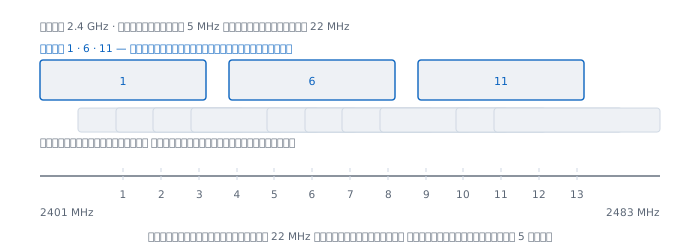
Computed from each channel's centre frequency:
  channel 1    2412 MHz    actually uses 2401 - 2423
  channel 6    2437 MHz    actually uses 2426 - 2448
  channel 11   2462 MHz    actually uses 2451 - 2473
They must be at least 22 MHz apart not to overlap, which means five channels apart.
  ch 1 - ch 6     apart 25 MHz    overlap  0 MHz
  ch 1 - ch 5     apart 20 MHz    overlap  2 MHz
  ch 1 - ch 2     apart  5 MHz    overlap 17 MHz
Out of 13 channels there is exactly one non-overlapping set: 1, 6 and 11. Putting your neighbour on channel 3 and yourself on channel 8 does not separate you; it makes everyone interfere with everyone.
And setting the width to 40 MHz in this band means one channel occupies nearly half of it, leaving almost nothing for anyone else.
Speed is not one number
This is the part I find most interesting. I left the machine sitting still, using no network, and read the values every ten seconds for two minutes.
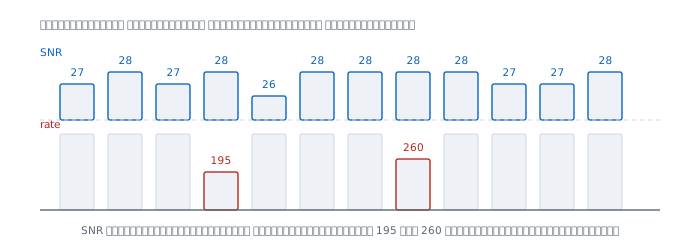
  time       signal  noise   SNR   MCS   rate
  22:51:16     -68    -95     27     4    390
  22:51:26     -68    -96     28     4    390
  22:51:37     -68    -95     27     4    390
  22:51:49     -68    -96     28     4    195
  22:52:00     -69    -95     26     4    390
  22:52:11     -68    -96     28     4    390
  22:52:21     -68    -96     28     4    390
  22:52:32     -68    -96     28     3    260
  22:52:43     -68    -96     28     5    390
  22:52:54     -69    -96     27     6    390
  22:53:04     -69    -96     27     4    390
  22:53:15     -68    -96     28     4    390
Signal moved by 1 dBm and noise moved by 1 dBm. SNR stayed between 26 and 28 throughout, yet the transmit rate dropped to 195 and to 260 and the MCS index moved between 3 and 6.
Earlier I had also read a value of 57 Mbps once. The full range observed was 57 to 390 — almost seven times, on a link where nothing changed at all.
The cause is the thing you cannot measure from your own machine: other people on the same frequencies, microwave ovens, Bluetooth devices, the neighbours' access points. A radio lowers its rate when transmissions fail, not when the signal is weak.
What SNR is, and why it matters more than bars
The line Signal / Noise: -68 dBm / -96 dBm tells you two things.
  -68 dBm    strength of the signal you want
  -96 dBm    strength of the background noise
   28 dB     the difference, called SNR
28 dB means the signal is 631 times stronger than the noise, and that figure is what determines how aggressive an encoding the radio dares to use — which is the MCS value.
The four bars on your screen show only the first number, never the second. A room with a strong signal but many users has high noise, low SNR, and is slower than a room with a weaker signal and quiet air.
Airtime is the real resource
Everyone in one cell shares exactly one thing, and it is not bandwidth. It is time. While one device transmits, everyone else must be silent.
And this is where a single slow device becomes everybody's problem.
  rate        time to send 1500 bytes
  390 Mbps        30.8 us
  195 Mbps        61.5 us
   65 Mbps       184.6 us
    6 Mbps      2000.0 us
A distant machine getting 6 Mbps uses 65 times more airtime than one getting 390 Mbps for exactly the same amount of data.
One slow device slows everybody
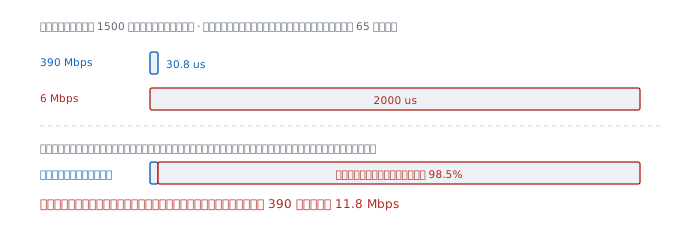
Suppose two devices take turns, frame for frame.
  fast client    390 Mbps    airtime   1.5%
  slow client      6 Mbps    airtime  98.5%
The whole cell then carries 11.8 Mbps, where the fast client alone would have had 390.
One slow device drags the entire cell down to a thirty-third of its capacity, and there is nothing the fast client can do, because the problem is not on its side.
This is the explanation for the most common office complaint — the whole floor is slow, and it turns out one old machine is clinging on from the far corner.
When it lies
"Full bars means fast." Bars show signal strength only. They say nothing about noise, nothing about how many others are using the air, and nothing about how much airtime is left.
"The router says 1200 Mbps." That is a bit rate on the air, summed across bands and antennas, under the best conditions physically possible. It is not what one device gets, and not a total to be divided among everyone.
"Move to a channel nobody is using." In 2.4 GHz there are only three real choices. Moving to channel 4 escapes nobody; it interferes with 1 and 6 at the same time.
"Wider channels are faster." They are, when nobody is nearby. A wider channel also collides with more people, and in a crowded place a narrow channel often wins.
"A new router will fix it." If the cause is one old device clinging on from a distance, a new router changes nothing, because the airtime is still consumed the same way.
"Wi-Fi is Ethernet without the cable." They differ at the root. Ethernet is two-way at once on a medium shared with nobody. Wi-Fi is one-way at a time on a medium shared with everyone in range, including people who are not on your network.
Real cases from real work
Case 1 — the whole floor is slow, but each machine tests fine
Situation Users complain in the afternoon; mornings are fine. Testing each machine individually gives good numbers.
How to read it Testing one machine at a time measures the moment everyone else is quiet, which is not the real condition. What you need to look at is airtime, not any one device's speed. Find whether some machine is attached at a very low rate: from the numbers above, one client at 6 Mbps consumes 98.5% of the air.
What this does not prove The symptom fits the pattern, but nothing else has been ruled out — a saturated uplink, or slow DNS as the DNS article describes. Each has to be measured separately.
Case 2 — measuring how steady your own link is
Situation You want to know whether "slow" is about signal or about other people.
Command Read repeatedly and see what moves.
$ for i in $(seq 1 12); do
    system_profiler SPAirPortDataType \
      | grep -E 'Signal|Transmit Rate|MCS'
    sleep 10
  done
How to read it If signal and noise hold steady while the rate swings, the problem is contention for the air, not distance — moving closer will not help, and the fix is on the channel-planning side. If the signal weakens with distance and the rate follows it down, that really is a distance problem.
What this does not prove What the machine reports is whatever the driver chooses to expose, which may be an average or the latest value, and it is measured only from our side. It shows nothing about what the access point sees.
Case 3 — choosing channels in a crowded building
Situation You have to configure several access points in one area.
How to read it In 2.4 GHz there are only three sets — 1, 6 and 11 — so repeat them, keeping the ones sharing a channel as far apart as possible. The 5 GHz band offers far more, 25 channels as this card reports above, so push everything that supports it into that band.
What this does not prove How many channels are actually usable depends on each country's regulations. This machine reports its country code as TH, and the figure of 13 channels in 2.4 GHz comes from that setting. Some countries allow 11, which changes the plan.
When Wi-Fi is not the answer
If the job is moving large amounts of data reliably, or anything that cannot tolerate variable latency, a cable still wins every time — it shares its time with nobody, needs no acknowledgement per frame, and has no neighbours interfering.
Wi-Fi trades stability for convenience, which is well worth it in most cases. It is just worth knowing what is being traded.
References
Measured on the machine this was written on
system_profiler SPAirPortDataType— every value in this article comes from this command, on one machine that did not move during the measurementsman wdutil— the other wireless diagnostic tool macOS ships with
Computed here
- The frequency and overlap table for 2.4 GHz is computed from the centre frequency formula 2407 + 5n MHz and a signal width of 22 MHz
- The airtime table is a 1500-byte frame divided by each bit rate
A note about the standard
- The full IEEE 802.11 standard has to be purchased, unlike the RFCs and unlike ITU-T X.200 cited in the layers article. This article therefore relies on measurement and computation. The working group that maintains it is IEEE 802.11.