Most people picture a firewall as a wall: an inside, an outside, and a guard at the gate.
That picture misses the thing that causes most misconfigurations — a firewall is an ordered list of rules, and the outcome depends on three things people rarely read: which rule wins when several match, what happens when none match, and whether the filter remembers connections at all.
macOS ships with a packet filter called pf, with a full manual page, and the answers to all three are in it. The second one surprises people.
If you have never looked, start here
The system's rule file is in one place, readable without any privileges.
$ cat /etc/pf.confOn the machine this was written on, that file contains no filter rules at all — only anchor points where other components hang their own.
  scrub-anchor "com.apple/*"
  nat-anchor "com.apple/*"
  rdr-anchor "com.apple/*"
  dummynet-anchor "com.apple/*"
  anchor "com.apple/*"
And its manual page is the best source for everything in this article.
$ man pf.confThe last matching rule wins
This is the sentence to read before writing your first rule, from the manual page on this machine.
"Filter rules are evaluated in sequential order, from first to last. The last matching rule decides what action is taken."
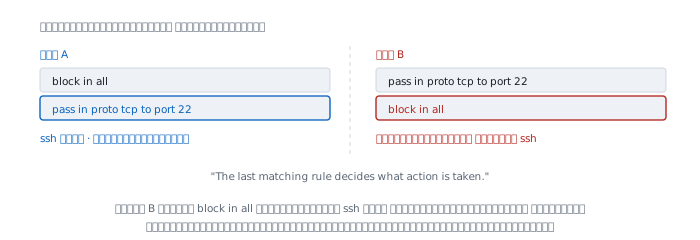
The last, not the first — the reverse of what most people expect, and pf knows it, which is why it offers a quick keyword to switch to first-match behaviour, described below.
The result is that two rule sets with identical text, in different order, do opposite things.
  set A
    block in all
    pass  in proto tcp to port 22
                                    -> ssh passes, rest blocked

  set B
    pass  in proto tcp to port 22
    block in all
                                    -> everything blocked, ssh too
In set B, block in all also matches the ssh packet and is the last rule to do so, so it wins and closes what the line above had just opened.
The default is pass, not block
The next sentence in the same manual page is the one I find most alarming.
"If no rule matches the packet, the default action is to pass the packet."
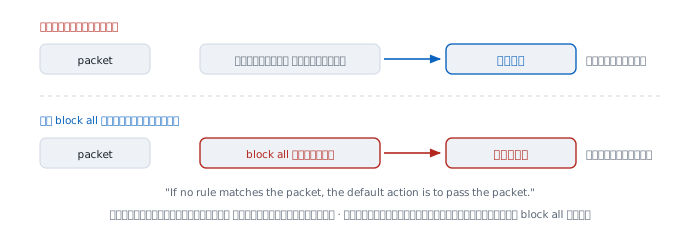
A filter with no rules passes everything, and a filter whose rules do not cover a case passes everything the rules did not mention.
The manual page states the fix in the same paragraph.
"The simplest mechanism to block everything by default and only pass packets that match explicit rules is specify a first filter rule of:
block all"
Combine the two facts and the correct shape appears — always start with block all, then open things one at a time on the lines below, because later lines beat earlier ones.
The dangerous case is a rule file that is already correct, to which someone appends a new line. That new line beats everything above it, possibly without the person realising.
quick — when you want first match to win
If you want first-match behaviour, there is a keyword for it.
"If a packet matches a rule which has the quick option set, this rule is considered the last matching rule, and evaluation of subsequent rules is skipped."
  block in quick from 203.0.113.0/24
  pass  in all
That range is blocked immediately without reading the line below; everything else passes.
quick makes long rule files far easier to read, but it introduces the opposite hazard — a quick line higher up shadows the lines below that someone expected to take effect.
Stateful and stateless
Older filters look at each packet on its own and remember nothing; that is stateless. Modern filters remember which connections were opened; that is stateful.
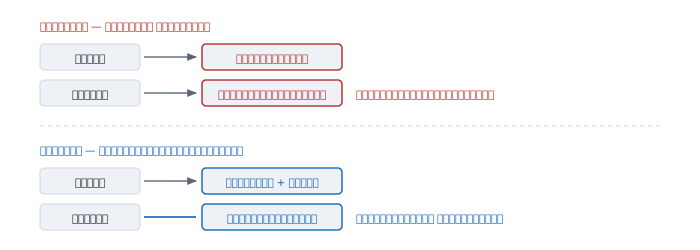
pf is stateful by default. The manual page says:
"pass — The packet is passed; state is created unless the no state option is specified"
The difference matters because every connection has two directions. Open only the outbound direction while remembering nothing, and the return traffic is blocked, so nothing works at all.
Stateless means writing a return-traffic rule every time, and that rule is itself the hole, as the next section shows.
Stateful means opening the outbound direction is enough; the return traffic for that connection is allowed automatically, while any packet that matches no state at all is blocked.
The trap in stateless rules
The way people used to open return traffic on a stateless filter was to look at the ACK bit in the TCP header, reasoning that return packets have it set while a new connection carries only SYN.
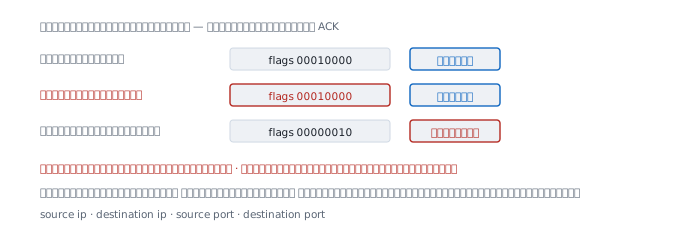
The problem is that those flags are just bits in one byte, written by the sender.
  FIN   0x01   00000001
  SYN   0x02   00000010
  RST   0x04   00000100
  PSH   0x08   00001000
  ACK   0x10   00010000
  URG   0x20   00100000
I built two TCP segments, one a genuine reply and one made by an attacker who simply set the ACK bit.
  real reply              flags=0x10   passes the rule
  attacker-made packet    flags=0x10   passes the rule
  new connection (SYN)    flags=0x02   blocked
The first two are identical byte for byte. A rule inspecting only flags cannot distinguish them in principle, not for lack of skill in writing rules.
A stateful filter can, because it does not inspect the bit. It asks whether a connection matching these four values exists in its table — source address, destination address, source port, destination port. A packet matching no entry is discarded.
The state table can fill up
That memory is finite, and the manual page documents it as a per-rule option.
"max ⟨number⟩ — Limits the number of concurrent states the rule may create. When this limit is reached, further packets that would create state will not match this rule until existing states time out."
That sentence describes a common failure shape — when the table is full, new connections are refused while the CPU is idle and the circuit is not full.
The arithmetic is direct. If an attacker opens a thousand connections per second and leaves them hanging:
  timeout  30 s   ->    30,000 entries held at once
  timeout  60 s   ->    60,000 entries held at once
  timeout 300 s   ->   300,000 entries held at once
A longer timeout requires a proportionally larger table. This is why shortening timeouts is an effective defence, and why the manual page lets you set them per rule.
What a firewall cannot see
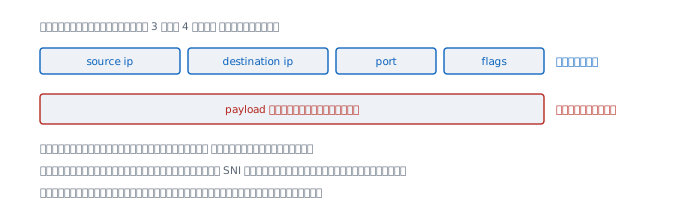
A filter at layers 3 and 4 sees these:
  source address        visible
  destination address   visible
  port                  visible
  flags                 visible
  payload               bytes visible, unreadable if encrypted
The TLS article explains that content is encrypted end to end, which means a firewall sees who is talking to whom, not what they are saying. What remains visible is the destination name in SNI, as that article points out, plus the volume and timing of the data.
And plenty of things are outside its scope entirely — people inside who already have access, files carried in another way, and flaws in the services you deliberately opened.
When it lies
"We have a firewall, so we are safe." A firewall enforces what you wrote. It does not judge what should be allowed. If a rule opens a port that should not be open, it opens it faithfully.
"No rules means nothing gets through." For pf the opposite is true — the manual page states that when no rule matches, the default is to pass.
"Append a pass rule to open something extra." That can do the reverse, because the appended line becomes the last match and cancels a block rule above it.
"A return-traffic rule using ACK is the same thing." It is not, per the experiment above. Flags are bits the sender writes. Only a stateful filter can tell the difference.
"Blocking ping makes things safer." The ping article shows that blocking ICMP breaks path MTU discovery and makes troubleshooting far harder, in exchange for almost no security.
"A firewall sees everything that passes through it." It sees headers, not encrypted content — and nothing at all that does not pass through it.
Real cases from real work
Case 1 — adding a rule breaks a different service
Situation A line was appended to open a new port, and a service that used to work stopped.
How to read it If the new line is broader than intended — an all slipped in — it becomes the last matching rule for the other service's packets too, and beats the rules above. The way to check is to read the file from the bottom up, looking for the last line that matches the broken traffic, not from the top down.
What this does not prove Rule order explains this symptom, but a quick line higher up has not been ruled out, and the live rule set may contain anchors into which other components insert rules at runtime — rules that do not appear in the file you opened.
Case 2 — new connections refused while the machine is idle
Situation CPU under ten percent, uplink not saturated, but new users cannot connect.
How to read it Check the state table first. The manual page already explains that once the limit is reached, packets that would create new state stop matching the rule until existing entries time out. The symptom is therefore "existing connections fine, new ones refused", which is a different signature from an overloaded machine.
What this does not prove A full table says a lot is being held; it does not say whether that is an attack or a timeout set too long for normal traffic. You have to compare the state creation rate against the timeout.
Case 3 — writing a first rule set correctly
Situation Setting up rules on a new machine.
How to read it This order is safe because it respects both rules quoted above.
  1  block all                      close everything, as the first line
  2  pass out proto tcp keep state  open outbound and remember it
  3  pass in proto tcp to port 22   open only the service you intend
Line 1 turns the default into block. Later, more specific lines each win in turn. And because state is remembered, no return-traffic rule is needed at all.
What this does not prove This is a skeleton, not a usable file. It says nothing about loopback, about the ICMP needed for path MTU discovery, or about DHCP, which has to pass before the machine even has an address. All three are why a bare block all usually leaves a machine unusable.
When a firewall is not enough
A firewall answers who may talk to whom, which is a good question but not the only one. It cannot say whether the party talking is who they claim to be — that needs authentication — nor whether the content was altered in transit, which needs the kind of encryption TLS describes.
And a firewall at the network edge sees nothing that moves inside without passing through it, which is why filtering on the machine itself still matters.
References
From the machine this was written on
man pf.conf— every sentence quoted here comes from that manual page on this machine: rule order, the default action,quick, state creation, and themaxoption/etc/pf.conf— the system rule file, which on this machine holds only anchor points and no filter rulesman pfctl— the command that enables, disables and loads rules
Computed here
- The TCP flag table, and the experiment building two segments carrying an identical ACK bit
- The state table figures, computed as connection rate multiplied by timeout