Network Fundamental Diagnostic tools
Packet capture — the tool that sees less than everyone thinks
Five articles on this site tell you to go and capture packets. This one explains how that works, why it needs special privilege, and why on a switch you will see almost nothing
· Part 5 · Diagnostic tools · 7 min read
Five articles on this site end with advice along the lines of "if you really want to know, go and capture the packets".
This one explains how that tool works, and more importantly what it can see — because the second answer disappoints people more often than it should.
Said up front, this article has no real capture
Other articles on this site show results measured on the machine they were written on. This one cannot do that, because capturing packets requires root privilege, which I do not grant myself.
What this article has instead is the mechanism, the reason that privilege is required, and the limits of what the tool can see — all of which are checkable from the manuals on the same machine.
If you have never looked, start here
This command needs no special privilege.
$ tcpdump -DIt lists the interfaces available for capture. Getting the list does not mean you can capture, and that boundary is what this article explains.
The mechanism is in the kernel, not in the program
tcpdump and Wireshark do not capture anything themselves. Both talk to a mechanism in the operating system, which on this machine has a manual of its own.
$ man bpfThe manual defines it in a single sentence that explains everything.
"The Berkeley Packet Filter provides a raw interface to data link layers in a protocol independent fashion. All packets on the network, even those destined for other hosts, are accessible through this mechanism."
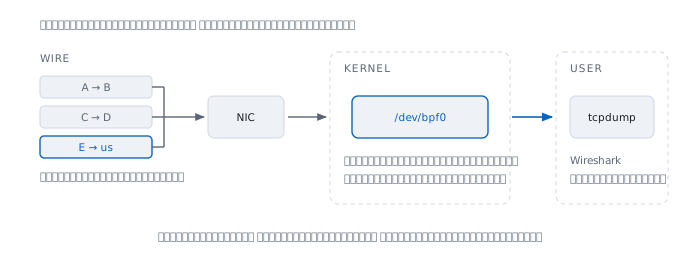
That phrase, "even those destined for other hosts", is the entire reason special privilege is required.
The privilege lives in the filesystem
The manual says the mechanism appears as a device.
"The packet filter appears as a character special device, /dev/bpf0, /dev/bpf1, etc."
On the machine this was written on:
$ ls -l /dev/bpf0
  crw-------  root  wheel
The mode is 600 and the owner is root. No group, no others — which means anyone who can open this device can read everyone's traffic on that machine.
So the message you get when capturing without the privilege is straightforward.
  tcpdump: lo0: You don't have permission to capture on that device
  (cannot open BPF device) /dev/bpf0: Permission denied
The tcpdump manual itself separates the two cases clearly.
"Reading packets from a network interface may require that you have special privileges"
"Reading a saved packet file doesn't require special privileges."
Reading a file somebody else captured needs no privilege, which is a route that genuinely works in many situations.
The filter runs in the kernel, not in the program
The common misunderstanding is that the program receives everything and then picks out what it wants.
The manual says otherwise.
"Sets the filter program used by the kernel to discard uninteresting packets."
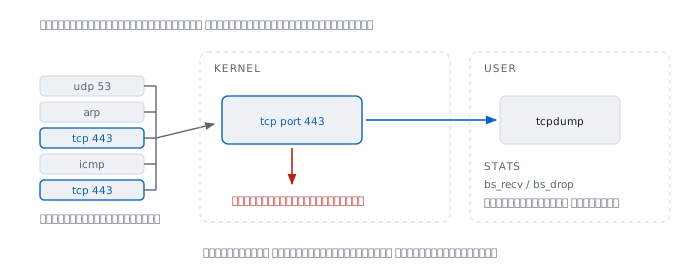
Packets that do not match are discarded before being copied up, which matters greatly when traffic is heavy, because copying everything up and then filtering is how you start losing packets.
And the tool reports that loss. The manual gives a statistics structure with two values.
  bs_recv   packets received
  bs_drop   packets dropped
If the second number is not zero, what you are looking at is incomplete — and a conclusion drawn from incomplete data can be wrong with nothing to warn you.
Promiscuous mode — and why it helps less than you think
A network card normally discards frames not addressed to it. This mode tells it to stop discarding.
"BIOCPROMISC Forces the interface into promiscuous mode."
But not discarding does not make more arrive, and this is the point the collision domain article has already answered.
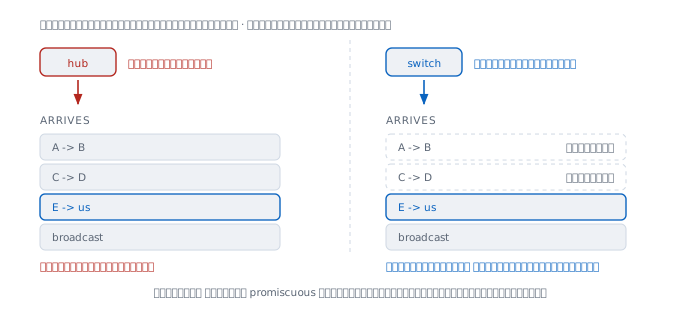
  device   what reaches your port
  hub      every frame on the segment
  switch   only yours, plus broadcast, multicast, unknown unicast
On a switch, promiscuous mode adds almost nothing, because the switch was never sending you other people's traffic in the first place. Turning it on and expecting to see the whole segment is an expectation inherited from the hub era.
That is why capturing on a modern network has to happen at the right place — on the endpoint itself, or on a port that has been configured to be sent a copy.
A small detail the manual warns about
"Since more than one file can be listening on a given interface, a listener that opened its interface non-promiscuously may receive packets promiscuously."
If another program has promiscuous mode open, yours receives that traffic too, without having asked — which means what you see can depend on whether somebody else happens to be capturing.
When it lies
"Turn on promiscuous mode and you see the whole segment." True on a hub, not true on a switch, which is everywhere now.
"Capture packets and you see everything." You see what reaches the card, and what was not dropped. The bs_drop value names the missing part.
"tcpdump needs root because it is an administrator's tool." It needs root because the device that supplies the data sees everyone's traffic, as the bpf manual states.
"Filtering slows down processing." The opposite — it runs in the kernel to reduce what must be copied up, and a narrower filter means fewer drops.
"See the packet and you know everything." Encrypted content is still unreadable, as the TLS article explains. You capture it, but not what is inside.
Real cases from real work
Case 1 — capturing shows nothing
Situation A capture host is set up on a switch and sees only its own traffic.
How to read it This is normal switch behaviour, as the collision domain article explains, not a fault in the tool. The capture point has to move to the endpoint, or the switch has to be asked to send a copy.
What this does not prove Seeing only your own traffic can also come from a filter that is too narrow. Capture unfiltered briefly before concluding.
Case 2 — the captured data is incomplete
Situation Analysis shows gaps in the packet sequence.
How to read it Look at the numbers the tool reports when it stops. If the dropped value is not zero, the kernel lost them, not the network. The fix is to filter more narrowly from the start.
What this does not prove Loss at the capture point and loss in the network look similar in the resulting file. The statistics have to separate them first.
Case 3 — no privilege on the machine you need to watch
Situation You need data from a machine where privilege cannot be granted.
How to read it The tcpdump manual states that reading a saved file needs no special privilege. Have someone with the privilege record the file, and analyse it normally afterwards.
What this does not prove The file reflects only their capture point and their filter. Not seeing something in the file does not mean it did not happen.
What this tool teaches
Capturing packets creates the feeling of seeing the whole truth, and that feeling is dangerous.
What you see is always bounded by three layers — where you captured, the filter you set, and what was dropped — and none of those layers announces itself in the resulting file.
The best tool for looking at a network still tells you only what arrived at the point where it stands.
References
From the machine this was written on
man bpf— the definition of the mechanism, the sentence about packets destined for other hosts, the in-kernel filter, promiscuous mode, and the statistics structure withbs_recvandbs_drop. Every quotation in this article comes from this pageman tcpdump— the two sentences on privilege for capturing, against reading a saved filels -l /dev/bpf0— mode 600, owner roottcpdump -D— works without special privilege
What this article could not do
- There is no real capture output here, because it requires root privilege, which was not granted. What is shown is the mechanism and its limits, not example results