Network Fundamental Out to the wider world
VPNs and tunnels — a packet wrapped inside a packet
The machine this was written on has fifteen tunnel interfaces set to five different MTUs, and one of them is larger than the wire it rides on
· Part 8 · Out to the wider world · 6 min read
The word VPN appears in 6 articles here, mostly as the cause of some odd symptom.
This one explains what it actually does. The answer is shorter than people expect — it puts a packet inside another packet. Everything else follows from that sentence.
If you have never looked, start here
Your machine may already have several tunnel interfaces.
$ ifconfig | grep -E '^(utun|gif|stf)'The machine this was written on has fifteen, and their MTUs are
   MTU   interfaces
  1000            1
  1280            3
  1380            5
  1500            5
  2000            1
Five different values on one machine, while the real link has exactly one: 1500.
Encapsulation — the whole of it
RFC 2003, of 1996, puts it in one sentence.
"To encapsulate an IP datagram using IP in IP encapsulation, an outer IP header is inserted before the datagram's existing IP header"
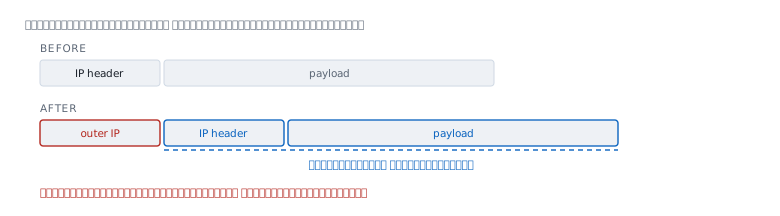
The original packet is not modified. It becomes the payload of a new one, and the routers along the way see only the outer header, with no idea what is inside.
The document also says how the length is counted.
"The Total Length measures the length of the entire encapsulated IP datagram, including the outer IP header, the inner IP header, and its payload."
Two headers, one packet. And that is where every problem in this article comes from.
The price is room
The added header comes straight out of the payload.
  outer header          bytes   inner usable on a 1500 link
  IPv4 header only         20                          1480
  IPv4 + UDP               28                          1472
  IPv6 header only         40                          1460
The machine inside the tunnel knows nothing about this. It sees an interface declaring an MTU and sends that much. If that figure has not had the header subtracted, the packet is too big the moment it is wrapped.
Which is why the MTU article says tunnels are always the culprit.
What the values on this machine tell you
Back to the table at the top.
  1500   same as the real link; no tunnel header subtracted at all
  1380   120 bytes taken off
  1280   the minimum IPv6 guarantees
  1000   a generous margin
  2000   larger than the wire it rides on
The last line is the interesting one. An interface set to 2000 on a machine whose real link is 1500 means its full-size packets are over the limit the moment they are wrapped.
I cannot verify who set these values or why. These interfaces are created by installed software. What is verifiable is that the values exist, and that in some cases no two of them agree.
A tunnel has to discover its own MTU too
RFC 2003 has a section called Tunnel MTU Discovery.
"When the Don't Fragment bit is set by the originator and copied into the outer IP header, the proper MTU of the tunnel will be learned from ICMP Datagram Too Big (Type 3, Code 4) messages reported to the encapsulator."
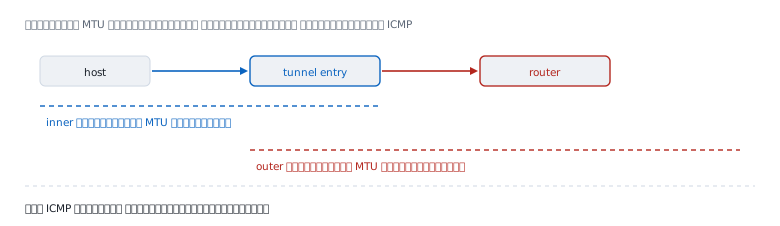
This is the same mechanism as the MTU article, nested twice.
  inner   the source host discovers the tunnel's MTU
  outer   the encapsulator discovers the real path's MTU
Both levels depend on ICMP. If ICMP is blocked, both go blind at once — which is why VPN symptoms are harder to trace than the same symptom without a tunnel.
What a tunnel gives you, and what it does not
Wrapping means the routers along the way see only the outer header. But wrapping alone is not encryption.
  encapsulation   put inside a new packet, still readable
  encryption      unreadable without a key, a separate matter
RFC 2003 in its entirety is about wrapping. Encryption is a different document, RFC 4301. "VPN" in ordinary use means both together, but technically they are two layers that come apart.
The TLS article covers encryption in the context of the web. The key material is the same idea; what differs is the layer it runs at.
When it lies
"VPN means encrypted." Not necessarily. Wrapping and encrypting are separate; some tunnels only wrap.
"The VPN is slow because of the encryption." Maybe. A more common cause is an MTU with no header subtracted, so packets are dropped and resent.
"Setting the tunnel MTU to the link's value is fine." This machine has one set to 1500, the same as the real link, which leaves no room for the tunnel's own header.
"A tunnel makes you invisible to routers along the way." They see the outer header — who is talking to whom at the tunnel endpoints, and how much.
"Lowering the MTU always fixes VPN problems." It helps in many cases, but the right amount depends on the tunnel, and lowering it further than needed costs throughput, as RFC 1191 warns.
Real cases from real work
Case 1 — with the VPN up, some sites do not load
Situation The VPN connects, ping works, some pages hang.
Command Compare the tunnel's MTU against the real link's.
$ ifconfig | grep -E 'mtu' | sort -uHow to read it If a tunnel interface carries the same value as the real link, the header has not been subtracted, and the symptom is exactly the MTU black hole from the MTU article.
What this does not prove MTU is a common cause, not the only one. Confirm with a large ping -D through the tunnel to find where the edge really is.
Case 2 — choosing the tunnel's MTU
Situation A new tunnel is being configured and a value has to be chosen.
How to read it Start from two numbers.
  1  the real path's MTU, measured with ping -D
  2  the header size of the tunnel type in use
The value to set is the first minus the second — not a figure copied from somewhere else.
What this does not prove This article does not verify the header size of each tunnel type. Check the documentation for the one actually in use.
Case 3 — find out what tunnels a machine has
Situation A machine behaves oddly on the network and you are not sure what is running.
Command
$ ifconfig | grep -E '^(utun|gif|stf|ipsec)'How to read it These interfaces are created by software, not hardware. An unusual number of them means several programs have made their own. The machine I wrote this on has fifteen.
What this does not prove An interface existing does not mean it is carrying traffic. Check its state and the routing table alongside.
What wrapping teaches
A tunnel solves a problem by adding a layer, which works very well. Its price is that every property of the layer beneath has to be recalculated.
The MTU changes, the hop count you can see changes, and any mechanism that depends on ICMP now has to work twice instead of once.
It is the pattern the protocols and their layers article describes. Layering makes design easier, and a leaking layer makes diagnosis harder. A tunnel adds one more set of leaks.
References
Standards
- RFC 2003, October 1996, IP Encapsulation within IP — the definition of wrapping, how total length is counted, and the Tunnel MTU Discovery section quoted here
- RFC 4301, December 2005, Security Architecture for the Internet Protocol — the document covering the encryption layer, which is separate from the wrapping
Measured on the machine this was written on
ifconfigfound 15 tunnel interfaces carrying five different MTUs — 1000, 1280, 1380, 1500 and 2000 — while the real link has only 1500
Computed here
- The table of room left after subtracting the outer header from 1500
What could not be confirmed from the source
- Which software set each tunnel interface's MTU, and why
- The header size of each tunnel type; this article gives only standard IP header sizes