Network Fundamental Addresses and identity
Subnet arithmetic by hand — six questions with one answer
Find the network ID, subnet mask, broadcast, host count, host range and next network with a single method, then go on to subnetting, route summarization and VLSM, with five exercises whose answers open on a click
· Part 1 · Addresses and identity · 18 min read
Subnet questions almost always arrive as a set of six — network ID, subnet mask, broadcast, host count, usable range, and the next network.
So most people memorise six procedures, when it is one question.
This article teaches a method that answers all six by finding one thing: where the boundary sits. Then you read the answers off it. Nothing to memorise, and once it is familiar you can do it in your head.
If you have never met IPv4, read this first
An IPv4 address is 32 bits, written for humans as four numbers separated by dots. Each number is eight bits, so each one runs from 0 to 255.
  192 . 168 . 10 . 77
    8     8    8    8      bits
  ---------------------
                     32    bits in total
Those 32 bits are split in two. The front says which network, the back says which machine inside it, and the number after the / says how long the front part is.
Everything in this article follows from that one boundary. For why it has to be a boundary at all, Internet Protocol and IPv4 Subnet lay that out already. This one is the practical half of those two.
Let the machine answer once, first
On the machine this was written on, with nothing installed.
$ python3
>>> import ipaddress
>>> n = ipaddress.ip_interface("192.168.10.77/26").network
>>> n
  IPv4Network('192.168.10.64/26')
>>> n.netmask
  IPv4Address('255.255.255.192')
>>> n.broadcast_address
  IPv4Address('192.168.10.127')
It answers in a second, so why work it out by hand?
Because the moments you actually need it are standing at a whiteboard, reading somebody else's config and needing to see immediately what is wrong with it, and deciding how to carve up a range — three situations where nobody waits for you to open a laptop.
And the heavier reason: the machine answers the question you typed, not the question you should have asked. Get the prefix wrong by one and it will confidently give you the wrong answer.
The six numbers all come from one place
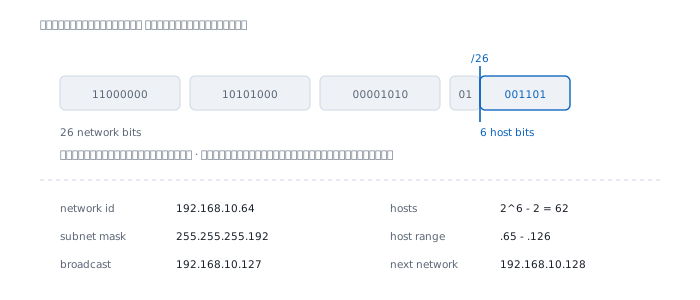
Once you know where the boundary is, these six fall out on their own.
  network id     host bits all zero
  subnet mask    network bits one, host bits zero
  broadcast      host bits all one
  hosts          two to the power of the host bits, minus two
  host range     the one after network id to the one before broadcast
  next network   the one after broadcast
None of them is a separate formula. All six are the host bits read with different values: all zero, all one, and everything between.
Step 1 — the prefix says which bit the boundary sits on
The number after the / is how many bits belong to the network. What is left of 32 belongs to the host.
  /26   ->  26 network bits  +   6 host bits  =  32
  /21   ->  21 network bits  +  11 host bits  =  32
  /30   ->  30 network bits  +   2 host bits  =  32
Divide the prefix by eight and you know which octet the boundary lands in.
  26 / 8  =  3 remainder 2    octets 1-3 whole, cut inside octet 4
  21 / 8  =  2 remainder 5    octets 1-2 whole, cut inside octet 3
  24 / 8  =  3 exactly        cut on an edge, no octet is split
The octet the line cuts through is the interesting octet, and it is the only one you have to think about. The other three are copied straight down.
RFC 4632 states the one constraint on a mask in a single sentence.
"The only outstanding constraint is that the mask must be left contiguous."
The ones have to be adjacent, starting from the left. No alternating patterns — which is why a mask octet has only nine possible values rather than 256.
Step 2 — the block size is the spacing of the boundary
This is the step usually taught as "take 256 minus the mask number" and called the magic number.
There is nothing magic about it, and once you see why, you will not forget it again.
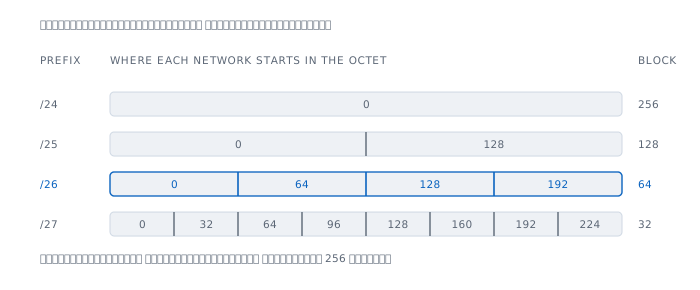
Inside the interesting octet, some number of bits is left for the host. If six are left, that octet can count 64 values, so a network is 64 wide and the next one starts 64 further along.
  host bits   mask octet   block size
          0          255            1
          1          254            2
          2          252            4
          3          248            8
          4          240           16
          5          224           32
          6          192           64
          7          128          128
          8            0          256
Look at the middle and right columns: they add to 256 on every row. That is because the mask number counts how far from zero you get before a new network starts, counted from the other end. 256 - mask is just a shorter way of writing the same fact.
RFC 4632 puts the same point as a design property.
"prefixes may be defined to describe any power of two-sized block of between one and 2^32 end system addresses"
Every network is a power of two, always. There is no network of 100 and none of 50, and that is what makes everything in this article computable.
The range used most often is /24 to /30.
  prefix   subnet mask         block   usable hosts
  /24      255.255.255.0         256            254
  /25      255.255.255.128       128            126
  /26      255.255.255.192        64             62
  /27      255.255.255.224        32             30
  /28      255.255.255.240        16             14
  /29      255.255.255.248         8              6
  /30      255.255.255.252         4              2
Step 3 — read all six answers off it
Run the three steps on 192.168.10.77/26.
  step 1   26 = 24 + 2         cut inside octet 4, 6 host bits left
  step 2   mask octet = 192    block is 256 - 192 = 64 wide
  step 3   0   64   128   192  where each network starts in octet 4
77 sits between 64 and 128, so it is in the network that starts at 64, and that network is 64 wide, covering 64 through 127.
Now read the six off.
  network id     192.168.10.64
  subnet mask    255.255.255.192   (/26)
  broadcast      192.168.10.127
  hosts          2^6 - 2 = 62
  host range     192.168.10.65 - 192.168.10.126
  next network   192.168.10.128
Every one matches what the machine answered at the top of this article.
Step 3 is where people slip most. They divide in their heads and answer, when the harder-to-get-wrong way is to count blocks up from zero — 0 64 128 192 — and see which slot the number falls in. Four counts and you are there, with no division at all.
When the boundary is not in the last octet
/21 cuts through the third octet. The method does not change at all; only which octet you do it in.
  10.5.180.200/21

  step 1   21 = 16 + 5         cut inside octet 3, 11 host bits left
  step 2   mask octet = 248    block is 256 - 248 = 8 wide
  step 3   ... 168  176  184   where each network starts in octet 3
180 sits between 176 and 184, so the network starts at 10.5.176.0.
  network id     10.5.176.0
  subnet mask    255.255.248.0     (/21)
  broadcast      10.5.183.255
  hosts          2^11 - 2 = 2046
  host range     10.5.176.1 - 10.5.183.254
  next network   10.5.184.0
Any octet to the right of the interesting one is all zero in the network ID and all 255 in the broadcast, because every bit of it is on the host side.
The host count comes from all 11 host bits, not just the ones in the interesting octet.
Why minus two, and the two cases where you do not
You subtract two because those two numbers are reserved, not because they are technically unusable.
  first address   the network's own name, no machine can hold it
  last address    the network's broadcast, no machine can hold it
There are two cases where the rule does not apply.
A /31 has only two addresses, and minus two leaves nothing. RFC 3021 declares both usable on a link with exactly two devices — you get 2, not 0.
A /32 has one address, used as a thing's own number rather than as a network, so there is nothing to subtract.
Both cases are covered in IPv4 Subnet. This article only warns you not to apply minus two to them.
Subnetting — borrowing bits from the host side
Splitting one network into several means moving the boundary to the right. Bits that belonged to the host become bits of the network.
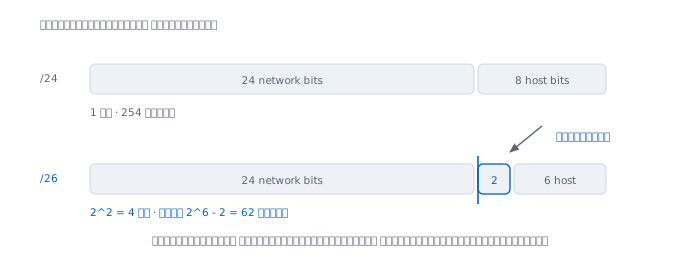
The question arrives in two shapes, and both are answered with powers of two.
Shape one: how many networks? Borrow n bits, get 2^n networks.
  borrow 1 bit    ->    2 subnets
  borrow 2 bits   ->    4 subnets
  borrow 3 bits   ->    8 subnets
  borrow 4 bits   ->   16 subnets
Shape two: how many hosts each? Leave h bits, get 2^h - 2 hosts.
  hosts needed   host bits   prefix   actually get
             2           2      /30              2
             6           3      /29              6
            12           4      /28             14
            25           5      /27             30
            50           6      /26             62
           100           7      /25            126
           200           8      /24            254
Notice you always round up. Ask for 25 and you get 30; ask for 100 and you get 126, because there is no middle size to choose.
Split 192.168.20.0/24 into four.
  need 4 subnets   ->   borrow 2 bits   ->   /24 + 2 = /26
  block size       ->   256 - 192 = 64
Each network starts at 0 64 128 192, which written out gives:
  192.168.20.0/26      .1     - .62      bcast .63
  192.168.20.64/26     .65    - .126     bcast .127
  192.168.20.128/26    .129   - .190     bcast .191
  192.168.20.192/26    .193   - .254     bcast .255
62 hosts each, so 248 usable across the four, down from 254 in the single one.
Splitting costs something. Going to four networks spends six addresses on the extra network IDs and broadcasts, and the finer you split the more it costs — which is why splitting further than you need is a bad habit.
Summarization — walking back the same way
Summarization, or route aggregation, is the reverse: move the boundary left so that several networks become one line in a routing table.
RFC 4632 gives the reason plainly.
"The only commonly understood method for reducing routing state on a packet-switched network is through aggregation of information."
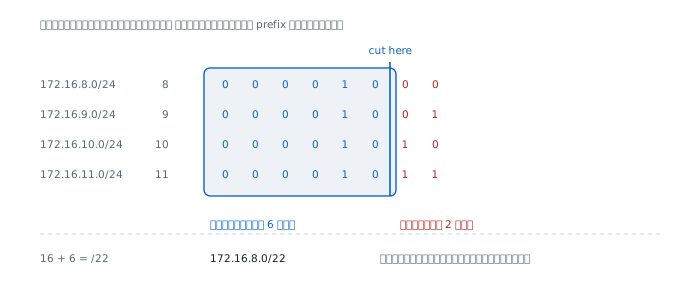
The method is one step: write the octet that differs in binary and see how many bits from the left are the same.
Try it on these four.
  172.16.8.0/24     octet 3 =   8 = 00001000
  172.16.9.0/24     octet 3 =   9 = 00001001
  172.16.10.0/24    octet 3 =  10 = 00001010
  172.16.11.0/24    octet 3 =  11 = 00001011
                                    ^^^^^^
                                    same 6 bits
Six bits of the third octet match, plus the 16 bits of the first two octets that already matched, making 22.
172.16.8.0/22 covers 172.16.8.0 - 172.16.11.255Four lines become one, and the next router along remembers a quarter as much.
The trap to watch for
Change them to 9 10 11 12, which looks like the same four adjacent networks.
    9 = 00001001
   10 = 00001010
   11 = 00001011
   12 = 00001100
        ^^^^^
        same 5 bits only
That leaves /21, which is 172.16.8.0/21, covering 172.16.8.0 all the way to 172.16.15.255.
  ours          9  10  11  12
  announced     8   9  10  11  12  13  14  15
  not ours      8  13  14  15
Four networks announced that are not ours. If somebody else really holds those numbers, their traffic comes to us and dies here — which is the event the BGP article describes happening to the whole internet.
A clean summary needs both: the count must be a power of two, and the first network must start on a multiple of that count. The set 8 9 10 11 passes both. The set 9 10 11 12 fails the second.
VLSM — giving each network the size it actually needs
Split a /24 into four equal parts, and if one part holds 60 machines while another is a link between two routers, the second part wastes 60 addresses.
VLSM stops forcing every network to be the same size; each one gets its own prefix.
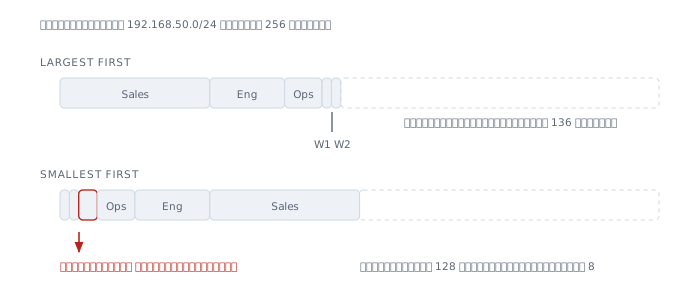
Worked example. One 192.168.50.0/24 to divide among:
  Sales          60 hosts
  Engineering    28 hosts
  Ops            12 hosts
  WAN-1           2 hosts
  WAN-2           2 hosts
First, turn host counts into prefixes with the table above, then sort from largest to smallest.
  Sales          60   ->   /26   (62)
  Engineering    28   ->   /27   (30)
  Ops            12   ->   /28   (14)
  WAN-1           2   ->   /30    (2)
  WAN-2           2   ->   /30    (2)
Second, lay them down in that order, with each network starting on a multiple of its own size.
  Sales          192.168.50.0/26      .1     - .62     bcast .63
  Engineering    192.168.50.64/27     .65    - .94     bcast .95
  Ops            192.168.50.96/28     .97    - .110    bcast .111
  WAN-1          192.168.50.112/30    .113   - .114    bcast .115
  WAN-2          192.168.50.116/30    .117   - .118    bcast .119
That leaves .120 through .255 free, 136 addresses in one piece.
Why largest first, and the reason usually given for it that is wrong
The explanation you usually hear is "smallest first will not fit". I tried it the other way round, and it does fit.
  WAN-1          192.168.50.0/30
  WAN-2          192.168.50.4/30
  Ops            192.168.50.16/28
  Engineering    192.168.50.32/27
  Sales          192.168.50.64/26
Every network landed. But look closely at .8 through .15.
Those eight addresses belong to nobody, and nothing can use them, because Ops is a /28 and has to start on a multiple of 16, so it skipped from .8 to .16 and left a hole too small to be worth anything.
  largest first    holes left behind   none
  smallest first   holes left behind   .8 - .15   (8 addresses)
So the real reason is not that smallest first runs out — it is that smallest first leaves scraps, and the scraps cannot be merged, because the start-on-a-multiple rule will not let them be.
Do it for real across dozens of networks and the scraps eat the space until one day a new network will not fit, while the total still says there is room.
Exercises
These five run from easy to hard. Try each one before opening the answer; the answers show the working step by step rather than just the result.
Exercise 1 — read the six numbers
192.168.100.150/27Find the network ID, subnet mask, broadcast, usable host count, host range, and the network ID of the next network.
Answer 1
  step 1   27 = 24 + 3         cut inside octet 4, 5 host bits left
  step 2   mask octet = 224    block is 256 - 224 = 32 wide
  step 3   0  32  64  96  128  160  192  224
150 sits between 128 and 160, so the network starts at 128 and is 32 wide, reaching 159.
  network id     192.168.100.128
  subnet mask    255.255.255.224   (/27)
  broadcast      192.168.100.159
  hosts          2^5 - 2 = 30
  host range     192.168.100.129 - 192.168.100.158
  next network   192.168.100.160
Exercise 2 — the boundary is not in the last octet
10.10.130.45/19Find the same six numbers.
Answer 2
  step 1   19 = 16 + 3         cut inside octet 3, 13 host bits left
  step 2   mask octet = 224    block is 256 - 224 = 32 wide
  step 3   0  32  64  96  128  160  192  224
130 sits between 128 and 160, so the network starts at 10.10.128.0.
The fourth octet is entirely on the host side, so it is 0 in the network ID and 255 in the broadcast.
  network id     10.10.128.0
  subnet mask    255.255.224.0     (/19)
  broadcast      10.10.159.255
  hosts          2^13 - 2 = 8190
  host range     10.10.128.1 - 10.10.159.254
  next network   10.10.160.0
The easy slip here is the host count. There are 13 host bits, not 5 — count everything left over from 32, not just what is in the interesting octet.
Exercise 3 — split one network into eight
Split 172.20.16.0/24 into eight equal networks. Give the new prefix, the hosts per network, and the network IDs of the first three.
Answer 3
  need 8 subnets   ->   2^3 = 8   ->   borrow 3 bits
  new prefix       ->   24 + 3 = /27
  host bits left   ->   32 - 27 = 5   ->   2^5 - 2 = 30 hosts
  block size       ->   256 - 224 = 32
Each network starts at 0 32 64 96 128 160 192 224. The first three:
  172.20.16.0/27      .1     - .30     bcast .31
  172.20.16.32/27     .33    - .62     bcast .63
  172.20.16.64/27     .65    - .94     bcast .95
An easy check: 8 networks times 32 addresses is 256, exactly one /24.
Exercise 4 — collapse four networks into one line
  10.4.16.0/24
  10.4.17.0/24
  10.4.18.0/24
  10.4.19.0/24
Can these be summarised into a single prefix? If so, which one? And if 10.4.20.0/24 is added, does it still work?
Answer 4
Write the third octet in binary.
  16 = 00010000
  17 = 00010001
  18 = 00010010
  19 = 00010011
       ^^^^^^
       same 6 bits
16 bits from the first two octets plus these six gives 22.
10.4.16.0/22 covers 10.4.16.0 - 10.4.19.255 exactly 4 networksCheck both conditions: four is a power of two, and the first network is 16, which is a multiple of four. Both pass.
Adding 10.4.20.0/24 breaks it.
  20 = 00010100
       ^^^^^
       same 5 bits only
The only prefix covering all five is /21 — 10.4.16.0/21 — which reaches 10.4.23.255, three networks past what is ours: 21, 22 and 23.
The right answer is to announce two lines, 10.4.16.0/22 and 10.4.20.0/24. Two lines beats claiming numbers that are not yours.
Exercise 5 — design with VLSM
You have one 192.168.70.0/24 and must serve:
  dept A    100 hosts
  dept B     50 hosts
  dept C     25 hosts
  link 1      2 hosts
  link 2      2 hosts
Allocate all five, then say how much space is left.
Answer 5
Convert to prefixes and sort largest to smallest.
  dept A    100   ->   /25   (126)
  dept B     50   ->   /26    (62)
  dept C     25   ->   /27    (30)
  link 1      2   ->   /30     (2)
  link 2      2   ->   /30     (2)
Lay them down, each starting on a multiple of its own size.
  dept A    192.168.70.0/25      .1     - .126    bcast .127
  dept B    192.168.70.128/26    .129   - .190    bcast .191
  dept C    192.168.70.192/27    .193   - .222    bcast .223
  link 1    192.168.70.224/30    .225   - .226    bcast .227
  link 2    192.168.70.228/30    .229   - .230    bcast .231
.232 through .255 is free — 24 addresses, enough for one more /28 or several more /30s.
Worth noticing: dept A asked for 100 and got a network holding 126. Those 26 spare addresses are not lost; they sit inside A's network and A can grow into them. But if A passes 126 the whole network has to move rather than grow, because .128 already belongs to B.
Common misconceptions
"You have to memorise the mask table first." You do not. The whole table is built from one fact — 256 - mask is the block size, and blocks are always powers of two. Remember those two and you can write the table out every time.
"256 minus the mask is a magic number." It is not magic. It is the size of a network inside that octet, which is two to the power of the bits left for the host.
"Host count comes from the last octet." It comes from all the host bits. A /19 has 13 of them, not 5. Reading one octet is only right when the prefix is between 25 and 30.
"Four adjacent networks always summarise into one line." The count must be a power of two and the first must start on a multiple of it. 9 10 11 12 are four adjacent networks that cannot be summarised.
"VLSM must go largest first or it will not fit." The other order usually fits. What it costs you is free space broken into scraps too small to use, not total capacity.
"The machine calculates it, so there is no need to." The machine answers the question you typed. Type the wrong prefix and it will answer wrongly with complete confidence, and nothing will warn you.
References
Standards
- RFC 4632 — CIDR: The Internet Address Assignment and Aggregation Plan V. Fuller and T. Li, August 2006 — both sentences quoted here come from it: the constraint that a mask must be left contiguous, and the reason for aggregating routes
- RFC 950 — Internet Standard Subnetting Procedure August 1985 — where subnetting comes from, and the rule reserving the first and last address
- RFC 3021 — Using 31-Bit Prefixes on IPv4 Point-to-Point Links December 2000 — the exception to the minus-two rule
Computed here
- Every table, every worked example and every answer was computed with the
ipaddressmodule of Python 3.9.6 on the machine this was written on, then checked against the by-hand method step by step - Both VLSM orderings were computed from the same rule — each network starts on a multiple of its own size — so the size of the hole left behind is a result of that rule rather than an estimate
- The addresses used as examples are invented ones from the private ranges of RFC 1918, not the numbers of any real network
Related articles on this site
- IPv4 Subnet explains why a mask has to be a boundary rather than a range of numbers, and covers
/31and/32in detail - Routing explains that a router uses the longest matching prefix, which is why summarising routes does not make the networks inside them disappear