If a machine already has an IP address, why does it need a second set of numbers?
The answer fits in one sentence, and that sentence makes everything else fall into place — a MAC address exists to carry data across one link, not across the internet.
It does not travel past a router. The website you open cannot see it. And today it is no longer a reliable identifier of a device either.
This page covers what it does, why it has to exist, and what people believe about it that is not true.
If you have not read Internet Protocol and IPv4 subnetting, start there — this sits one layer below both.
If you have never looked, start here
Look at your own machine:
ifconfig en0 | grep ether      # macOS and BSD
ip link show                   # Linux
Then look at the neighbours it knows about:
$ arp -an
? (192.168.1.1) at 00:1b:21:3a:5c:9e on en0 [ethernet]
? (224.0.0.251) at 1:0:5e:00:00:fb on en0 ifscope permanent [ethernet]
Those two lines carry more than they appear to. The first is the router in the building; the second is not a machine at all but a group, and we will come back to it.
This table holds only neighbours on the same link. Not one machine elsewhere on the internet appears in it, which is the first clue to the whole answer.
What the 48 bits are made of
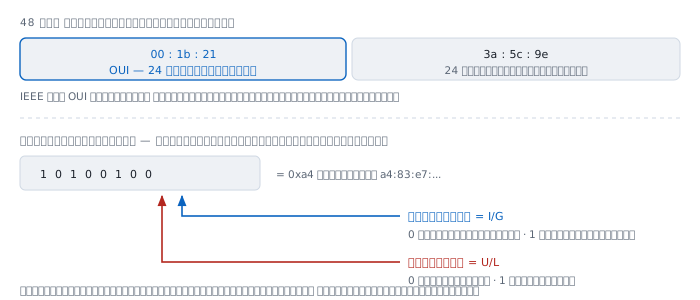
The first half is the OUI, a number IEEE sells to manufacturers. The second half the manufacturer assigns, taking responsibility for not repeating itself.
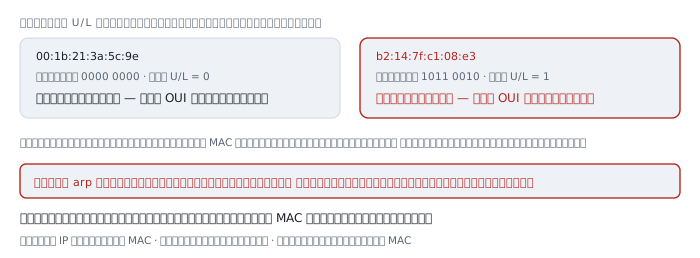
But the part that matters is the two rightmost bits of the first byte:
  rightmost bit   I/G   0 = one machine        1 = many machines
  next bit        U/L   0 = manufacturer set   1 = locally set
Read those two and you know immediately what you are looking at:
  00:1b:21:...  0000 0000  both bits 0   real hardware number
  b2:14:7f:...  1011 0010  U/L = 1       set by software
  01:00:5e:...  0000 0001  I/G = 1       addressed to a group
  ff:ff:ff:...  1111 1111  both bits 1   addressed to everyone
Open your own arp -an and look at the first byte of each row. You will see straight away which devices use real numbers and which invent them — which becomes the central point further down.
November 1982 — the problem that required two sets of numbers
IP was barely a year old, and something had to be solved before it could run on Ethernet at all. RFC 826, written by David C. Plummer of MIT and published in November 1982, states the problem directly:
the 10Mbit Ethernet requires 48.bit addresses on the physical cable, yet most protocol addresses are not 48.bits long, nor do they necessarily have any relationship to the 48.bit Ethernet address of the hardware
In plain terms: the hardware already had its own numbering scheme, and IP arrived afterwards. The two know nothing about each other, so something had to ask across the gap, live.
That something is ARP.
ARP — the bridge between two numbering schemes
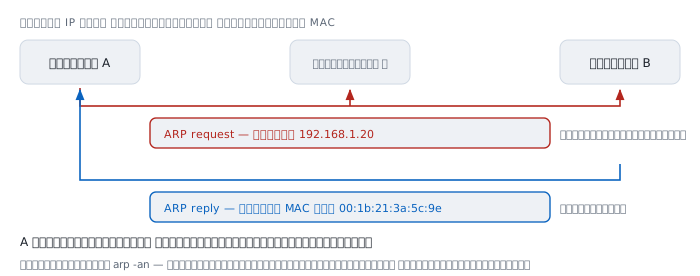
When a machine wants to send to an IP address on the same link, it knows the IP but still cannot send, because network cards and switches read only MACs.
So it shouts across the whole link: "who holds 192.168.1.20? Answer to my MAC." Everybody hears it; exactly one answers; and the answer is remembered in a table.
That table is what arp -an prints, and RFC 826 scoped it from the beginning to "a single Ethernet cable".
IPv6 does not use ARP. It uses Neighbor Discovery, which runs on ICMPv6 — the same principle, but using multicast instead of broadcast, so it disturbs uninvolved machines far less.
The heart of it — MAC does not cross a router
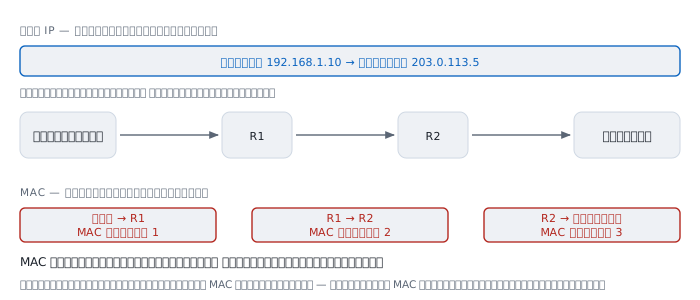
This is the part to understand. Everything else is detail.
When you open a website, your packet crosses several routers. Along the way:
- the source and destination IP addresses stay the same, written once
- the source and destination MACs are rewritten at every hop
Every time a router receives a frame, it discards the entire frame header and writes a new one, with its own MAC as source and the next device's as destination.
Three consequences answer the questions people ask most often.
The website cannot know your machine's MAC. It sees only the MAC of the last router before itself. Anyone claiming a website collected your MAC has misunderstood.
MAC is useless for tracking across the internet, because it never gets anywhere. What actually tracks people is IP addresses, cookies and browser fingerprints.
Changing your MAC does not disguise you on the internet. It changes only how devices on your own link see you.
Switches and routers read different fields
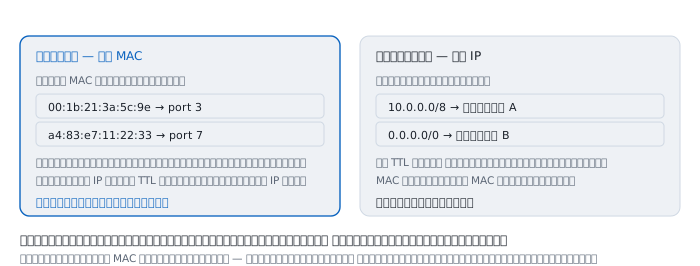
A switch remembers which MAC is on which port, learning it by itself from the frames passing through — see a frame from some MAC arrive on port 3, note that MAC as being on port 3. Meet an unknown destination and it sends out every port, then learns from the answer.
A switch does not touch the IP header, does not decrement TTL, and does not need to know IP exists at all.
A router remembers which network exits where, reads the destination IP, decrements TTL by one, and rewrites the frame header entirely.
The two read different fields of the same packet and ignore each other's. That is why a MAC does not cross a router — not because it is forbidden, but because the router overwrites it every time.
Addresses that belong to no machine
Some MACs do not mean one device.
ff:ff:ff:ff:ff:ff is broadcast: every machine on this link. ARP requests use it, and that is why an oversized network slows everything down — every machine must receive and process every time anybody asks about anybody.
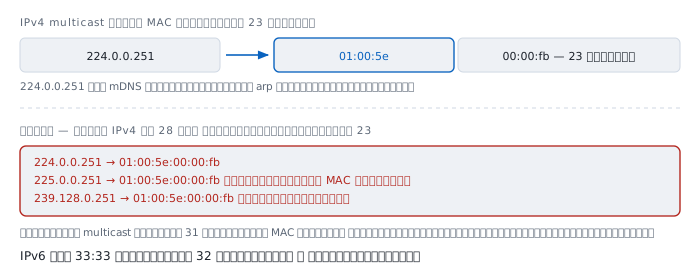
01:00:5e:... is IPv4 multicast. The line in the arp output above is 224.0.0.251, which is mDNS, used by devices to announce themselves locally.
The mapping takes the low 23 bits of the multicast address and appends them to 01:00:5e. And there is an interesting limitation — IPv4 multicast has 28 bits identifying the group, but only 23 fit:
  224.0.0.251     ->  01:00:5e:00:00:fb
  225.0.0.251     ->  01:00:5e:00:00:fb     different group, same MAC
  239.128.0.251   ->  01:00:5e:00:00:fb     and still the same
Every multicast address therefore shares its MAC with 31 others, so the network card must accept them all and let software discard the rest. IPv6 fixed this by using 33:33 followed by the full low 32 bits, with no collisions.
When MAC stopped identifying devices
A MAC used to be a number fixed to the card, so it was used as a device identifier in many places.
Then it was used to track people. Shopping centres and airports placed receivers to collect the MACs of passing phones and assemble each person's route through the building, without their knowledge or consent.
Operating systems answered with MAC randomisation — modern phones and laptops invent a new number for each network they join, and some change it periodically. A randomised address always has its U/L bit set to 1.
Look at arp -an on your own home network and count how many rows have U/L set in the first byte. In an ordinary home today it is often about half.
What broke along with it is everything that used MAC as an identifier:
- Static IP reservations keyed on MAC, which come loose when the device re-randomises
- Counting devices on a network, which now overcounts
- Filtering by a list of permitted MACs, which was never security anyway
Things that are not true
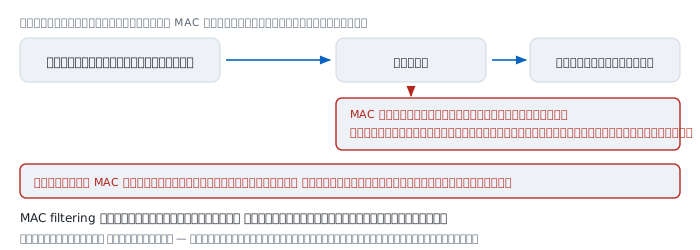
"MAC filtering makes Wi-Fi safer" — it does not. MAC addresses always travel unencrypted in the frame, even on an encrypted network. Anyone listening sees the whole permitted list and sets their own to match with a single command. It is a name tag, not a key.
"MACs are globally unique" — that is the intent, but in practice there are manufacturers who have shipped duplicates, cheap devices using one number for a whole batch, and locally set numbers that guarantee nothing at all.
"Change your MAC and you are anonymous online" — you change only what devices on your own link see. Past the first router nobody sees it again.
"A MAC tells you the brand" — only for manufacturer-assigned numbers, and today a great many devices use randomised ones that match no OUI.
"A MAC in a log identifies the machine" — only if that log came from a device on the same link. A web server's logs contain no user MACs at all.
Worked examples from real work
Case 1 — a duplicate IP, settled by MAC
The ping article has a case where replies come back duplicated with (DUP!) and differing TTLs. The final confirmation lives here:
$ arp -an 192.168.10.50
? (192.168.10.50) at 00:1b:21:3a:5c:9e on en0 [ethernet]
$ arp -an 192.168.10.50
? (192.168.10.50) at 4c:52:62:11:07:d3 on en0 [ethernet]
How to read it. One IP, two MACs alternating, means two machines answering ARP for the same address. Case closed.
Not yet proved. We do not know which one is misconfigured. Look up both OUIs to guess the vendors, or trace which switch port each is on.
Case 2 — finding which port a machine is plugged into
switch# show mac address-table | include 001b.2138
  10    001b.2138.5c9e    DYNAMIC     Gi1/0/14
How to read it. The switch reports seeing this MAC arrive on port Gi1/0/14 in VLAN 10. This is how you find a physical machine in a room with hundreds of cables without walking the racks.
Not yet proved. That port may lead to another switch rather than to the machine. Several MACs on one port means something is in between.
Case 3 — a reservation that came loose by itself
A user reports that their machine always used to get the same IP and now keeps changing.
How to read it. Check whether the MAC now in use has U/L set:
  first byte 0x00 = 0000 0000  ->  U/L = 0  real
  first byte 0xb2 = 1011 0010  ->  U/L = 1  randomised
If it is 1, the device has MAC randomisation on and invented a new number, so a reservation keyed on the old one no longer matches.
The fix. Tell the device to use its real address for this network — modern operating systems offer that per network — or stop keying reservations on MAC at all.
Not yet proved. We do not know whether it randomises once per network or periodically, which changes the fix considerably.
Case 4 — cannot ping a machine on the same network, though all is configured
$ ping -c 2 192.168.1.50
Request timeout for icmp_seq 0
$ arp -an 192.168.1.50
? (192.168.1.50) at (incomplete) on en0 [ethernet]
How to read it. (incomplete) means the ARP request went out and nobody answered. So the problem is below the IP layer — the machine may not be there, it may be on a different VLAN, or a cable is out.
This is where MAC is most useful in diagnosis, because it separates a link layer problem from an IP layer one.
Not yet proved. We do not know the cause. Check next whether the machine is powered on and genuinely in the same VLAN.
When MAC is not enough
arp -anorip neigh— the neighbours a machine knows right nowshow mac address-tableon a switch — which MAC is on which porttcpdump -e— the-eflag shows frame headers, which is the only way to see for yourself that they really are rewritten at every hop- An OUI lookup against IEEE's database to guess a vendor, which works only for manufacturer-assigned numbers
A MAC address is not a device's passport. It is a name tag used in one room.
Past that room's door nobody recognises it, and today even inside the room it is a name its owner can change at will.
References
Standards
- RFC 826 — An Ethernet Address Resolution Protocol David C. Plummer, November 1982 — the origin of ARP and the explanation of why two unrelated numbering schemes had to coexist
- RFC 4861 — Neighbor Discovery for IP version 6 what IPv6 uses instead of ARP
- RFC 1112 — Host Extensions for IP Multicasting the origin of mapping IPv4 multicast onto MACs beginning 01:00:5e
- RFC 2464 — Transmission of IPv6 Packets over Ethernet Networks the IPv6 multicast mapping onto MACs beginning 33:33
- RFC 7042 — IANA Considerations for Ethernet Parameters the detail of the I/G and U/L bits and the allocated ranges
- RFC 8981 — Temporary Address Extensions for SLAAC the privacy reasoning behind not tying addresses to hardware
Manuals
man arpandman ip-neighbouron the machine you are sitting attcpdump -e, the most direct way to watch frame headers being rewritten at every hop