The Ethernet article ended with a table of EtherType values, and left one of them unexplained:
0x8100 a VLAN tag followsThe four bytes that value points at are what let one switch behave as many, and what every corporate network on earth depends on.
This page is about how they work, why they were designed that way, and where they fail most quietly.
The problem — the boundary of a broadcast
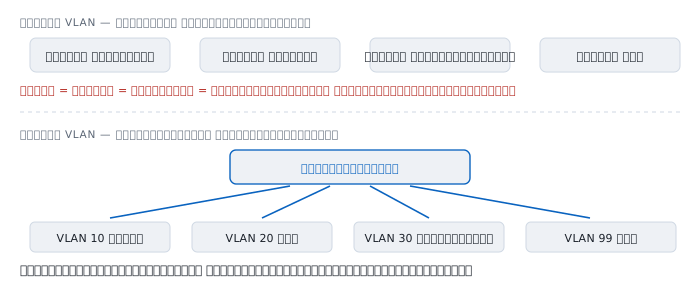
The MAC address article explained that a switch floods frames whose destination it does not know, and that a broadcast reaches every machine on the same wire.
Which means one switch is one broadcast domain. Every machine plugged into it hears everyone else's ARP, everyone else's DHCP, and everyone else's device discovery.
Two problems follow.
The first is size. More machines means more broadcasts, and every machine must process each one. A network that grows too large slows itself down with its own noise.
The second is separation. Accounting and the guest laptops should not be on the same network.
Before 1998 there was one answer: buy another switch. Four networks meant four switches, four sets of cabling, and re-cabling every time somebody changed department.
1998 — IEEE 802.1Q
The standard that solved this is IEEE 802.1Q, first published in 1998.
Before it, every vendor had their own. Cisco's was ISL, which wrapped the entire original frame inside a 26-byte header.
802.1Q took a different approach: insert a 4-byte tag into the middle of the frame and leave everything else where it was.
  ISL      26-byte header wrapping the frame   1.7% of a 1500 payload
  802.1Q   4-byte tag inserted mid-frame       0.3%
The difference is not only bytes saved. Inserting means a device that does not understand the tag can still read the destination and source addresses, because both sit before the tag. Wrapping moves everything.
ISL is gone. 802.1Q is in every switch sold today.
What is in those four bytes
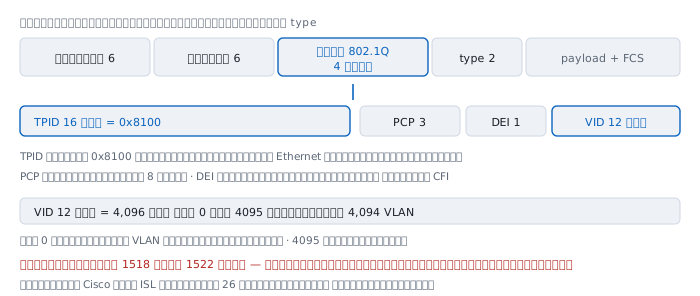
The position matters — the tag sits between the source address and the type field:
destination 6 source 6 [ tag 4 ] type 2 payload FCS 4Inside, it is four parts:
  TPID   16 bits   0x8100, saying this is a tag rather than a type
  PCP     3 bits   priority, eight levels
  DEI     1 bit    drop eligible if congested; formerly CFI
  VID    12 bits   the VLAN number
TPID is the mechanism that makes all of this backward compatible. A device reads the two bytes where the type should be; find 0x8100 and it knows a tag is present with the real type four bytes further on. Find anything else and it reads a type as usual.
VID is 12 bits, and that number bounds everything:
  2^12  =  4,096 values
  0     =  no VLAN; priority information only
  4095  =  reserved, must not be configured or transmitted
          -------
  4,094 usable VLANs
VLAN 1 is configurable but is the factory default on every port, which is why it should not be used for real traffic — a point that returns in the native VLAN section.
And the tag makes frames longer:
  ordinary frame    64 to 1518 bytes
  tagged frame      68 to 1522 bytes
1522 exceeds the 1518 the Ethernet article gave as the ceiling, so these are called baby giants, and older equipment that does not know 802.1Q discards them as oversized — a symptom that appears when an old switch is added to a VLAN network.
Two kinds of port
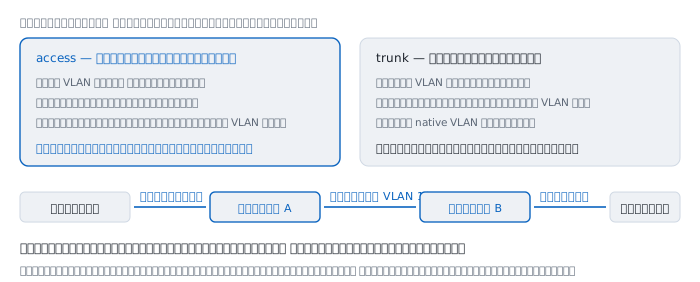
access is a port with a machine on it, belonging to one fixed VLAN. Frames leaving it carry no tag.
Which means the machine plugged in does not know VLANs exist. The switch adds the tag on the way in and removes it on the way out.
trunk is the cable between switches, carrying many VLANs at once, with every frame tagged to say which it belongs to.
  machine  ->  switch A   untagged
  switch A ->  switch B   tagged VLAN 10
  switch B ->  machine    tag removed
Tags exist only on the cable between switches. The machines at each end talk as though they were on one switch, with no idea anything happened in between.
The boundary a VLAN creates
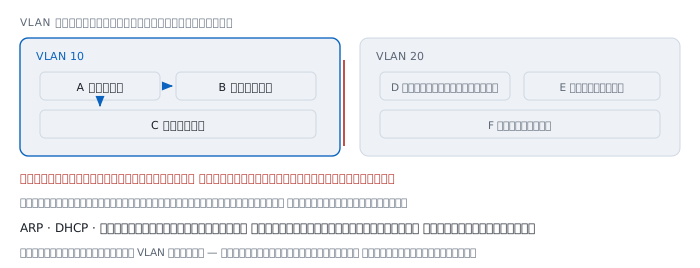
When a machine in VLAN 10 broadcasts, the switch forwards it only to ports in VLAN 10. Machines in VLAN 20 hear nothing, even plugged into the same switch two ports away.
That boundary is not a cut cable; it is a rule in the switch's software.
ARP, DHCP and device discovery all use broadcast, so all of them stop at this edge. And that is the real reason VLANs exist — it is about boundaries, not security, however much the side effect resembles security.
The native VLAN — the quietest mistake
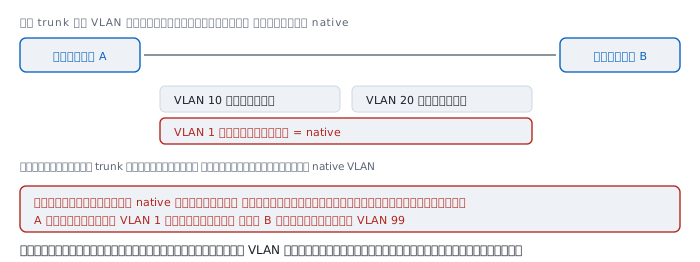
One VLAN on a trunk travels untagged. It is called the native VLAN.
It exists for historical reasons, to interoperate with equipment that does not understand tags. A frame arriving on a trunk without a tag is taken to belong to the native VLAN.
And this is where it becomes dangerous — if the two switches disagree:
  switch A   native = VLAN 1    sends VLAN 1 frames untagged
  switch B   native = VLAN 99   untagged arrives, called VLAN 99
Frames cross from VLAN 1 into VLAN 99 with no warning of any kind. No error, no log, nothing to say that the boundary you meant to build has a hole in it.
Some vendors detect the mismatch. Not all of them, and not in every case.
The attack that uses it
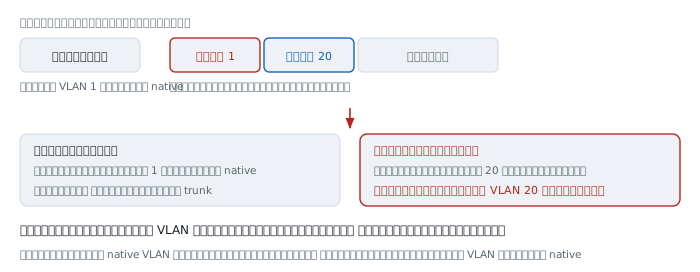
An attacker in the same VLAN as native sends a frame with two tags stacked:
  outer   VLAN 1    matching the trunk's native
  inner   VLAN 20   the VLAN they want to reach
The first switch sees the outer tag as 1, matching native, so it strips it as usual and forwards along the trunk.
The second switch receives the frame, sees the inner tag as 20, and believes it. The frame is now inside VLAN 20, with the attacker having broken nothing at all.
The defences are two ordinary configuration choices:
- Set the native VLAN to a number nobody uses, such as 999
- Never put user ports in the same VLAN as native
Note that this attack is one-way — replies cannot come back, because the return path has no equivalent mechanism. One direction is enough for plenty of things.
Separated means unable to talk
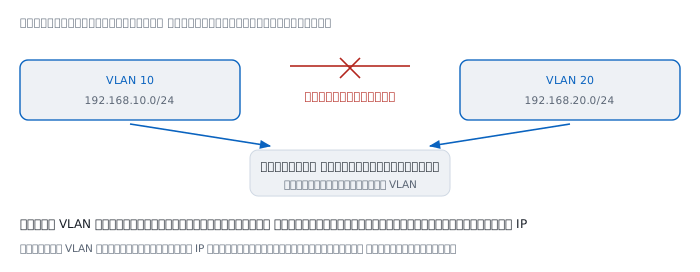
A VLAN separates broadcast domains, which means machines in different VLANs cannot send to each other directly, even on the same switch.
By convention, one VLAN maps to one IP network:
  VLAN 10  ->  192.168.10.0/24
  VLAN 20  ->  192.168.20.0/24
Given that, crossing VLANs is crossing IP networks, which the Internet Protocol article established is always a router's job.
So something must have a leg in both — a router connected over a single trunk with a subinterface per VLAN, or a layer-3 switch that routes internally.
And because inter-VLAN traffic must pass a router, that is where rules can be applied, which is why VLAN segmentation is so often treated as security even though the VLAN itself does no such thing.
Things that are not true
"VLANs are security" — VLANs create boundaries. Security comes from the rules applied where traffic crosses them. Separate the VLANs and configure nothing at the router and you have gained nothing.
"Different VLANs are certainly isolated" — a mismatched native VLAN lets frames across, and the double-tagging attack exists precisely because of it.
"VLAN 1 is fine to use" — technically yes, but it is the factory default on every port, so every unconfigured port is already in it, including the ones somebody forgot.
"There are 4,096 VLANs available" — 4,094 usable, and in provider networks separating thousands of customers that is not enough, which is why 802.1ad allows legitimate double tagging with 0x88a8 as the outer TPID.
"Tags reach the end machine" — no. An access port always strips the tag first, so ordinary machines never see one, except where deliberately configured to.
Worked examples from real work
Case 1 — a machine getting an address from the wrong network
A machine is moved to a different port and receives an address from a network it should not.
How to read it. That port is in a different VLAN than intended, so the DHCP server answering is that VLAN's, not the right one.
  switch# show interface Gi1/0/14 switchport
    Administrative Mode: static access
    Access Mode VLAN: 1 (default)
VLAN 1 (default) is the sign that this port was never configured.
Not yet proved. We do not know whether it was forgotten or somebody moved a patch cable without saying. Compare against the port documentation.
Case 2 — some VLANs cross between switches and others do not
How to read it. A trunk permits VLANs by list; it does not carry everything automatically.
  switch# show interface Gi1/0/24 trunk
    Port      Vlans allowed on trunk
    Gi1/0/24  1,10,20
VLAN 30 is not on the list, so its frames are discarded at the trunk silently.
The lesson. Adding a VLAN means adding it to every trunk along the path, not only creating it at both ends.
Not yet proved. We do not know how many trunks are on that path. Walk every one between source and destination.
Case 3 — an old switch discarding frames quietly
An old switch is added to extend the network, and machines behind it work intermittently.
How to read it. A tagged frame is 1522 bytes, and equipment that does not know 802.1Q treats anything over 1518 as oversized and discards it.
The symptom is therefore selective — small frames pass, large ones do not, so small pages load while large downloads hang.
  switch# show interface Gi0/1 | include giants|errors
    0 runts, 1247 giants, 0 throttles
A non-zero giants counter on the old device is direct evidence.
Not yet proved. The counter accumulates since boot; clear it and measure again to confirm it is still happening.
Case 4 — checking whether native matches
  switchA# show interface Gi1/0/24 trunk
    Port      Native vlan
    Gi1/0/24  1

  switchB# show interface Gi1/0/24 trunk
    Port      Native vlan
    Gi1/0/24  99
How to read it. The two ends disagree. Frames A sends untagged as VLAN 1 are received by B as VLAN 99. The boundary you meant to build has a hole here.
This is worth checking every time a trunk is added, because nothing will warn you.
Not yet proved. Matching now does not mean matching later; replacing a device or resetting it to factory defaults returns native to 1.
References
Standards
- IEEE 802.1Q, first published 1998 — defines the 4-byte tag, the TPID, PCP, DEI and VID fields, where it is inserted, and the extension of the maximum frame from 1518 to 1522 bytes
- IEEE 802.1ad — legitimate double tagging with
0x88a8as the outer TPID, for provider networks where 4,094 VLANs is not enough - Inter-Switch Link and IEEE 802.1Q Frame Format Cisco's comparison of ISL, which wraps the frame in a 26-byte header, with 802.1Q, which inserts a 4-byte tag
Related reading here
- Ethernet — where 1518 comes from, and the 0x8100 entry in the EtherType table
- MAC address — how a switch works, and why a broadcast reaches everything on one wire
- IPv4 subnetting — the IP networks that usually map one-to-one onto VLANs
Manuals
show vlan brief,show interface switchportandshow interface trunkon a switch, the three commands that answer nearly every VLAN question