The IP and subnetting articles explained what an address is and how they are divided, but never answered where a machine gets one.
In almost every home and office the answer is DHCP, and this page is about it.
The problem it solves sounds impossible to begin with. How does a machine with no address send a message asking for one, when every packet needs a source address?
To ask for an address you need an address
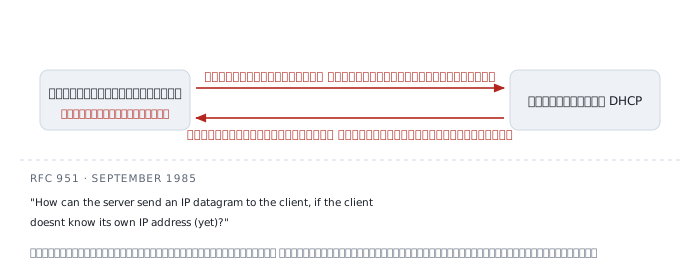
The question is older than DHCP. RFC 951, the BOOTP standard from September 1985, states it outright:
How can the server send an IP datagram to the client, if the client doesnt know its own IP address (yet)?
The entire protocol is the answer to that one sentence.
The answer is to use addresses that require knowing nobody, in both directions. Outbound uses 0.0.0.0 as the source, meaning no address yet, and 255.255.255.255 as the destination, meaning every machine on this wire.
The reply is a broadcast too, because a server still cannot send directly to a machine that has no address.
Depending on broadcast in both directions is the root of every remaining limitation on this page — both the fact that it cannot cross a router by itself, and the fact that anybody can answer in its place.
If you have never looked, start here
A Mac keeps the last DHCP packet it received, and it can be read in full.
$ ipconfig getpacket en0
op = BOOTREPLY
htype = 1
hlen = 6
hops = 0
xid = 0x3f7a12c4
secs = 0
flags = 0x0
ciaddr = 192.0.2.31
yiaddr = 192.0.2.31
siaddr = 0.0.0.0
giaddr = 0.0.0.0
chaddr = 00:00:5e:00:53:11
sname =
file =
options:
  dhcp_message_type (uint8): ACK 0x5
  server_identifier (ip): 192.0.2.1
  lease_time (uint32): 0x15180
  subnet_mask (ip): 255.255.255.0
  router (ip_mult): {192.0.2.1}
  domain_name_server (ip_mult): {192.0.2.1}
  end (none):
That is the whole article on one screen. Every field name in it gets explained below.
Three things to notice now: siaddr and giaddr are both zero, sname and file are empty, and lease_time is a hex number that converts to something suspiciously round.
DORA — four messages, and why not two
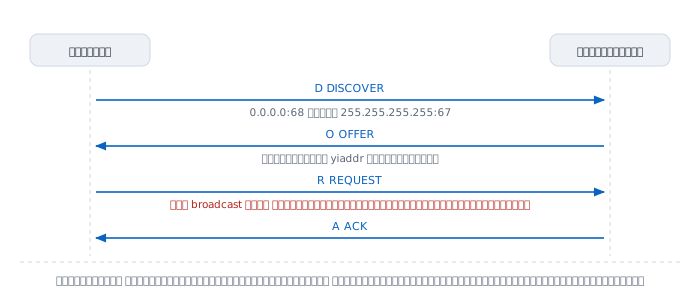
The nickname for the sequence is DORA, after the first letters.
  1  DISCOVER   the machine shouts, asking who hands out addresses
  2  OFFER      a server proposes one, without reserving it yet
  3  REQUEST    the machine says whose offer it is taking
  4  ACK        the server confirms and reserves it for real
The question worth asking is why not two messages. Ask and answer would seem to be enough.
The answer is that there may be more than one server, and all of them heard the same DISCOVER, because it was a broadcast. If each reserved an address the moment it replied, addresses would be reserved several times over while the machine used only one.
The REQUEST step exists to announce which one was chosen, and RFC 2131 requires that this message "MUST include the 'server identifier' option to indicate which server it has selected".
Why the REQUEST is still broadcast
This is the part most often missed. If the machine already knows whose offer it wants, why not send it directly?
Because the servers that were not chosen need to know too, so they can release the address they offered back into the pool. Send the REQUEST only to the chosen server and the others hold their addresses until they time out.
The broadcast is therefore not sloppiness. It is how you tell everybody at once with a single message.
The shape of the message
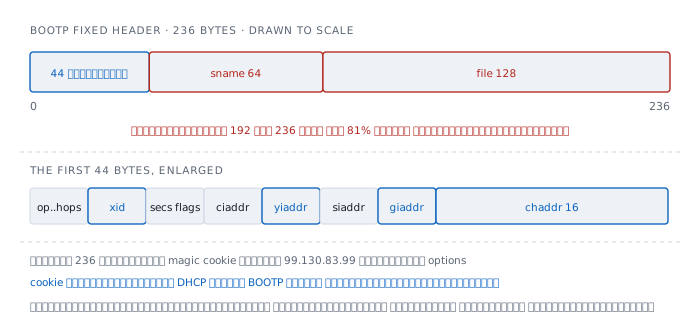
  off  field    octets  meaning
    0  op            1  1 = request, 2 = reply
    1  htype         1  hardware type, 1 = ethernet
    2  hlen          1  hardware address length, 6
    3  hops          1  relay agents increment this
    4  xid           4  transaction id, chosen by the client
    8  secs          2  seconds since the client started
   10  flags         2  one bit asks for a broadcast reply
   12  ciaddr        4  the client's own address, if it has one
   16  yiaddr        4  the address being handed out
   20  siaddr        4  next server, for booting
   24  giaddr        4  relay agent address
   28  chaddr       16  client hardware address
   44  sname        64  server host name
  108  file        128  boot file name
  236  cookie        4  99.130.83.99
  240  options     var
236 bytes inherited from 1985
sname at 64 bytes and file at 128 come to 192 of the 236, which is 81% of the whole header — and on the machine whose packet appears above, both are empty.
Those two fields come from BOOTP's original job, which was not handing out addresses but booting machines with no disk. RFC 951 says they exist so a machine learns "the address of a server host, and the name of a file to be loaded into memory and executed".
Diskless machines have all but vanished; the bytes are all still there. Because removing them would change the message layout, which would break every old device on earth at once.
This is the clearest example of what happens to a protocol that succeeds. The price of backward compatibility is paid in bytes, on every message, forever.
The magic cookie is the seam
DHCP was not designed fresh. It was built on top of BOOTP, and what separates the two is a four-byte number appended after those 236.
RFC 2132 defines it: "The value of the magic cookie is the 4 octet dotted decimal 99.130.83.99 (or hexadecimal number 63.82.53.63) in network byte order".
Find that number and what follows is DHCP options. Do not, and it is plain BOOTP. Those four bytes are the entirety of what separates two protocols.
Options are TLV
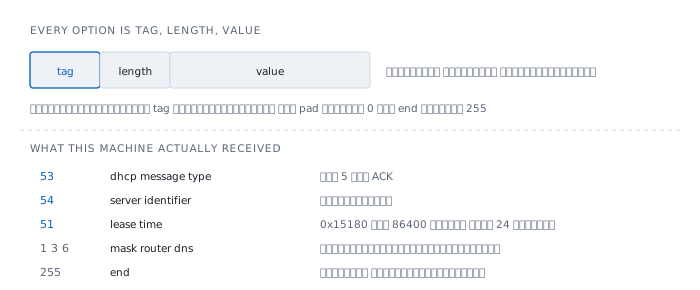
RFC 2132 describes the structure: "All options begin with a tag octet, which uniquely identifies the option ... All other options are variable-length with a length octet following the tag octet".
One byte of tag, one byte of length, then a value as long as the length says — with two exceptions carrying only a tag, pad and end.
This structure is why DHCP has not died. New capabilities are added by claiming a new tag number; anything that does not recognise one can skip it, because it knows the length. The message layout never has to change.
The numbers you meet most often:
    1  subnet mask
    3  router
    6  domain name server
   12  host name
   50  requested ip address
   51  ip address lease time
   53  dhcp message type
   54  server identifier
   55  parameter request list
   58  renewal time T1
   59  rebinding time T2
   82  relay agent information
  255  end
Option 53 is what says which DORA message this is, which is interesting because the message type does not live in the main header at all. It lives in the options, because the main header is BOOTP's, and BOOTP has no concept of a message type.
  1  DISCOVER      5  ACK
  2  OFFER         6  NAK
  3  REQUEST       7  RELEASE
  4  DECLINE       8  INFORM
And option 55 is the list the client asks for, not the list the server gives. The machine states what it would like to know, and the server answers as much of it as it has.
Why two ports
DHCP uses port 67 for the server and 68 for the client. RFC 2131 states that "DHCP messages from a client to a server are sent to the 'DHCP server' port (67), and DHCP messages from a server to a client are sent to the 'DHCP client' port (68)".
The question is why the client does not use an ephemeral port like every other program.
Because the reply is a broadcast. With a random client port, a server would not know which port to broadcast to — and every other machine on the wire would receive it as well.
RFC 951 gives a further original reason: using two ports avoids waking other servers' daemons unnecessarily whenever a reply is broadcast.
This follows directly from having to work before any address exists. Anything that cannot be negotiated in advance has to be nailed down as a constant.
The lease, and two moments that matter
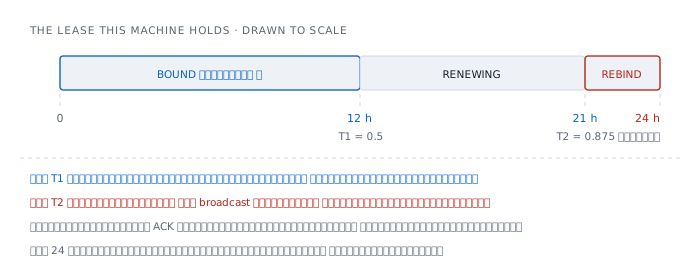
The address is not permanent. It has a lifetime, and the value this machine received is 0x15180.
  lease  0x15180 = 86400 s = 24 h
  T1     0.5   x 86400 = 43200 s = 12 h
  T2     0.875 x 86400 = 75600 s = 21 h
T1 asks directly, T2 shouts
RFC 2131 sets both defaults explicitly: "T1 defaults to (0.5 duration_of_lease). T2 defaults to (0.875 duration_of_lease)".
At T1 the machine sends a REQUEST straight to the same server, because it still remembers who gave it the address, from the option 54 that came with the ACK. No broadcast is needed, because the machine now has an address.
At T2, with still no answer, it switches to broadcast, because the silence may mean the original server is gone. So it asks anybody still listening.
Having two moments rather than one buys time. Between T1 and T2 there are nine hours to keep retrying before giving up on the original server, and between T2 and expiry another three to find a new one.
If the lease expires without an ACK, the RFC says the machine "MUST immediately stop any other network processing" — it must stop using that address at once, not carry on regardless.
How it crosses a subnet when it is broadcast
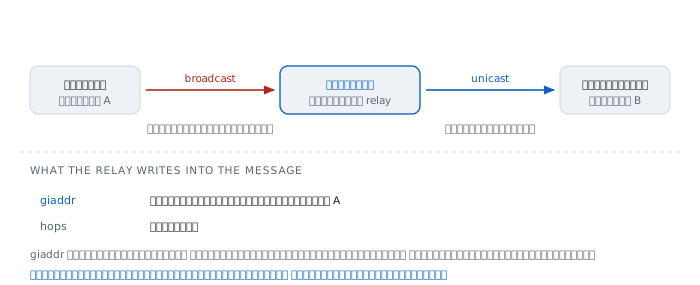
Broadcasts do not cross routers, which the Spanning Tree and VLAN articles treat as a matter of containing scope. Here it is a problem, because it would mean a DHCP server on every subnet.
The fix is to make the router an intermediary. RFC 2131 defines "A BOOTP relay agent or relay agent is an Internet host or router that passes DHCP messages between DHCP clients and DHCP servers" and states the effect: it "eliminates the necessity of having a DHCP server on each physical network segment".
The whole mechanism lives in the giaddr field. The router writes its own address on the client's subnet into it, and forwards by unicast to the server.
That single field does two jobs at once.
First, it says which pool to draw from, because the router's address identifies which subnet the client is on.
Second, it says where to send the answer. The RFC states that where giaddr is non-zero, the server sends its replies to the server port on the relay agent named in it.
On the machine whose packet is above, giaddr = 0.0.0.0, which proves there is no relay in between. The server is on the same wire.
Option 82 — what the relay adds
RFC 3046, from 2001, added option 82 so a relay can attach which port or circuit a request arrived on.
The benefit is finer decisions at the server. The RFC says "Servers recognizing the Relay Agent Information option may use the information to implement IP address or other parameter assignment policies".
Its security assumption is more interesting than the mechanism. The RFC states that it rests on a trusted relationship between the relay agent and the server, with the client assumed untrusted — a plain admission that nothing the client says can ever be believed.
When nobody answers — 169.254
If no server answers at all, a machine does not simply give up. RFC 3927, from 2005, provides a way out.
The reserved range is 169.254/16, and a machine picks an address in it for itself, then checks that nobody else on the wire has the same one.
  169.254.0.0   - 169.254.0.255     reserved
  169.254.1.0   - 169.254.254.255   usable
  169.254.255.0 - 169.254.255.255   reserved
The RFC says "The first 256 and last 256 addresses in the 169.254/16 prefix are reserved for future use and MUST NOT be selected", leaving 65,024 usable.
What matters is that these addresses only talk on the same wire. No gateway, no DNS, no internet. Seeing a 169.254 address is therefore not a configuration at all. It is an error message shaped like an address.
Anybody can be a server
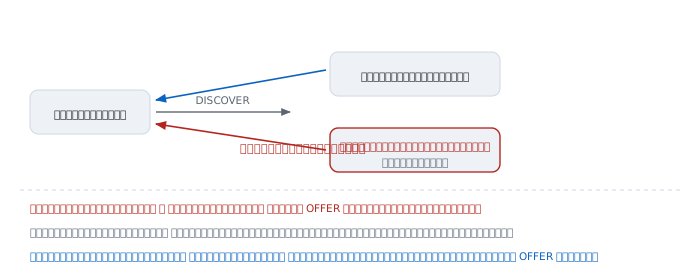
DHCP has no authentication of any kind. No signature, no secret. Anybody who can send an OFFER is a server.
And the client takes whichever arrives first — which an attacker on the same wire usually manages before a real server several switches away.
The result is worse than it first appears, because DHCP does not hand out only an address. It hands out the gateway and the DNS server too.
- Set the gateway to your own machine and all traffic passes through it
- Set the DNS to your own machine and every name the user types is yours to answer
Note that both are achieved without touching the target machine at all, and the victim has no way of knowing, because everything looks entirely normal.
The fix is not in the protocol. It belongs on the switch: mark which ports are allowed to send server messages, and discard those arriving from anywhere else.
On the IPv6 side
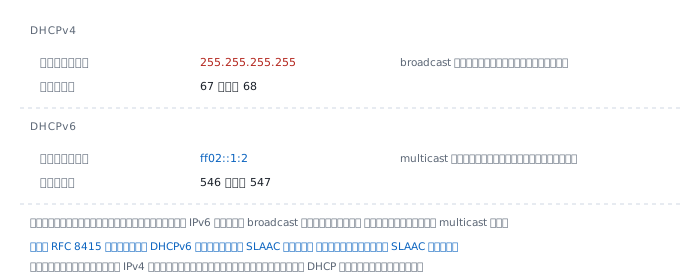
  DHCPv4   255.255.255.255   67   68
  DHCPv6   ff02::1:2         547  546
The destination changed because the IPv6 article already established that IPv6 has no broadcast at all, so a multicast group takes its place — the one named All_DHCP_Relay_Agents_and_Servers.
RFC 8415, from 2018, gives the ports: "Clients listen for DHCP messages on UDP port 546. Servers and relay agents listen for DHCP messages on UDP port 547".
The larger difference is that IPv6 has an alternative. The IPv6 article described SLAAC, where a machine builds its own address with no server at all, and RFC 8415 says DHCPv6 "can operate either in place of or in addition to stateless address autoconfiguration".
Instead of, or as well as — something IPv4 never had, where the only choices were DHCP or setting the number by hand.
Where it lies to you
"Got an IP, so the network works." No. DHCP hands out four separate things: the address, the subnet mask, the gateway and the DNS server. Each missing one breaks something different. No gateway means nothing outside the subnet; no DNS means names fail while addresses still work.
"You always get the same address back." Nothing guarantees it. A server usually returns the same one if it is still free, but that is each server's policy, not a requirement of the standard.
"Set the IP by hand and DHCP stops mattering." You can, but the number has to be outside the pool the server hands out, or one day another machine will be given the same one.
"A long lease is always better." Not so. A long lease means addresses stay reserved long after their machines left, which is a problem anywhere people come and go, like a café. A short lease means more renewals and more work for the server.
"DHCP always lives on the router." At home, yes. In an organisation usually not — the router only relays, and the real server is elsewhere. That is exactly why the giaddr field exists.
Worked examples from real work
Case 1 — the machine has an address starting 169.254
The cable is in, the machine says it is connected, nothing reaches the internet, and the address looks odd.
How to read it. An address starting 169.254 is the entire answer. No DHCP server answered at all, so the machine assigned itself one under RFC 3927.
$ ipconfig getpacket en0
ipconfig: getpacket: no packet
There is no packet to look at, which confirms an ACK was never received.
From there it forks. If other machines on the same wire get normal addresses, the problem is this machine's port or cable. If every machine is the same, the problem is the server or the relay on the router.
Not yet proved. We know nobody answered, but not how far the request got. Capture traffic on that port and check a DISCOVER actually left before blaming the server.
Case 2 — an address arrives, but from the wrong network
The machine gets a perfectly normal address, but from a range it should not have, and cannot reach the internet.
How to read it. Open the packet and see who gave it.
$ ipconfig getpacket en0 | grep -E 'server_identifier|router|yiaddr'
yiaddr = 198.51.100.44
  server_identifier (ip): 198.51.100.9
  router (ip_mult): {198.51.100.9}
server_identifier is the answer. It names who replied. If that is not the server it should be, something else answered instead.
Two common causes. One is somebody plugging a home router into the network, which ships with DHCP enabled from the factory. The other is a port on the wrong VLAN, putting the machine within earshot of another network's server.
Note that router points at the same address as server_identifier, which is the signature of a home router doing everything in one box.
Not yet proved. We know who answered, but not which port it is plugged into. Track it down from its MAC in the switch's address table.
Case 3 — new machines cannot get an address while existing ones are fine
Machines that already have an address keep working, but anything arriving new gets nothing, and it happens when the place is busy.
How to read it. A symptom that separates old machines from new ones is the signature of an exhausted pool rather than a failed server, because existing machines are merely renewing addresses that are still reserved for them.
The ceiling computes directly from the subnet size. A /24 has 254 usable addresses; subtract whatever is statically assigned and the rest is the real ceiling.
And lease time is the multiplier people forget. Somewhere with fast turnover, like a café or a meeting room, a 24-hour lease means the address of somebody who walked out stays reserved for most of a day.
There are two fixes to choose between: a larger subnet, or a lease short enough to return addresses as fast as people leave.
Not yet proved. We have computed that the pool ought to be exhausted but not looked. Open the lease table on the server and see how many are reserved and how many are genuinely in use.
Case 4 — finding out where the current address came from
Nothing is wrong, but it needs confirming what the machine was given and by whom.
How to read it. Open the last packet in full.
$ ipconfig getpacket en0 | grep -A9 options
options:
  dhcp_message_type (uint8): ACK 0x5
  server_identifier (ip): 192.0.2.1
  lease_time (uint32): 0x15180
  subnet_mask (ip): 255.255.255.0
  router (ip_mult): {192.0.2.1}
  domain_name_server (ip_mult): {192.0.2.1}
  end (none):
Seven lines say everything: who gave it, for how long, and what came with it.
A technique that always works is converting lease_time yourself. 0x15180 in decimal is 86400, which is exactly 24 hours, and from there T1 and T2 follow immediately with 0.5 and 0.875.
Not yet proved. This is the last packet received, not a statement of how much time remains. Find when it arrived and subtract that from the lease.
References
The core standards
- RFC 2131 — Dynamic Host Configuration Protocol R. Droms, March 1997, Standards Track, replacing RFC 1541 — the message layout, the DORA sequence, ports 67 and 68, the defaults for T1 and T2, and the definition of a relay agent
- RFC 2132 — DHCP Options and BOOTP Vendor Extensions S. Alexander and R. Droms, March 1997 — the magic cookie, the TLV structure, every option number, and the eight message type values
- RFC 951 — Bootstrap Protocol Bill Croft and John Gilmore, September 1985 — the origin of the whole message layout, the chicken-and-egg question, and the reason for two ports
Extensions
- RFC 3046 — DHCP Relay Agent Information Option M. Patrick, January 2001 — option 82 and the assumption that the client is untrusted
- RFC 3927 — Dynamic Configuration of IPv4 Link-Local Addresses Cheshire, Aboba and Guttman, May 2005 — the origin of 169.254/16 and the 256 addresses reserved at each end
- RFC 8415 — DHCP for IPv6 November 2018, replacing seven documents — ports 546 and 547, the group ff02::1:2, and the relationship with SLAAC
What is on the machine
ipconfig getpacket en0on macOS shows the last DHCP packet in full, both the BOOTP fields and the options that arrived- The
lease_timeof0x15180converts to 86400 seconds, which is where the 12 and 21 hours in the diagram come from
Related reading here
- Subnetting — the mask DHCP hands out with the address
- VLAN — the broadcast boundary that decides who hears a DISCOVER
- DNS — another value DHCP hands out, and the next step after getting an address
- IPv6 — the alternative that needs no server at all