The IP address on your machine right now probably starts with 192.168. or 10., yet a site that tells you "your IP is..." shows something entirely different.
Those two numbers do not contradict each other. They are proof that something is translating addresses for you constantly, and that something is NAT.
The interesting part is that NAT was never meant to be permanent. The document that defined it in 1994 is only Informational, not a standard, and says outright that the long-term answer is a protocol with longer addresses.
Thirty years later the long-term answer has not arrived, and that temporary measure is in every building on earth.
This page follows Internet Protocol and IPv4 subnetting, which established addresses and private ranges.
If you have never noticed, start here
$ ifconfig en0 | grep 'inet '
  inet 192.168.1.134 netmask 0xffffff00 broadcast 192.168.1.255

$ curl -s https://api.ipify.org
203.0.113.7
Those two lines are the whole of NAT in one picture — your machine calls itself 192.168.1.134, while the outside world sees you as 203.0.113.7.
And if you count the connections your machine has open right now:
$ netstat -an -p tcp | grep ESTABLISHED | wc -l
      14
All fourteen leave through the same single public address. The question this article answers is how the replies know which one they belong to.
There are not enough addresses, and have not been for a long time
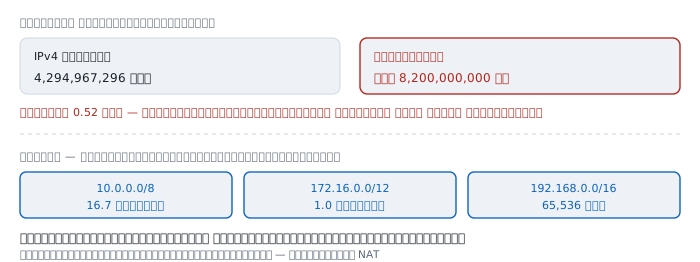
IPv4 addresses are 32 bits, which means:
2^32 = 4,294,967,296 addressesThat sounds like plenty, until you divide by the number of people:
4,294,967,296 ÷ 8,200,000,000 people = 0.52 addresses eachOne each is already not enough, and that is before counting the phone, the laptop, the television, the watch, the camera and everything else in a home that connects.
The escape was RFC 1918, reserving three ranges anybody may reuse:
  10.0.0.0/8        16,777,216 addresses
  172.16.0.0/12      1,048,576 addresses   <- the forgotten one
  192.168.0.0/16        65,536 addresses
Addresses in these ranges must never appear on the internet; every router on earth discards them. So every home can use 192.168.1.1 for its router at once without colliding.
Which creates a new problem: if the addresses inside cannot be used outside, how does anything get out?
May 1994 — something meant to be temporary
NAT is defined in RFC 1631 by K. Egevang and P. Francis, published in May 1994.
A telling detail: its status is Informational, not Standards Track — a document saying "this is what people do", not "this is what must be done".
It states the problem plainly:
The two most compelling problems facing the IP Internet are IP address depletion and scaling in routing.
And positions the answers:
The short-term solution is CIDR (Classless InterDomain Routing). The long-term solutions consist of various proposals for new internet protocols with larger addresses.
NAT was placed as a gap-filler, in case CIDR proved insufficient before protocols with larger addresses arrived.
That protocol arrived and is called IPv6, but the gap NAT filled has not closed, and NAT became something everyone treats as normal, forgetting it was ever meant to be temporary.
RFC 3022, from 2001, replaced it with a more detailed description of what people actually built.
The design thinking — one table doing everything
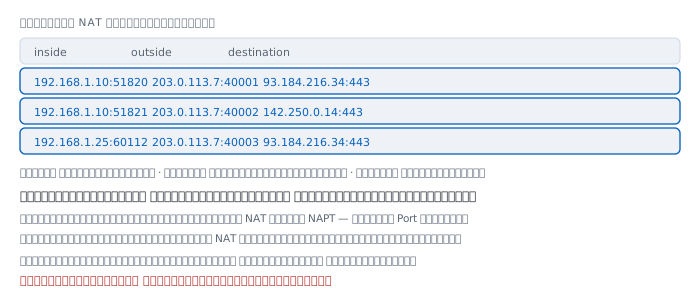
The problem is many machines inside and one address outside.
Translating only the address is not enough: when a reply arrives at 203.0.113.7, the router has no way of knowing which machine inside should receive it.
The solution is to use port numbers as the discriminator.
  inside                  outside               destination
  192.168.1.10:51820  ->  203.0.113.7:40001  ->  93.184.216.34:443
  192.168.1.10:51821  ->  203.0.113.7:40002  ->  142.250.0.14:443
  192.168.1.25:60112  ->  203.0.113.7:40003  ->  93.184.216.34:443
Rows one and three go to the same destination from different machines, and stay distinguishable because their outside ports differ.
The correct name for what everyone calls NAT is therefore NAPT, with Port in it. Address-only NAT does exist but almost nobody uses it, because it does not solve the shortage at all.
This table lives in memory and is not persistent. Reboot the router and every connection in flight is severed. And each row has a lifetime, which returns below.
Outbound and back
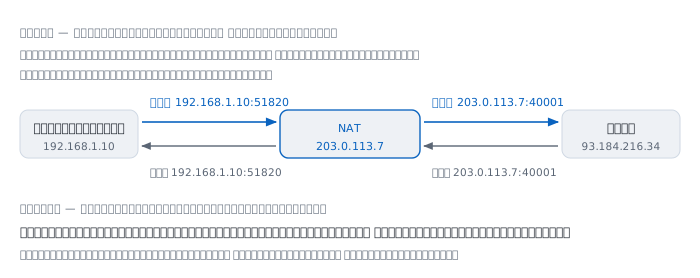
  outbound
  machine   from 192.168.1.10:51820  to 93.184.216.34:443
  NAT       from 203.0.113.7:40001   to 93.184.216.34:443   + record it

  inbound reply
  site      from 93.184.216.34:443   to 203.0.113.7:40001
  NAT       from 93.184.216.34:443   to 192.168.1.10:51820  + look it up
The point to grasp is that the site at the far end cannot know how many machines sit behind that address. It sees 203.0.113.7 and to it that is one customer.
This joins neatly with MAC address — a MAC dies at the first router, and the source IP dies at the NAT. Everything that says who you are inside the building is gone before you leave it.
Why nobody outside can connect in
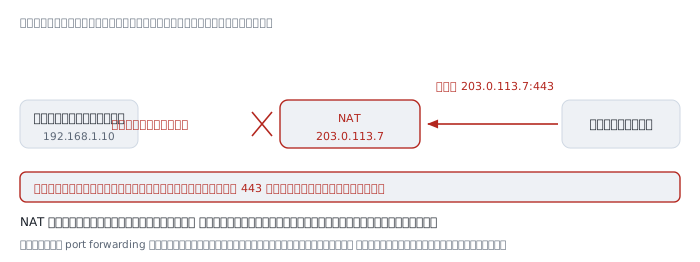
All of the above works because a machine inside started it, so the table row already existed when the reply came back.
Now reverse it: somebody outside wants to reach port 443 on a machine inside.
The packet arrives at 203.0.113.7:443 and NAT consults its table. No row says which machine port 443 belongs to, because nobody inside ever opened a connection using it.
The packet has nowhere to go, and is discarded.
The important part: NAT does not refuse because a policy forbids it, but because it does not know who to hand it to. That difference matters enormously in the firewall section below.
Port forwarding is adding a permanent row to the table by hand, answering that question in advance — anything arriving at port 443 goes to this machine.
Rows expire
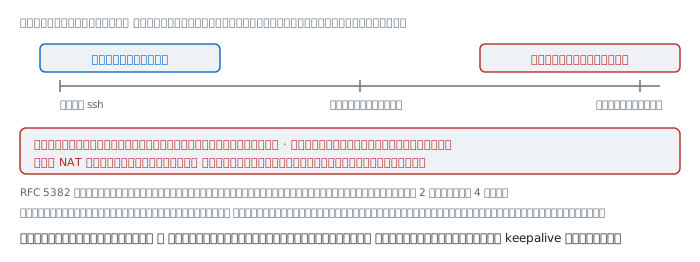
Routers have finite memory and cannot keep every row forever, so rows with no traffic are eventually deleted.
RFC 5382 sets the minimums:
  established connections    must be kept at least 2 hours 4 minutes
  opening or closing ones    must be kept at least 4 minutes
But those are the minimums the standard requires, not what real equipment is configured with. Many home routers and CGNAT devices use far shorter values to save memory, some down to a few minutes.
This explains the symptom people meet most often — open ssh, go to lunch, come back and type, and it hangs. Both your machine and the server still believe the connection is open; the NAT in between has forgotten.
The fix is to send something small periodically so the row does not expire, which is where ServerAliveInterval in ssh, keepalive in VPNs and their equivalents elsewhere come from.
CGNAT — NAT behind NAT
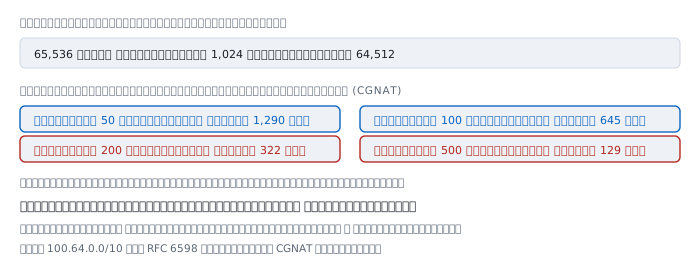
When there are not even enough public addresses to give one per household, providers run another layer of NAT on their side, called CGNAT, using the 100.64.0.0/10 range that RFC 6598 reserved for it.
Your packets are therefore translated twice — at the home router, then again at the provider's equipment.
And here there is arithmetic that cannot be escaped:
  ports per public address                    65,536
  minus the reserved range                    64,512 actually mappable

  at  50 concurrent connections per device  ->  1,290 subscribers
  at 100 concurrent connections per device  ->    645 subscribers
  at 200 concurrent connections per device  ->    322 subscribers
  at 500 concurrent connections per device  ->    129 subscribers
A browser with several tabs easily uses hundreds of concurrent connections, so providers must cap ports per subscriber rather than allow free use.
The symptom when ports run out is that some sites randomly fail to open, with no message of any kind — very hard to diagnose unless you know CGNAT is in the path.
Check whether you are behind it with traceroute: an address in 100.64.0.0/10 among the early hops is the answer.
NAT is not a firewall
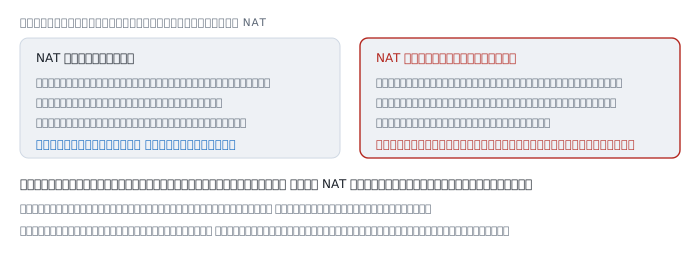
This is the most widespread misconception about NAT.
It is true that outsiders cannot connect in, but the reason is not security. NAT makes no judgement about what should or should not pass; it simply does not know who to forward to. The blocking is a side effect, not a purpose.
And what NAT blocks not at all is everything a machine inside starts itself:
- malware that has installed itself and calls out to its operator's server
- a user who opens a dangerous site themselves
- an IoT device sending data out with nobody asking it to
Which is the path of very nearly every attack today.
A firewall decides by policy what may pass, in both directions. NAT does one thing: translate addresses. The two happen to give the same result in exactly one case, and it is not the main route in any more.
What NAT breaks
RFC 1631 listed the drawbacks itself, back in 1994:
Any application that carries (and uses) the IP address inside the application will not work through NAT unless NAT knows of such instances and does the appropriate translation.
NAT rewrites addresses in the packet header but knows nothing of the contents. A protocol that sends its own IP address inside the data therefore sends an address that cannot be used.
The same document sums it up: "It breaks certain applications (or at least makes them more difficult to run)."
The deeper consequence is that NAT destroys an assumption the internet was designed on — that any two machines should be able to reach each other directly.
With that assumption gone, a direct connection between two machines both behind NAT becomes a problem requiring a whole set of techniques: STUN, which lets a machine ask what address the outside sees it as, and TURN, which gives up and relays through a server in the middle.
The video call you use daily contains a great deal of code that exists only to defeat NAT.
Worked examples from real work
Case 1 — ssh that hangs after lunch
$ ssh server
... working normally ...
... away for 40 minutes ...
$ ls
(hangs, nothing happens)
How to read it. Both ends still believe the connection is open, but the NAT row has been deleted, so the next packet has nowhere to go.
Confirm by opening a new connection, which succeeds immediately. If the server were really down, that would fail too.
The fix. Have ssh send something small periodically:
  # ~/.ssh/config
  Host *
      ServerAliveInterval 60
Not yet proved. We do not know which NAT forgot — the home router or the provider's CGNAT. Test from a different network to compare.
Case 2 — are you behind CGNAT
$ traceroute -n 8.8.8.8
 1  192.168.1.1      1.1 ms
 2  100.64.12.1      9.8 ms      the CGNAT range from RFC 6598
 3  203.0.113.1     14.1 ms
How to read it. The second hop is in 100.64.0.0/10, which is neither an RFC 1918 private address nor a public one. Seeing it means you are behind CGNAT.
What follows. Port forwarding on your home router will not help, because there is another NAT above it that you do not control.
Not yet proved. We do not know the provider's per-subscriber port cap, which determines when port exhaustion will bite.
Case 3 — port forwarding configured but still unreachable
How to read it. Work down in order:
  1  does the address a website reports match the router's WAN address
     no  ->  there is CGNAT above you; stop, you cannot fix this
  2  does the target machine have a fixed address inside
     no  ->  DHCP moved it and the rule now points at the wrong machine
  3  does the target's own firewall allow that port
Step one is where people most often go wrong, and it is the one you cannot solve yourself.
Not yet proved. All three can pass and it can still fail because the provider blocks that port, which is common for 25, 80 and 443 on home plans.
Case 4 — a video call with audio but no video
How to read it. Video calls always try a direct connection between the two machines first, because it is faster and cheaper for the provider, and fall back to a relay server when that fails.
One direction working while the other does not usually means the two NATs behave differently. The stricter one allocates a new port whenever the destination changes, so the other side cannot reply to the port it knew.
Not yet proved. We do not know whether this is NAT or a firewall blocking UDP. See whether forcing the relay improves it; if it does, the problem is in the direct path.
Does IPv6 end this
IPv6 addresses are 128 bits, enough to give every device on earth a public address of its own. NAT is therefore technically unnecessary there.
Two things keep it alive anyway.
First, many people believe NAT is security and feel uneasy about every machine having a public address — when the correct answer is a firewall, which does that job better and on purpose.
Second, the world must support IPv4 for a long time yet. As long as there are destinations that speak only IPv4, NAT has to stay.
So a temporary measure from 1994 will likely be with us far longer than anybody writing it imagined.
References
Standards
- RFC 1631 — The IP Network Address Translator (NAT) K. Egevang and P. Francis, May 1994, Informational — the source of every quotation here: the problem statement, the placing of CIDR as the short-term answer and larger addresses as the long-term one, and the drawback about applications carrying IP addresses inside themselves
- RFC 3022 — Traditional IP Network Address Translator January 2001, replacing RFC 1631 with a fuller account of what was built
- RFC 1918 — Address Allocation for Private Internets the three private ranges
- RFC 6598 — IANA-Reserved IPv4 Prefix for Shared Address Space the origin of 100.64.0.0/10 used by CGNAT
- RFC 5382 — NAT Behavioral Requirements for TCP October 2008 — the minimum lifetimes for table rows
- RFC 4787 — NAT Behavioral Requirements for Unicast UDP the UDP side, where lifetimes are far shorter
- RFC 8445 — Interactive Connectivity Establishment (ICE) how video calls defeat NAT
Manuals
ifconfigorip addrcompared with what an external site reports, the fastest way to see NAT at worknetstat -anto see how many connections are using that table right now