The IP article ends its section on choosing an exit with a line that sounds satisfying:
"And because every machine along the path thinks the same way, a packet travels the world without any single one of them knowing the whole route."
And then it stops. The VLAN article points back saying crossing between networks "is always a router's job", while IP itself only says "hand it to the gateway and let it deal with the rest".
The arrows point at each other and then fall on the floor. No article says what the gateway actually does next.
This one answers that, and the answer is shorter than people expect — one rule, which you can measure on the machine you are sitting at right now.
If you have never looked, start here
Every machine has a routing table, not just routers.
$ netstat -rn -f inetOn the machine this was written on, reduced to essentials:
  Destination        Gateway          Netif
  default            192.168.1.1      en0
  127                127.0.0.1        lo0
  192.168.1          link#12          en0
  192.168.1.130      (link layer)     en0
Those four lines are everything this machine knows about the world. And the next command is what lets this article prove itself.
$ route -n get 8.8.8.8It tells you which line the kernel picked for the destination you asked about.
One rule — the longest prefix wins
RFC 1812 of June 1995, Requirements for IP Version 4 Routers, states the rule in a single sentence.
"Routers must use the most specific matching route (the longest matching network prefix) when forwarding traffic."
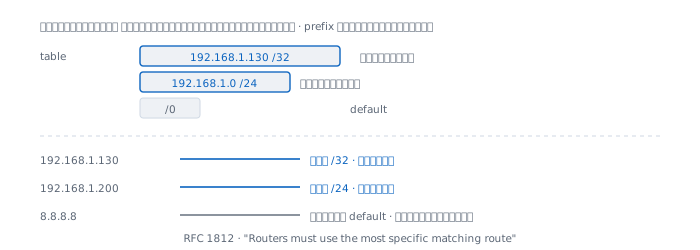
I asked the machine about three destinations chosen to match different lines.
  destination       matched entry     next hop
  192.168.1.130     192.168.1.130     direct
  192.168.1.200     192.168.1.0       direct
  8.8.8.8           default           192.168.1.1
Three destinations, three lines, in exactly the order of prefix length — /32 beats /24, and /24 beats /0.
The document gives the same kind of example: for a destination of 10.144.2.5 with 10.144.2.0/24, 10.144.0.0/16 and 10.0.0.0/8 in the table, the rule keeps only the first "because its prefix length is longest".
There are no exceptions and no votes. Every router on earth uses this one rule, which is why packets reach their destination without anyone planning the whole path.
Where the lines in the table come from
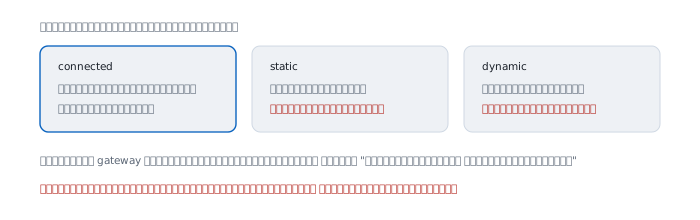
There are only three sources.
Connected — plug in a cable and give the interface an address, and the route to that network appears by itself. In the table above that is the 192.168.1 line whose gateway is link#12 rather than an address, which means "do not hand this to anyone, just send it out here".
Static — somebody typed it. Good for routes that do not change, and almost every home default route is one of these. The drawback is that it does not know when the far end has died; it will keep pointing at the same place forever.
Dynamic — routers talk to each other and exchange what they can reach. The benefit is that a broken path is replaced automatically. The cost is having to believe what the neighbours say, which is the subject of the next article.
The default route is an admission of ignorance
The default line is 0.0.0.0/0, the shortest possible prefix. It therefore matches every destination in the universe, and loses to every line that is more specific.
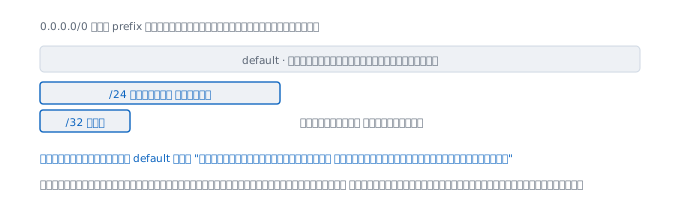
What it really means is "I do not know this destination; give it to someone who probably does."
That is why a home routing table has four lines while the internet has billions of destinations — the home router does not need to know anything except who to throw the unknown at.
Interestingly, the table on the machine this was written on has two default routes.
  default   192.168.1.1   en0
  default   link#20       bridge100
Two lines with identical prefix length, which the longest-match rule cannot decide between. Something else has to break the tie, such as interface priority, and that is where operating systems differ from one another. It is the cause of the maddening "sometimes it works, sometimes it does not" on machines with several interfaces.
What crossing between networks actually involves
The VLAN article says you need a device with a leg in both networks, but not what that device does as the packet passes.
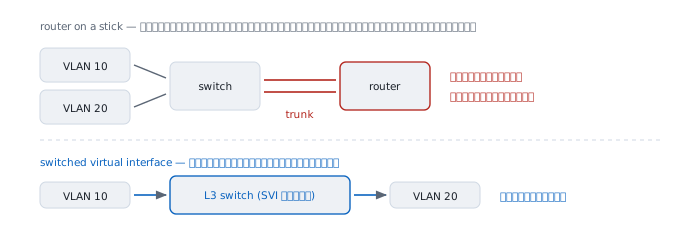
Two arrangements are used in practice.
Router on a stick — the router connects to the switch with one cable carrying a trunk, and has one subinterface per VLAN. Traffic crossing VLANs goes up to the router and comes back down the same cable, which means that cable carries the load twice.
Switched virtual interface — a layer-3 switch has the virtual interfaces inside itself, so the traffic never leaves. Much faster, and the way it is mostly done now.
Both behave identically from the packet's point of view. The only difference is which box does the work.
What actually changes when a packet is forwarded
This is where people are most often wrong — a router does not change the IP addresses.
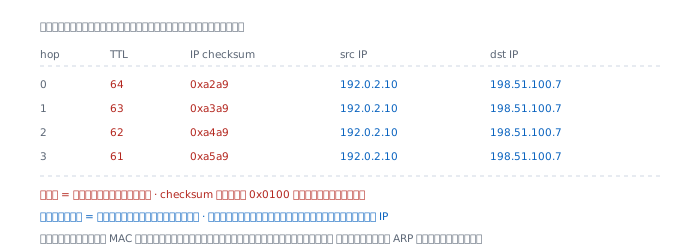
I built an IP header and simulated it passing three routers.
  hop   TTL   IP checksum   src IP        dst IP
    0    64   0xa2a9        192.0.2.10    198.51.100.7
    1    63   0xa3a9        192.0.2.10    198.51.100.7
    2    62   0xa4a9        192.0.2.10    198.51.100.7
    3    61   0xa5a9        192.0.2.10    198.51.100.7
The IP addresses do not move by a single byte. What changes is TTL falling by one, and the header checksum having to be recomputed to match.
Notice the checksum rising by exactly 0x0100 each time, which is no coincidence — it is the reason the shortcut formula in the error detection article exists at all, because routers must adjust the checksum at every hop and cannot afford to read the whole packet again.
What does change at every hop, in both directions, is the MAC addresses — the source becomes the router doing the sending, the destination becomes the next device along.
That is why ARP has to run at every hop, and why traceroute can name the routers one at a time.
The machine this was written on is a router
"Router" is not a kind of device; it is a role. Any machine can take it with one switch.
$ sysctl net.inet.ip.forwarding
  net.inet.ip.forwarding: 1
A value of 1 means this laptop is forwarding other people's packets right now, which I did not turn on deliberately. Something that created the bridge100 interface enabled it.
The difference between an ordinary machine and a router is therefore that one value: at 0, packets not addressed to us are discarded; at 1, they are passed along.
When it lies
"A router knows the whole path." It knows none of it. It knows only who the next hop is — the sentence the IP article left hanging is literally true.
"The route in the table is the route in use." Only the winning line is in use, which may not be the one you are looking at. Ask route -n get instead of guessing from the table.
"Add a route and traffic will take the new path." Only if its prefix is longer than the existing line. Adding a route of equal width does nothing at all.
"Routers rewrite IP addresses." They do not. What rewrites IP addresses is NAT, which is a separate thing added later.
"Ping works, so the route is right." Ping proves a path exists in both directions. It does not prove it is the path you intended, and the return path can differ from the outbound one.
Real cases from real work
Case 1 — traffic takes the wrong path
Situation A new route was configured, but traffic still goes the old way.
Command Ask the kernel rather than reading the table and guessing.
$ route -n get 10.20.30.40How to read it Look at the destination it answers with; that is the winning line. If it is not the line you just added, a longer prefix already exists — and a route of equal or greater width can never win.
What this does not prove The command describes this machine's decision only. It says nothing about how the next router decides, and nothing about the return path, which is a separate set of decisions.
Case 2 — it gets there but nothing comes back
Situation Traffic goes out but replies never arrive.
How to read it Routes are one-directional. Having a route to them does not mean they have a route back to you. This appears most often after adding a new network and forgetting to tell the router at the other end. Check from the far side whether a route back to your network exists — not from yours.
What this does not prove The same symptom comes from a firewall that permits outbound but blocks the return, as the firewall article describes. Separating the two requires looking at counters on the devices.
Case 3 — a machine with several interfaces gets confused
Situation A machine has both cable and Wi-Fi, or a VPN, and traffic leaves by an unexpected interface.
How to read it Count the default routes. The machine this was written on has two. When prefix lengths tie, the longest-match rule cannot decide, and the tie-breaker differs between operating systems. The symptom is "sometimes yes, sometimes no", which is very hard to chase if you do not know to look here.
What this does not prove Knowing there are several defaults tells you there is ambiguity, not which one will be chosen. Test with route -n get against the destinations you actually care about.
When routing in your own network is not enough
Everything here explains how a router uses a table. It has not answered where the internet's whole table comes from.
The home default route throws the unknown at the provider, the provider throws it further, and eventually somebody has to genuinely know where that prefix lives in the world.
That somebody knows because someone else told them, and nothing proves the one who told them is telling the truth — the same shape ARP, DHCP and STP all ran into.
That is BGP, and the subject of the next article.
References
Standards
- RFC 1812, June 1995, Requirements for IP Version 4 Routers — the longest-match sentence quoted here, and the route selection algorithm with its worked example
Measured on the machine this was written on
netstat -rn -f inet, the real routing table including its two default routesroute -n get, the experiment with three destinations matching three linessysctl net.inet.ip.forwarding, the value that turns an ordinary machine into a router
Computed here
- The per-hop TTL and header checksum table is computed directly from the IP header layout. Addresses use the documentation ranges of RFC 5737